Connections¶
Mirror of spec §7.1–7.3 and §7.6. See also the cookbook for the "connect to local S3Mock" walkthrough.
A Connection is the unit aws-tui authenticates as. Two kinds:
kind = "aws"— uses the standard boto3 credential chain (env, shared credentials, SSO cache, EC2 IMDS, ECS task role). Auto- discovered from~/.aws/{config,credentials}on every launch.kind = "s3-compatible"— for MinIO, Cloudflare R2, Backblaze B2, Wasabi, Ceph, SeaweedFS, anything with an S3-compatible API.
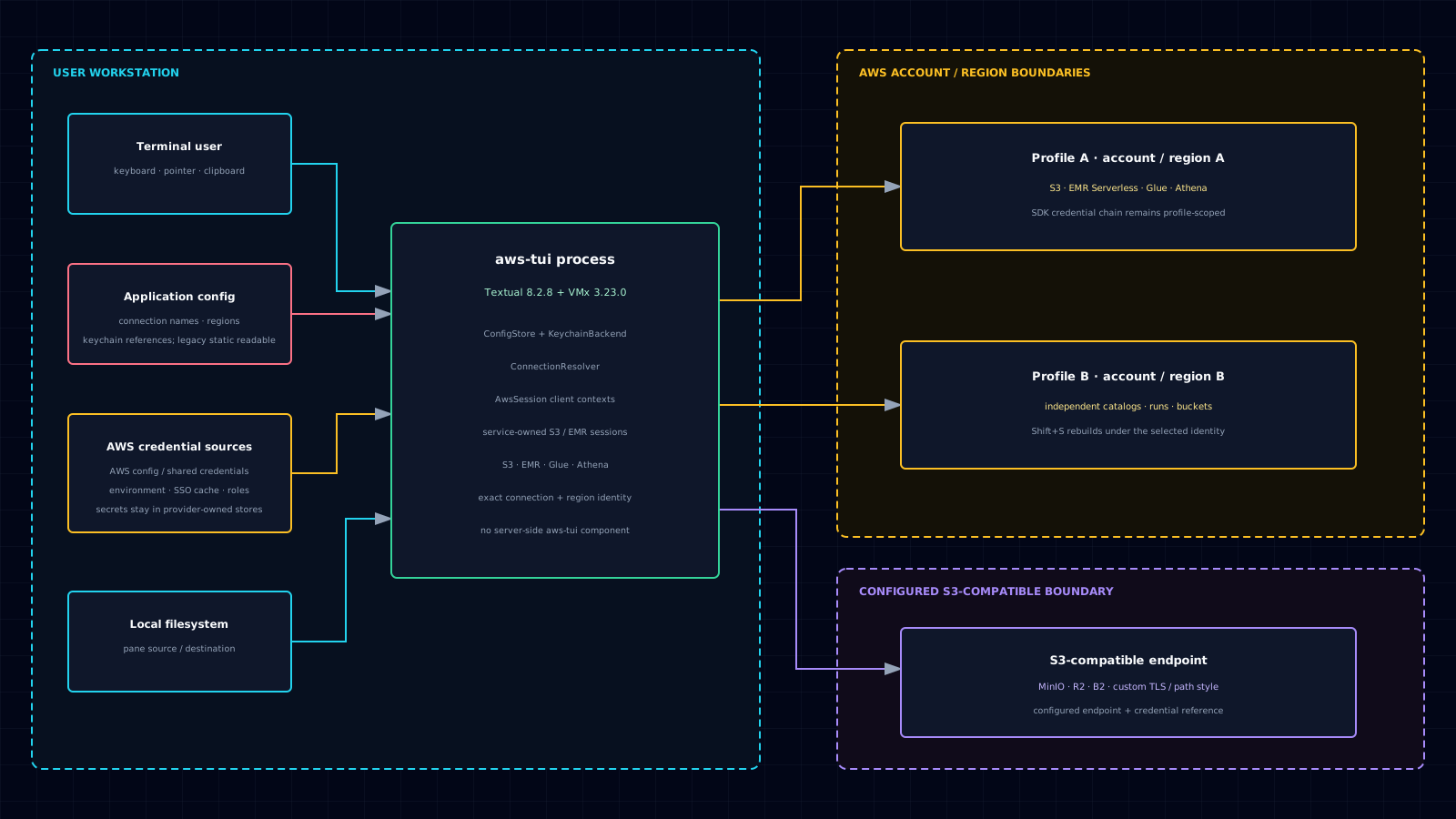
Each connection is a separate credential and endpoint boundary; nothing is shared between them at runtime.
1. Config Schema¶
[connections.kaveh-dev]
kind = "aws"
profile = "kaveh-dev"
region = "us-east-1"

[connections.minio-local]
kind = "s3-compatible"
endpoint_url = "http://localhost:9000"
region = "us-east-1"
credentials = "keychain:minio-local"      # or env:PREFIX_, aws-profile:name, static
force_path_style = true
verify_tls = false                        # http:// MinIO -> no cert to verify

[connections.r2-personal]
kind = "s3-compatible"
endpoint_url = "https://<account>.r2.cloudflarestorage.com"
region = "auto"
credentials = "keychain:r2-personal"
force_path_style = false

[defaults]
connection = "kaveh-dev"
theme = "carbon"
Connection fields such as profile, region, endpoint_url,
credentials, access_key_id, secret_access_key, and session_token
must be TOML strings when present. force_path_style and verify_tls
must be TOML booleans (true / false), not quoted strings.
endpoint_url must be an HTTP(S) endpoint. URL paths are preserved, but
do not include URL username/password, query strings, or fragments. The UI
and config loader apply the same validation, so an invalid hand-edited entry
fails with a configuration error before a client is created. Every
S3-compatible entry requires one of the credential specifications below;
static also requires nonblank access_key_id and secret_access_key.
2. Credential sources for S3-compatible connections¶
The credentials field is dispatched at runtime:
| Spec | Source |
|---|---|
keychain:<service> |
OS keychain via the Python keyring library; backend depends on platform. Accounts: access_key_id, secret_access_key, and optional session_token |
env:PREFIX_ |
${PREFIX}_ACCESS_KEY_ID + ${PREFIX}_SECRET_ACCESS_KEY + optional ${PREFIX}_SESSION_TOKEN; the trailing underscore is part of the configured prefix |
aws-profile:<name> |
An existing entry in ~/.aws/credentials, including optional aws_session_token for temporary credentials |
static |
Inline access_key_id / secret_access_key / optional session_token in config.toml — startup warning toast |
Recommended order of preference: keychain ▸ env ▸ aws-profile
▸ static. The in-TUI Settings form writes credentials to the OS keychain
and persists only a keychain: reference in config.toml. Initial saves use
keychain:aws-tui:connections/<url-escaped-name>. The <url-escaped-name>
uses URL escaping for the connection name, so names containing /, :, or
spaces cannot collide. Atomic credential updates alternate between
keychain:aws-tui:connection-revisions/<url-escaped-name>/0 and
keychain:aws-tui:connection-revisions/<url-escaped-name>/1, switch the
config to the newly written revision, and then remove the superseded service.
The two-slot scheme keeps rollback-safe committed generations without
accumulating keychain entries.
Hand-authored legacy keychain:<service> references and static entries remain
readable; editing a static entry through Settings migrates it to keychain-backed
storage. No first-run credential form is currently shipped.
3. Auto-Discovery and SSO Cache Probe¶
ConnectionResolver.list() unions on every launch:
[connections.*]entries in<config-dir>/config.toml- AWS profiles in
~/.aws/configand~/.aws/credentials— auto-promoted tokind = "aws",profile = "<name>",source = "auto-aws-profile".
Explicit entries win on name collision. Auto-discovered entries show
an (auto) badge in the picker.
Set AWS_CONFIG_FILE or AWS_SHARED_CREDENTIALS_FILE to override the two
shared AWS files; aws-tui expands ~ and environment variables in either
path. Startup selection follows [defaults].connection,
AWS_DEFAULT_PROFILE, AWS_PROFILE, then the first connection in resolver
order. That order is every explicit [connections.*] entry — s3-compatible
entries included — followed by auto-discovered AWS profiles, so an explicit
connection wins the fallback over any profile.
For AWS connections, region resolution follows the explicit connection
region, the selected profile's configured region, AWS_DEFAULT_REGION, then
us-east-1. This matches the botocore profile and region environment
contracts consumed by the pinned SDK.
The dedicated command-palette path (
: connection materialize <name>) for promoting an auto-discovered AWS profile into a real[connections.*]block is spec'd but deferred to v0.9 — the palette doesn't register connection-management entries in v0.8.x. To materialize today, add the[connections.<name>]block to<config-dir>/config.tomlby hand (the schema is shown in §1).
For each SSO-backed AWS connection, AwsSession.probe_token(conn) performs a
cheap freshness check without calling AWS:
- Resolve the SSO cache filename by mirroring the pinned
botocore.tokens.SSOTokenLoadercache-key contract. - Read
expiresAt, compare against now-UTC with a 60-second skew buffer. - Return
connected | expired | missing.
For non-SSO AWS profiles with no sso_session / sso_start_url, the offline
probe returns connected; live boto calls then validate shared credentials,
credential_process, env, or role-backed credentials.
SSO-backed profiles use local AWS config and SSO cache reads only; no AWS
network call. Non-SSO profiles return connected from the offline probe and
are validated by the live boto path.
4. Switching between connections at runtime¶
Every connection the resolver returns — AWS profiles, manually-configured
s3-compatible entries, and auto-discovered AWS profiles alike — joins
a single in-app source-cycle on the focused pane. The ring is local followed
by the resolver's order: explicit [connections.*] entries first, in config-file order and regardless of kind, then auto-discovered AWS profiles
from ~/.aws/config and ~/.aws/credentials. An explicit entry whose name
matches a discovered profile shadows it, so each name appears once. Press
Shift+S (or S) on a pane to step through it:
local
  → s3-compatible · minio-local · localhost:9000     [connections.minio-local]
  → aws s3 · prod · us-east-1                        [connections.prod]
  → s3-compatible · r2-prod · <account>.r2.cloudflarestorage.com
  → ... (every other explicit [connections.*] entry, in file order)
  → aws s3 · dev-sso · us-west-2                     discovered [profile dev-sso]
  → aws s3 · analytics · eu-west-1                   discovered [profile analytics]
  → ... (every other discovered profile not shadowed by an explicit entry)
  → local   ← wraps
Why this is useful day-to-day:
- Multi-account AWS work — if you have several
[profile *]blocks in~/.aws/config(typical for orgs with multiple AWS accounts or SSO permission sets),Shift+Sis the fastest way to jump between them. One keystroke per profile; the pane re-mounts in place with the new identity in the bottom border subtitle. No command palette, no modal, no re-launch. - Multiple
s3-compatibleendpoints — there's no fixed limit. Add as many MinIO, Cloudflare R2, Backblaze B2, Wasabi, Ceph, SeaweedFS endpoints as you want (in the in-app Settings nav page, or by hand via additional[connections.<name>]blocks). Every new entry joins the cycle automatically on next launch (or immediately if added through Settings — the rail'sConnectionListChangedMessagerefreshes the candidate ring without a relaunch). - Bounded launch fallback — automatic startup attempts share one 90-second budget across the ordered connection list. Connections that do not fit in that launch budget remain available for explicit selection after the local fallback mounts.
- Cross-account / cross-vendor transfers — put one account on the
left pane, a different account on the right pane (each pane cycles
independently), then
c(copy) streams between them viaCrossFsCopy— no intermediate local hop required. TheCrossFsMoveengine exists, butmmove UI wiring is deferred to v0.9.
The , key opens Settings where you can add, edit, or delete
s3-compatible connections (see the
docs/cookbook.md S3Mock walkthrough).
AWS profiles are read-only from aws-tui's perspective — manage those
through the standard ~/.aws/ tooling.
Shift+S filters out connections that have been observed unreachable
during the session in S3 panes (e.g. a stopped MinIO container). A
one-line info toast names what was skipped on the first press. Selecting
S3 from the nav after a local-only fallback retries the initial connection
and clears that connection's unreachable mark; pressing r on an
unreachable pane and recovering it also clears the mark.
4.1. Source scopes and service identity¶
aws-tui has two source scopes. S3 keeps an independent source in each file
pane, so the left and right panes can intentionally point at different
connections or local storage; each pane selects its own source. EMR, Glue,
and Athena use a bordered picker to select an exact source, while Shift+S
cycles the single-context service through resolver order. Single-context AWS
services use the one active AWS connection owned by RootVM; selecting a
source rebuilds that service under the chosen profile and region.
Single-context AWS services, including EMR Serverless and Glue,
intentionally do not consult or mutate the S3 pane reachability set. Athena
follows the same rule.
Authentication and service API failures remain visible in the mounted service
instead of filtering or removing the connection from that source ring.
The bordered EMR, Glue, and Athena picker displays an exact selectable source
as connection-name · profile · region, omitting profile when it matches
the connection name. EMR
application selection plus Glue and Athena view/resource selections
are scoped to service, connection name, and region, so switching back may
restore a still-valid identifier without crossing account or regional
boundaries. Use Shift+A to cycle EMR applications;
Shift+S always switches the service source.
Resolver order remains explicit [connections.*] entries first, followed by
auto-discovered AWS profiles whose names do not collide. Source cycling follows
that resolver order without alphabetical resorting. A Glue table's S3,
Athena, or Iceberg handoff is stricter: its TableRef preserves catalog,
database, table, connection name and region. The app resolves that exact
connection_name and requires the resolved region to match. If that named
connection is gone or its region changed, aws-tui shows an advisory and stays
on the current service; it never picks the next profile as a substitute.
Athena is AWS-only: it never participates in an S3-compatible source ring.
Its workgroup, catalog, database, history row, and saved-query selections are
scoped to the active connection name and region. Switching source cancels
local loaders and result fetches, requests cancellation for any app-owned
active Athena query, awaits the page shutdown, and only then disposes the old
Athena page and mounts a fresh page. No old-profile rows are retained while
the new source loads. Resolver order is
unchanged: explicit [connections.*] entries first, then non-colliding
auto-discovered AWS profiles, and Shift+S follows that order.
Glue's Iceberg metadata requests use an Athena workgroup from the same
connection name and region. A remembered workgroup is revalidated against the
enabled workgroups visible to that profile; otherwise the first enabled
workgroup in Athena's returned order is selected. Workgroup, catalog,
database, table, snapshot, metadata rows, query history, results, and S3
artifacts never cross a connection/region scope. demo-dev, demo-prod, and
demo-shared intentionally contain disjoint Iceberg datasets to exercise this
isolation.
An access failure from a service API, such as EMR Serverless, Glue, or Athena
AccessDenied, is
service-scoped: it remains visible in that service page and does not mark the
connection unreachable or remove it from the source cycle. A connection is
only marked unreachable by connection-level S3 pane failures.
5. Provider Configuration Patterns¶
aws-tui enforces only the connection fields it passes to botocore: an HTTP(S)
endpoint, region, addressing style, TLS verification choice, and credential
source. Use the storage provider's current documentation to choose the exact
endpoint and region and to determine whether path-style addressing is
required. Set verify_tls = false only for a controlled development endpoint
whose certificate cannot be verified; aws-tui shows a warning when that
setting is active.
6. Recommended 1-Day MPU Abort Lifecycle Rule¶
Set a 1-day lifecycle rule to abort incomplete multipart uploads on every bucket you write to from aws-tui (or any other tool). aws-tui uses explicit multipart upload for non-empty S3 writes and aborts it on cancellation or failure. A process termination or network failure can still interrupt cleanup before the abort reaches S3, and multipart upload IDs are not persisted for startup recovery, so the lifecycle rule remains the server-side backstop.
put-bucket-lifecycle-configuration replaces the bucket's entire lifecycle configuration with the document you send. Never apply a single-rule file to a bucket that already has rules: fetch the current rules, add this one, review the merged result, then put the merged document.
# 1. Fetch the current rules. Only a bucket with no lifecycle configuration
#    (NoSuchLifecycleConfiguration) may start from an empty rule list; any
#    other failure aborts so an auth or network error cannot masquerade as
#    "no rules" and wipe the bucket's policies in step 3. Run these steps as
#    a script; `false` stops a script, an interactive shell just prints the
#    error.
if ! aws s3api get-bucket-lifecycle-configuration --bucket <name> \
        > current-lifecycle.json 2> get-lifecycle.err; then
    grep -q NoSuchLifecycleConfiguration get-lifecycle.err \
        || { cat get-lifecycle.err; false; }
    echo '{"Rules": []}' > current-lifecycle.json
fi

# 2. Append the abort rule to the existing Rules array. jq keeps every
#    other rule intact and replaces a previous abort-incomplete-mpu rule, so
#    the step is safe to rerun.
jq '.Rules |= (map(select(.ID != "abort-incomplete-mpu")) + [{
      "ID": "abort-incomplete-mpu",
      "Status": "Enabled",
      "Filter": {},
      "AbortIncompleteMultipartUpload": { "DaysAfterInitiation": 1 }
    }])' current-lifecycle.json > merged-lifecycle.json

# 3. Review merged-lifecycle.json, then apply the merged document.
aws s3api put-bucket-lifecycle-configuration \
    --bucket <name> --lifecycle-configuration file://merged-lifecycle.json
For a bucket with no existing rules the merged document is exactly:
{
  "Rules": [
    {
      "ID": "abort-incomplete-mpu",
      "Status": "Enabled",
      "Filter": {},
      "AbortIncompleteMultipartUpload": { "DaysAfterInitiation": 1 }
    }
  ]
}
7. First-run flow¶
If ConfigStore.load() returns no [connections.*] and
~/.aws/{config,credentials} is also empty, v0.8.x opens the main
screen with a local-only placeholder. No first-run modal is currently
shipped. Use aws configure sso / aws sso login for AWS profiles, or
open Settings with , to add an S3-compatible endpoint.
8. Interrupted-transfer diagnostic journal¶
aws-tui writes a durable JSONL begin record under
<cache-dir>/transfers/<id>.jsonl while each transfer is active. Terminal
transfers are removed promptly, so files left after a process crash identify
interrupted work. Startup scanning, automatic replay, and persisted multipart
upload IDs remain deferred; see the
cookbook for
inspection and cleanup.