4.1 Architecture and Flow Diagrams
This page indexes the project architecture map, the parallel flow map, and seven per-approach service/data-flow diagrams. Every diagram is checked in as a high-resolution PNG and a standalone HTML/SVG source.
For exact per-approach steps, dependencies, tuning variables, and measured
performance, see approaches.md. This page focuses on where the
approaches are deployed and how their lanes connect to the Atlas stack.
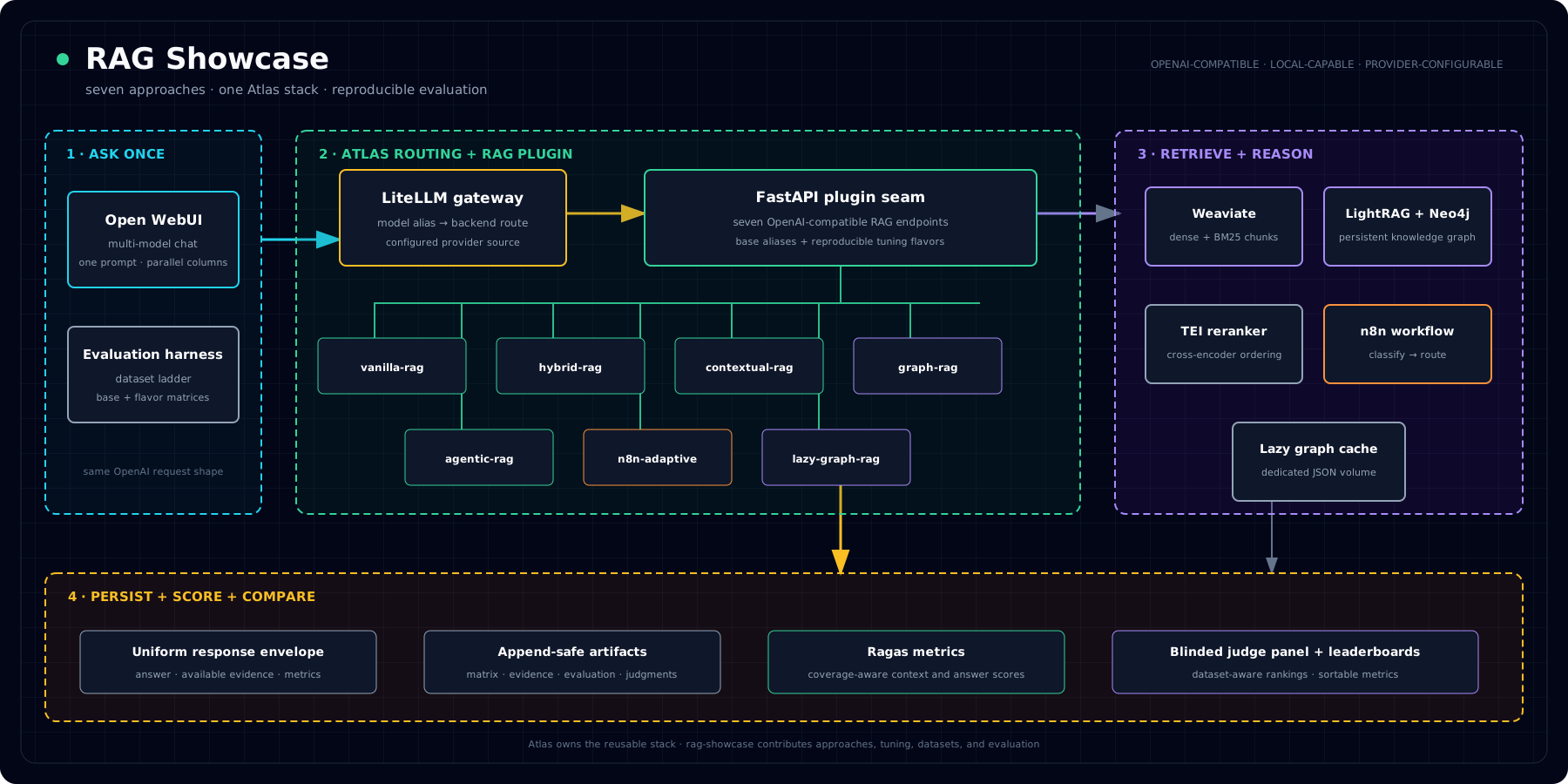
The comparison overview traces all seven retrieval lanes from callers, through Atlas-hosted aliases and services, to the shared response and evaluation surfaces. Open the interactive comparison overview.
1. Detailed Project Architecture
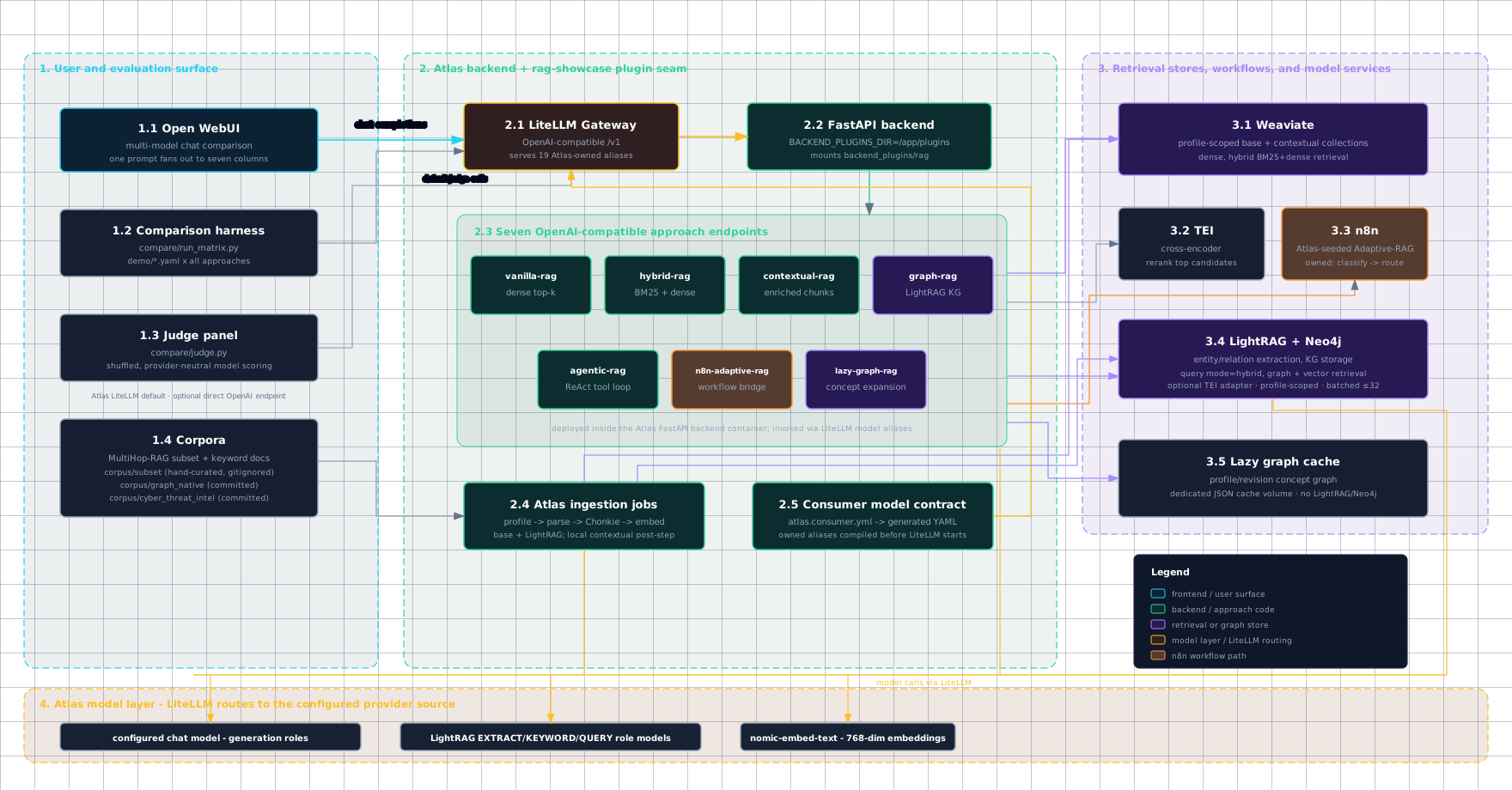
Source: diagrams/architecture-detailed.html.
PNG: diagrams/img/architecture-detailed.png.
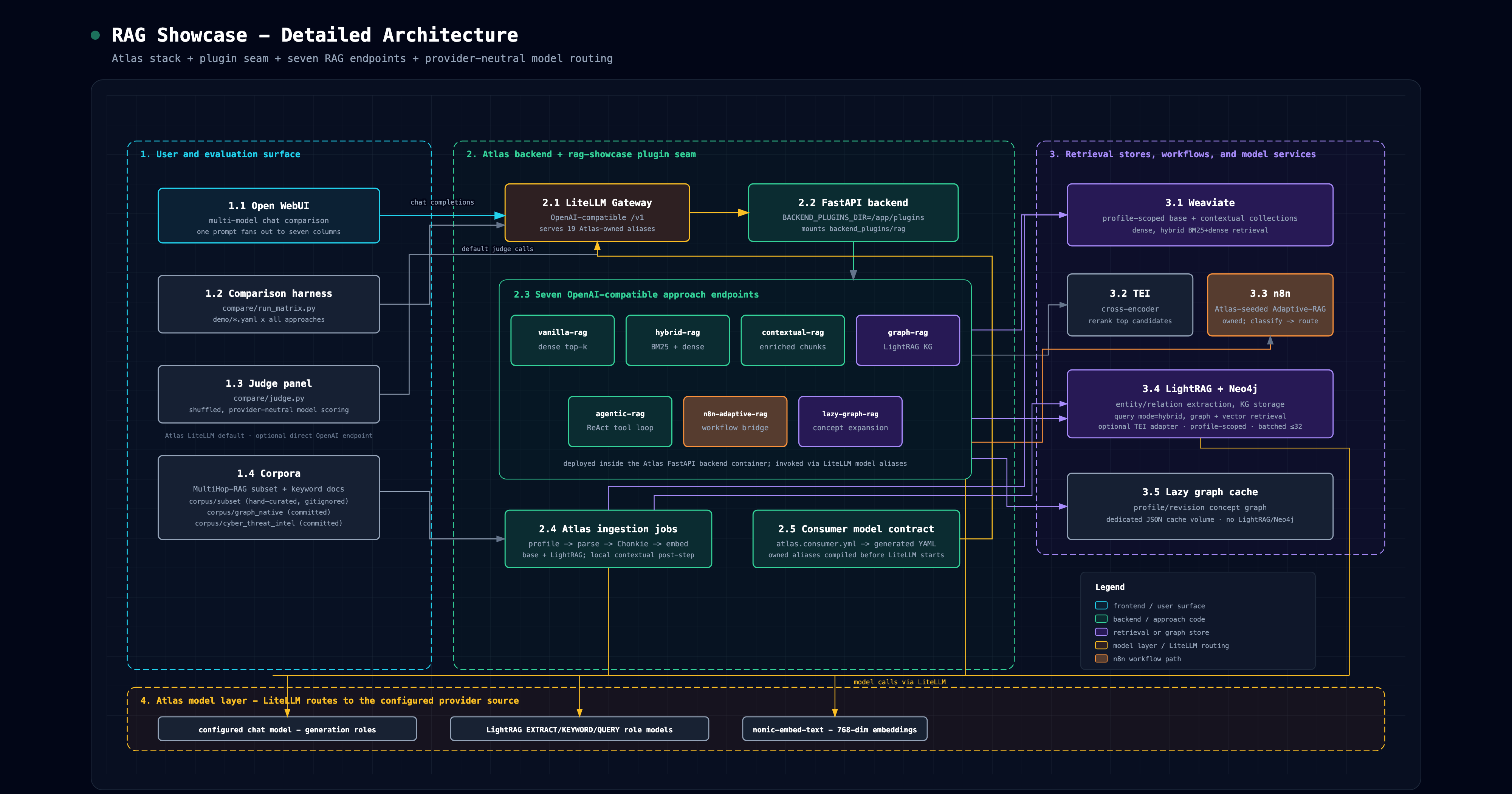
1.1 User and evaluation surface
Open WebUI and the comparison harness both call the same LiteLLM gateway. Open WebUI
is the interactive multi-model chat surface; compare/run_matrix.py is the repeatable
test runner; compare/judge.py scores stored answer matrices through a configurable
OpenAI-compatible judge endpoint. The checked-in default routes that traffic through
Atlas LiteLLM; direct host endpoints remain an explicit experiment override.
1.2 Atlas backend and plugin seam
Atlas provides the reusable infrastructure. Rag-showcase adds a mounted FastAPI
plugin under backend_plugins/rag, where each approach exposes an OpenAI-compatible
/rag/<approach>/v1/chat/completions endpoint. The plugin's plugin.yml declares
the shared /rag route root, /rag/health, inherited Kong auth, typed env, and
upstream dependencies. atlas.consumer.yml declares all base and flavor model
aliases; Atlas validates and compiles them into LiteLLM's startup configuration.
The seven approach endpoints are deployed inside the Atlas backend container, not as
seven separate containers. Open WebUI and compare/run_matrix.py invoke them through
LiteLLM's /v1/chat/completions surface after LiteLLM maps the selected model name
to the corresponding backend route.
1.3 Retrieval stores and workflow services
The direct retrieval approaches use profile-scoped Weaviate collections
(RagBase_<profile> and RagContextual_<profile>), with TEI reranking for
hybrid/contextual paths. graph-rag and
the graph tool inside agentic-rag delegate to LightRAG and Neo4j. n8n-adaptive-rag
bridges into the n8n workflow and reports the selected route. The workflow source
lives in this repository, while atlas.consumer.yml delegates its namespacing,
idempotent import, and webhook probe to Atlas.
lazy-graph-rag reads the same profile-scoped base chunks and keeps its
fingerprint-keyed concept graph in a dedicated persistent cache volume; it does
not use Neo4j or create a new graph per query once the cache is warm.
The opt-in graph-rag-rerank profile sends LightRAG candidates through Atlas's
authenticated TEI adapter. The adapter splits requests at the configured 32-item
client limit, remaps indexes across batches, and applies one final top_n.
1.4 Model strategy
Atlas owns model routing through LiteLLM and its provider source configuration.
Rag-showcase sets role-level defaults for the comparison: generation roles use the
configured chat model, while Atlas's model catalog owns adapter selection,
capabilities, and scoped request defaults such as think:false. LightRAG gets
separate EXTRACT/KEYWORD/QUERY model inputs through Atlas. The same repo can
therefore run against container Ollama, host Ollama, GPU-backed Ollama, or another
Atlas-supported provider without changing the compose overlay.
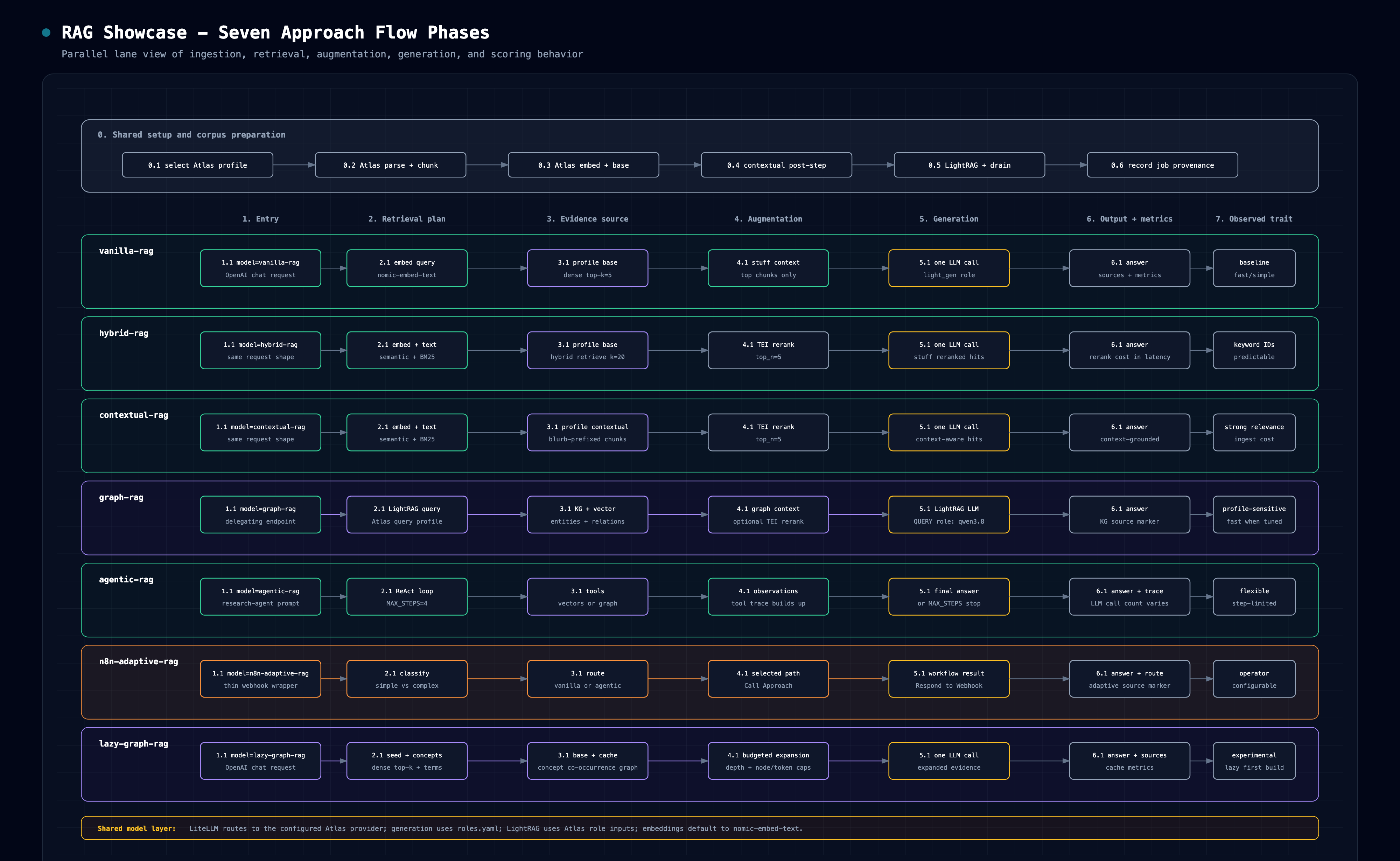
2. Seven Approach Flow Phases
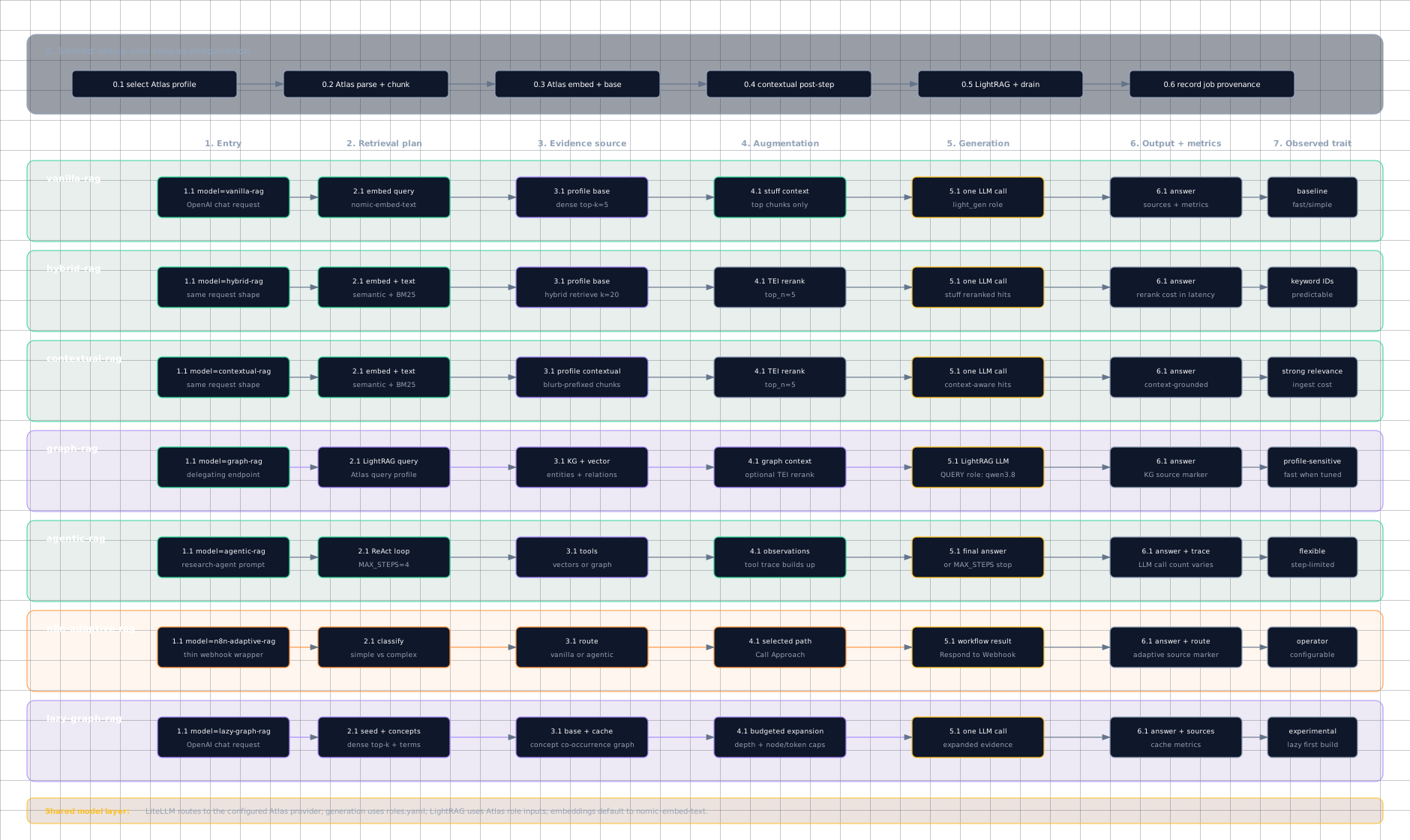
Source: diagrams/approach-flows.html.
PNG: diagrams/img/approach-flows.png.
2.1 Shared setup
All approaches start from the same declared Atlas ingestion profile. Atlas discovers and parses documents, chunks them with Chonkie, embeds and writes the profile-scoped plain collection, uploads parsed documents to LightRAG, and records drain/finalize status. Rag-showcase then reads those exact chunks to build the approach-specific contextual collection. Atlas also compiles the base and flavor aliases into LiteLLM before it starts.
2.2 Direct retrieval lanes
vanilla-rag, hybrid-rag, and contextual-rag all finish with one generation call
over selected evidence. They differ mainly in how evidence is selected: dense top-k,
hybrid retrieval plus reranking, or contextualized chunks plus reranking. Here
"hybrid retrieval" means BM25 keyword search plus dense vector search over chunks;
it is separate from graph RAG.
2.3 Graph and agentic lanes
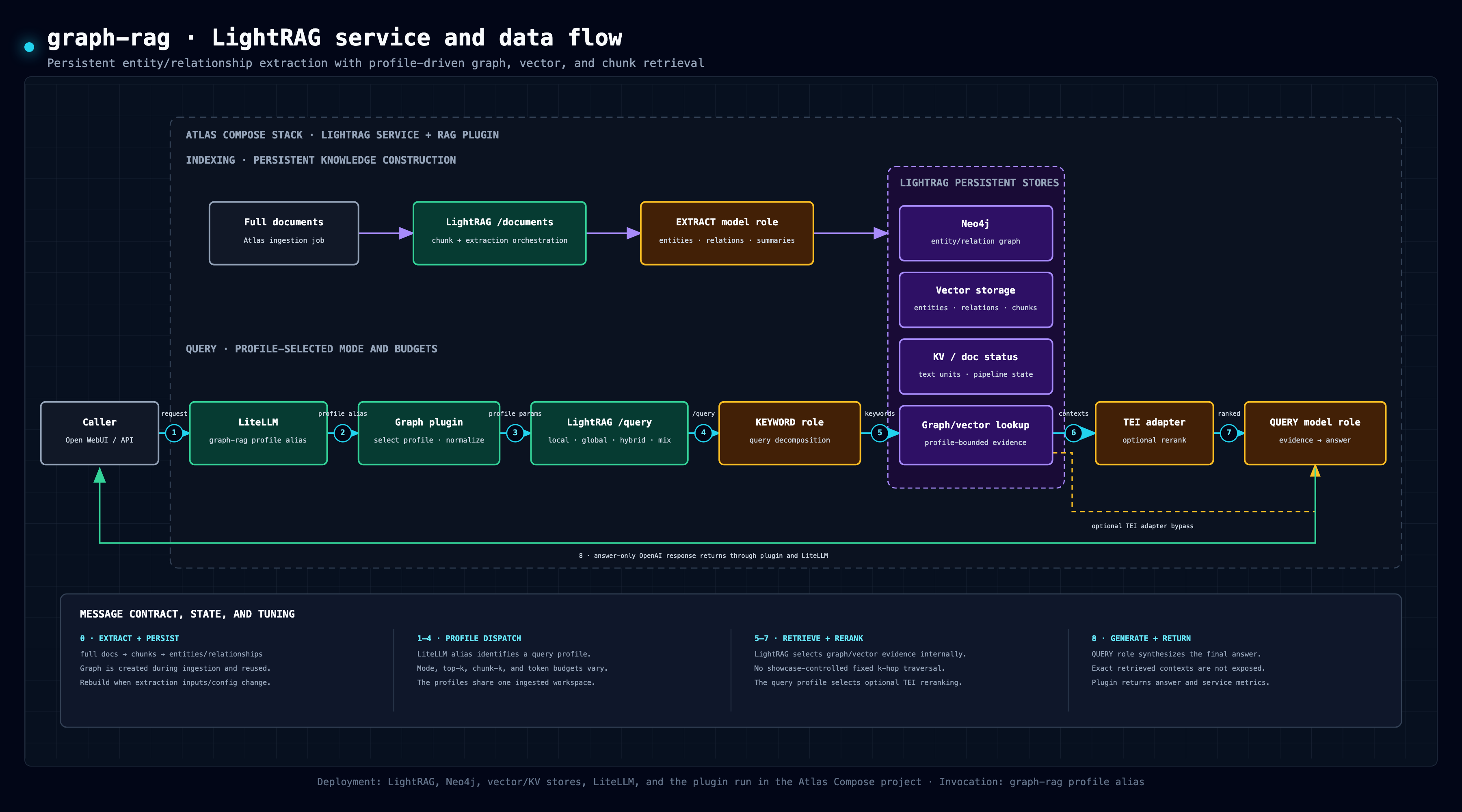
graph-rag delegates the whole answer to an Atlas-managed LightRAG query profile
over extracted entities, relationships, and vector context. Fast, wide, and
rerank aliases change query-time mode/fanout/rerank without rebuilding the shared
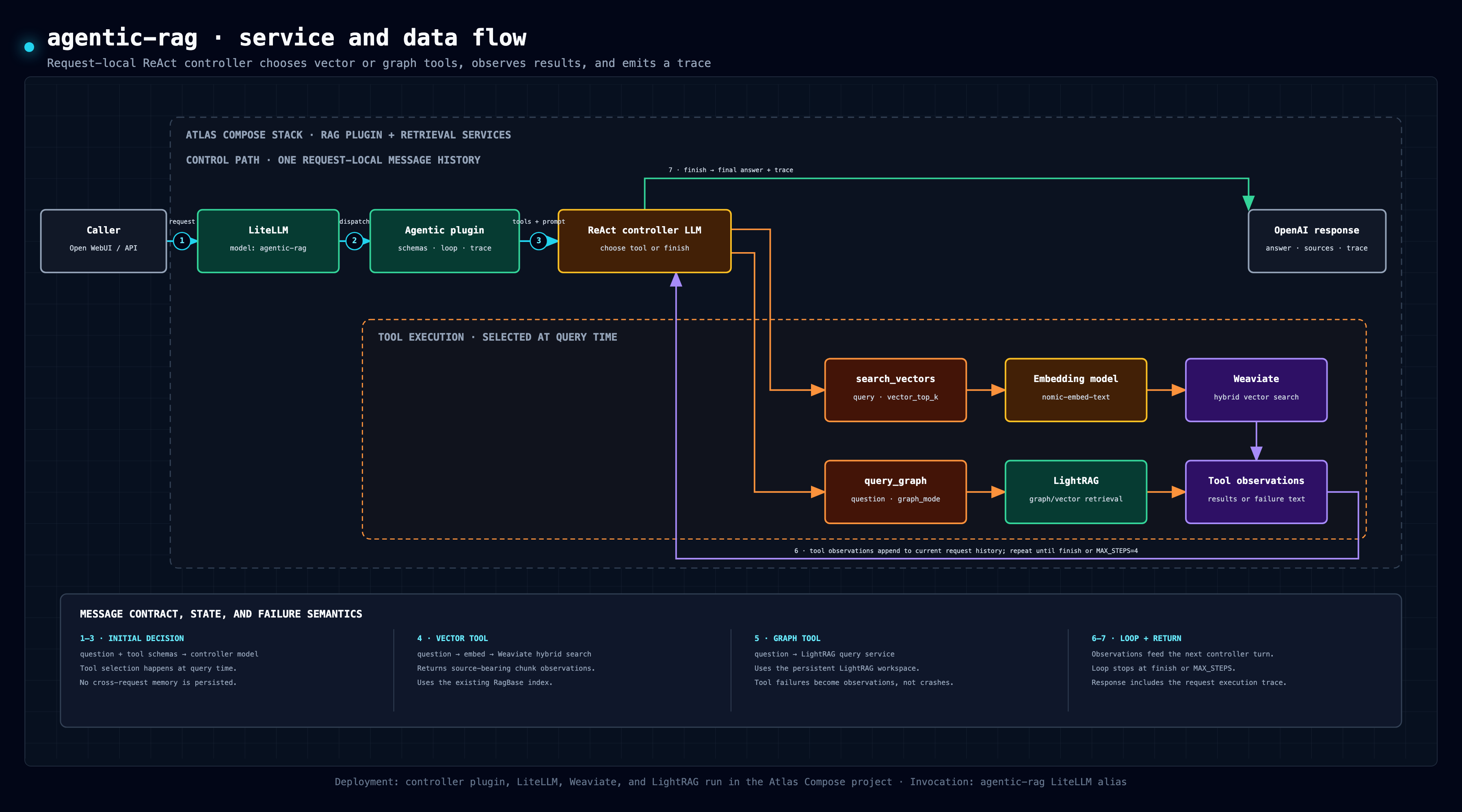
graph. agentic-rag runs a bounded ReAct loop that can call vector search or graph
query tools before returning a final answer and tool trace.
2.4 Adaptive workflow lane
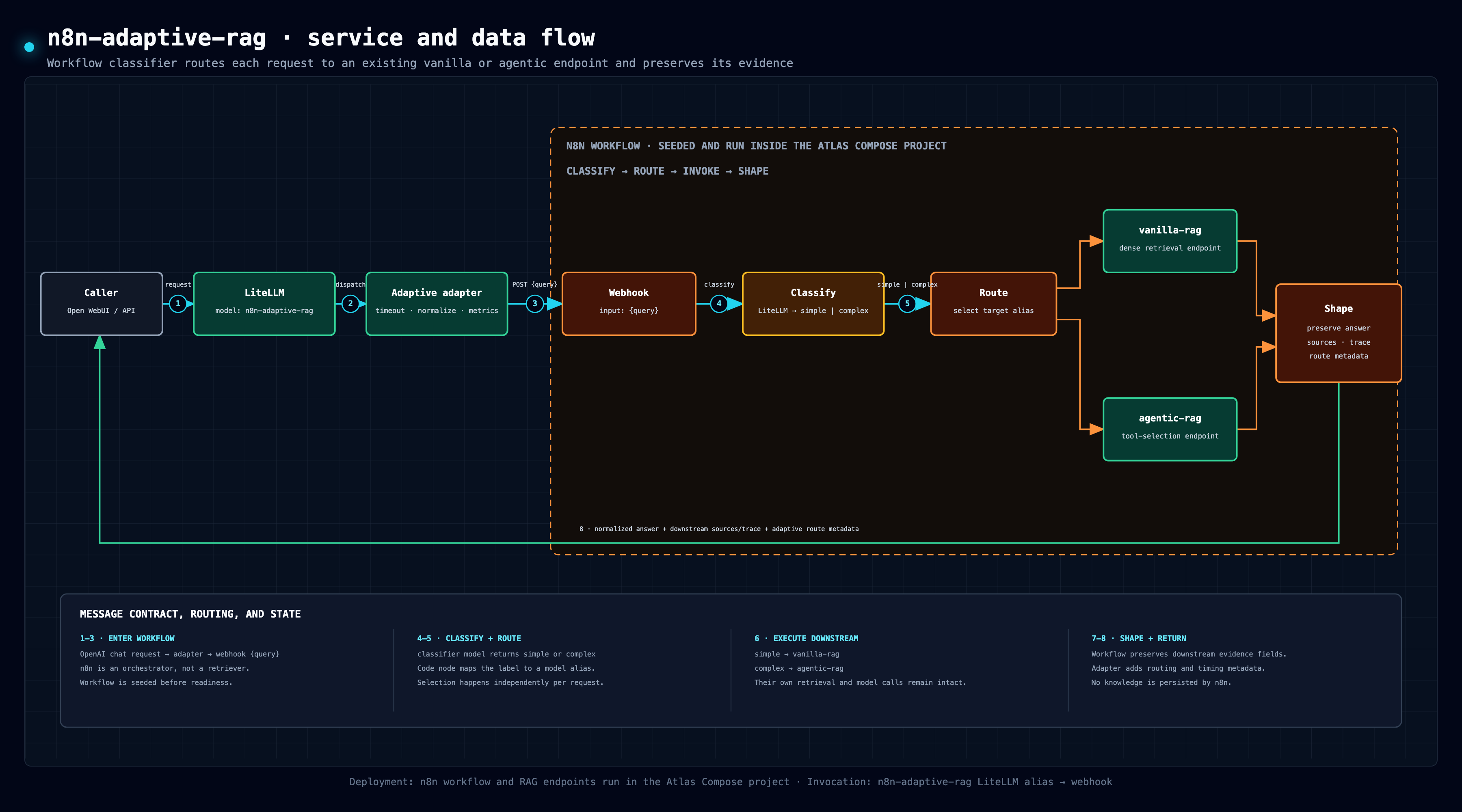
n8n-adaptive-rag is a workflow bridge. The n8n workflow classifies the query,
routes it to a selected approach, shapes the response, and returns the answer plus
route metadata to the OpenAI-compatible wrapper. Atlas seeds the checked-in workflow
as atlas-consumer-adaptive-rag and activates it even with no N8N_API_KEY
(Atlas #720), so the showcase wrapper does no manual publish or n8n restart.
2.5 Lazy graph lane
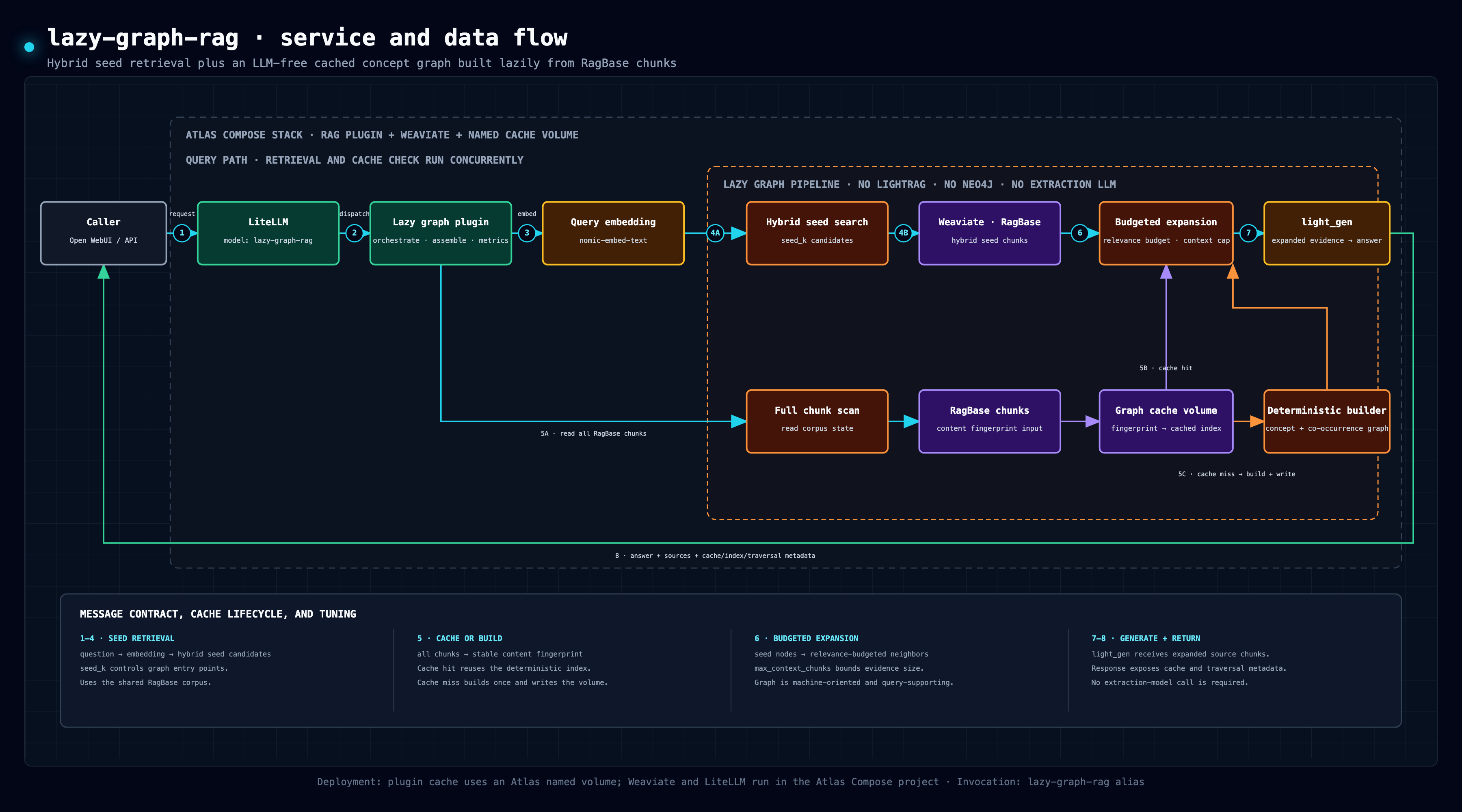
lazy-graph-rag takes hybrid seed chunks, derives lexical concepts, expands a
deterministic co-occurrence graph within depth/node/token budgets, and generates
one answer from the selected chunks. The graph is built on the first query for a
new corpus fingerprint and then reused; query observations are not written back.
All seven lanes are invoked the same way from the outside: the caller chooses a model alias in LiteLLM, and LiteLLM forwards to the mounted FastAPI route in the Atlas backend container.
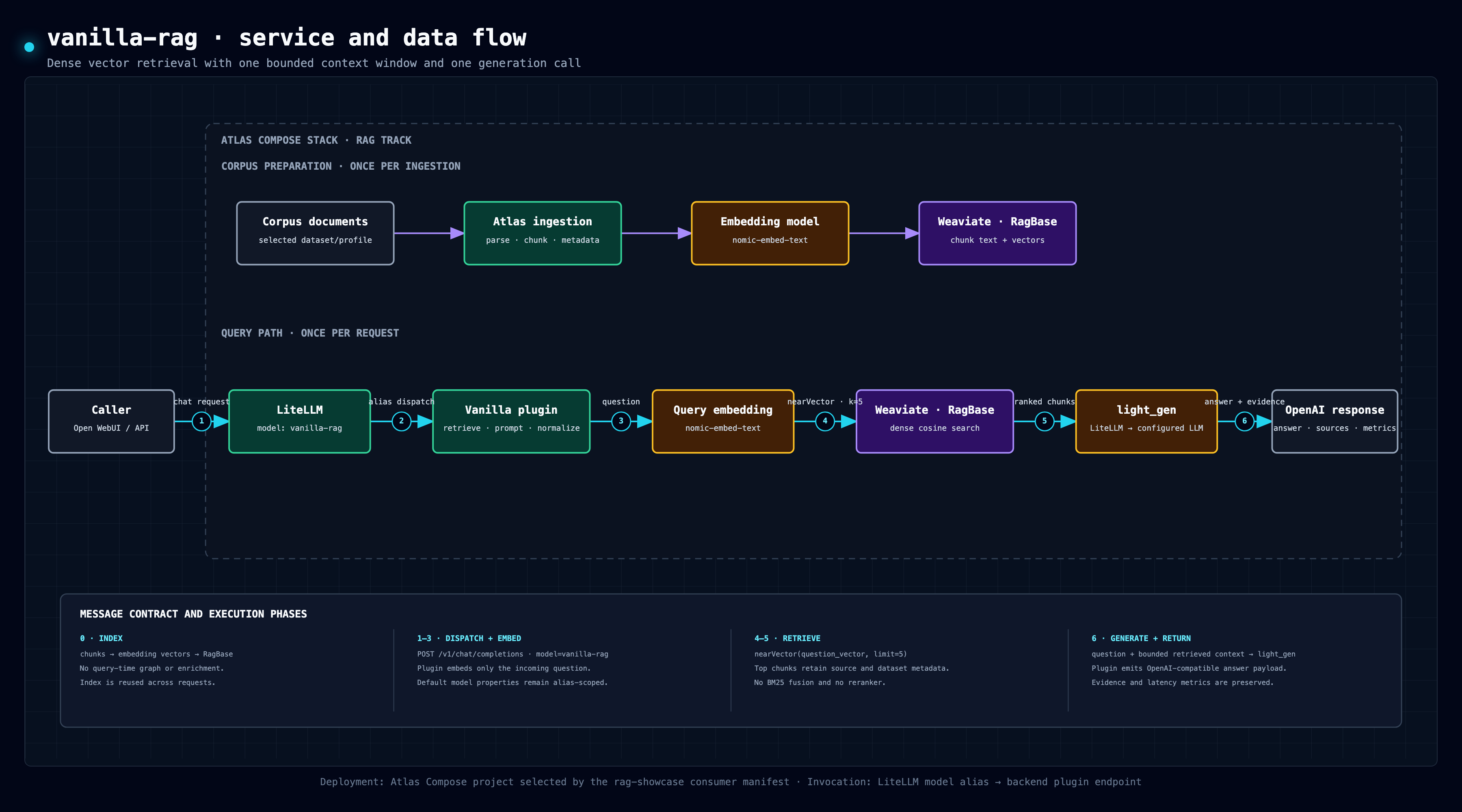
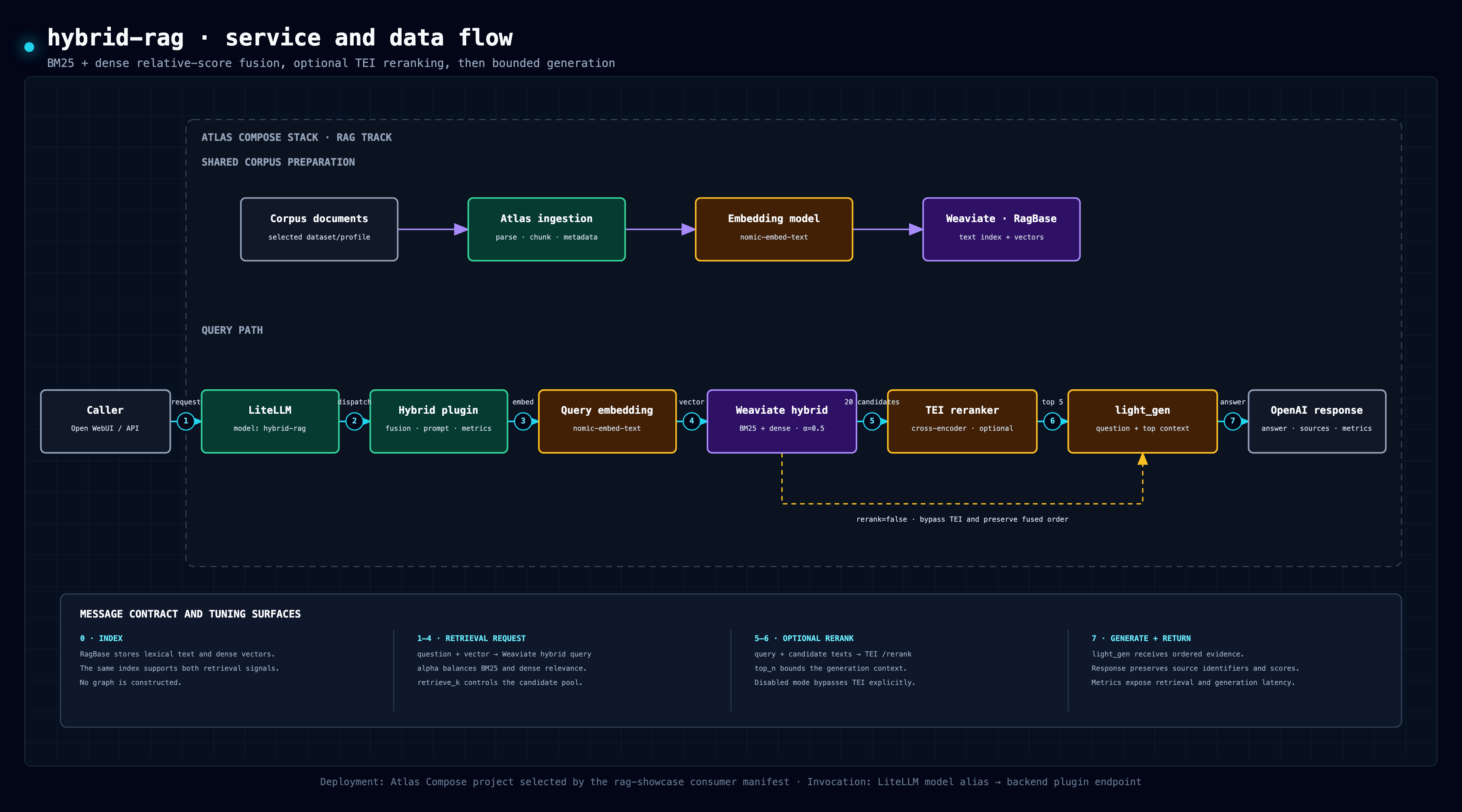
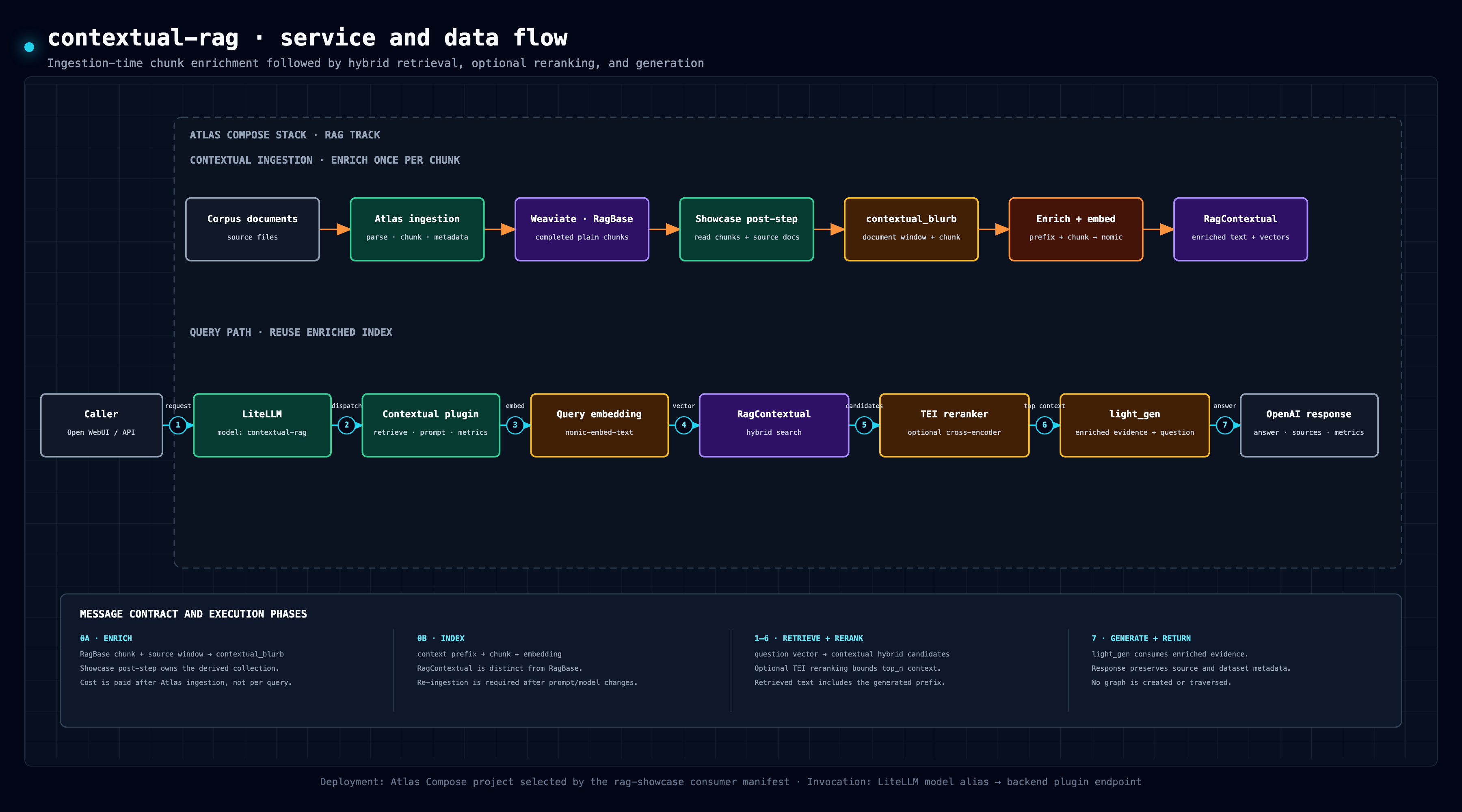
3. Per-Approach Service and Data Flows
The drill-down diagrams separate ingestion-time work, persisted state, request-time messages, optional branches, and returned evidence. Their deployment footers identify the Atlas-hosted services and the LiteLLM alias or webhook used for invocation.
| Approach | Primary distinction | PNG | Interactive HTML |
|---|---|---|---|
vanilla-rag |
Dense top-k control path | PNG | Open |
hybrid-rag |
BM25+dense fusion and optional TEI rerank | PNG | Open |
contextual-rag |
Ingestion-time chunk contextualization | PNG | Open |
graph-rag |
Persistent LightRAG graph/vector workspace | PNG | Open |
agentic-rag |
Request-local ReAct tool loop | PNG | Open |
n8n-adaptive-rag |
Workflow classification and endpoint routing | PNG | Open |
lazy-graph-rag |
LLM-free cached concept graph and budgeted expansion | PNG | Open |
4. One Query, End to End (Sequence)
The two diagrams above show structure and per-approach phases; this sequence shows
temporal order and call counts for a single hybrid-rag request — the pattern the
metrics footer counts (2 LLM calls = one embedding + one generation; the TEI
rerank is a cross-encoder, not an LLM call).
sequenceDiagram
    autonumber
    participant C as Open WebUI / run_matrix.py
    participant L as LiteLLM gateway
    participant H as /rag/hybrid-rag endpoint (plugin)
    participant W as Weaviate
    participant T as TEI reranker
    participant M as Chat model (light_gen role)

    C->>L: POST /v1/chat/completions (model=hybrid-rag)
    L->>H: forward to manifest-declared api_base
    H->>L: POST /v1/embeddings (query)
    L-->>H: query vector
    H->>W: hybrid search (BM25 + dense, alpha, retrieve_k)
    W-->>H: candidate chunks
    H->>T: POST /rerank (query, candidate texts)
    T-->>H: scored order (top_n kept)
    H->>L: POST /v1/chat/completions (stuffed context)
    L->>M: route to provider source
    M-->>L: answer
    L-->>H: answer
    H-->>L: uniform payload (answer + sources + metrics footer)
    L-->>C: chat.completion (or single-chunk SSE when stream=true)
vanilla-rag skips the rerank leg; contextual-rag is identical but queries the
selected RagContextual_<profile> collection; graph-rag and agentic-rag
delegate the middle to LightRAG / a ReAct tool loop; n8n-adaptive-rag inserts
the n8n workflow between the endpoint and a routed approach; lazy-graph-rag
adds deterministic concept expansion between hybrid seeding and generation.
5. Deployment Topology (Containers and Mounts)
The project's central mechanism — vendored Atlas plus a non-invasive overlay —
shown as the compose-level view. Everything in the Atlas stack subgraph is
Atlas-owned; the showcase contributes the overlay file, mounted plugin/data
directories, workflow source, and parent-owned atlas.consumer.yml, which imports
config/atlas.env.user and registers those external contracts directly.
flowchart LR
    subgraph host["Host (this repository)"]
        manifest["atlas.consumer.yml<br/>models · workflows · ingestion profiles"]
        overlay["compose/rag-overlay.yml<br/>external manifest overlay"]
        plugdir["backend_plugins/rag/"]
        tooling["corpus/ · Atlas job client · contextual post-step"]
        n8ndir["n8n/ (workflow JSON)"]
        harness["compare/*.py + scripts/run-dataset-ladder.py<br/>host-run via uv"]
    end
    judgeprovider["optional external OpenAI-compatible judge"]

    manifest --> overlay
    manifest --> plugdir
    manifest --> n8ndir

    subgraph atlas["Atlas stack (infra/ submodule, docker compose)"]
        backend["backend (FastAPI)<br/>plugin seam mounts /app/plugins"]
        litellm["litellm :4000<br/>(host-published on LITELLM_PORT)"]
        owui["open-webui"]
        weaviate["weaviate :8080/:50051"]
        tei["tei-reranker :80"]
        lightrag["lightrag :9621 + neo4j"]
        n8n["n8n :5678 (queue mode)"]
        lazycache[("lazy graph cache volume")]
        provider["configured Atlas LLM provider source"]
    end

    overlay -. "registered directly by<br/>the consumer manifest" .-> atlas
    manifest -- "compiled profiles" --> backend
    plugdir -- "bind mount :ro → /app/plugins" --> backend
    tooling -- "bind mounts :ro → /app/*" --> backend
    n8ndir -- "Atlas validates + seeds<br/>namespaced workflow" --> n8n
    harness -- "matrix + default judge calls" --> litellm
    harness -. "optional direct judge override" .-> judgeprovider
    owui --> litellm
    litellm --> backend
    backend --> weaviate & tei & lightrag & n8n & lazycache
    litellm --> provider
6. Regeneration Notes
The diagrams are standalone HTML files with inline SVG. To regenerate the PNGs from Chrome on macOS:
CHROME="/Applications/Google Chrome.app/Contents/MacOS/Google Chrome"
"$CHROME" --headless=new --disable-gpu --hide-scrollbars \
  --window-size=1800,900 --force-device-scale-factor=2 \
  --screenshot=docs/diagrams/img/rag-showcase-comparison-overview.png \
  file://"$PWD"/docs/diagrams/rag-showcase-comparison-overview.html

"$CHROME" --headless=new --disable-gpu --hide-scrollbars \
  --window-size=2000,1050 --force-device-scale-factor=2 \
  --screenshot=docs/diagrams/img/architecture-detailed.png \
  file://"$PWD"/docs/diagrams/architecture-detailed.html

"$CHROME" --headless=new --disable-gpu --hide-scrollbars \
  --window-size=2000,1230 --force-device-scale-factor=2 \
  --screenshot=docs/diagrams/img/approach-flows.png \
  file://"$PWD"/docs/diagrams/approach-flows.html

for approach in vanilla-rag hybrid-rag contextual-rag graph-rag agentic-rag \
  n8n-adaptive-rag lazy-graph-rag; do
  "$CHROME" --headless=new --disable-gpu --hide-scrollbars \
    --window-size=1800,1000 --force-device-scale-factor=2 \
    --screenshot="docs/diagrams/approaches/$approach/data-flow.png" \
    "file://$PWD/docs/diagrams/approaches/$approach/data-flow.html"
done