2. Getting Started
Get the full data-eng-lab stack running in order from a fresh clone.
1. Prerequisites
| Requirement | Notes |
|---|---|
| Docker + Docker Compose | Runs the Atlas platform services |
| Git with submodule support | Initializes the pinned Atlas submodule under infra/ |
| Python 3.11+ and uv | Runs repository tooling and tests |
| Java 17 | Builds the Maven Spark apps with make build-apps |
| About 10 GB free disk | Holds images, downloaded datasets, and Iceberg data |
2. Architecture
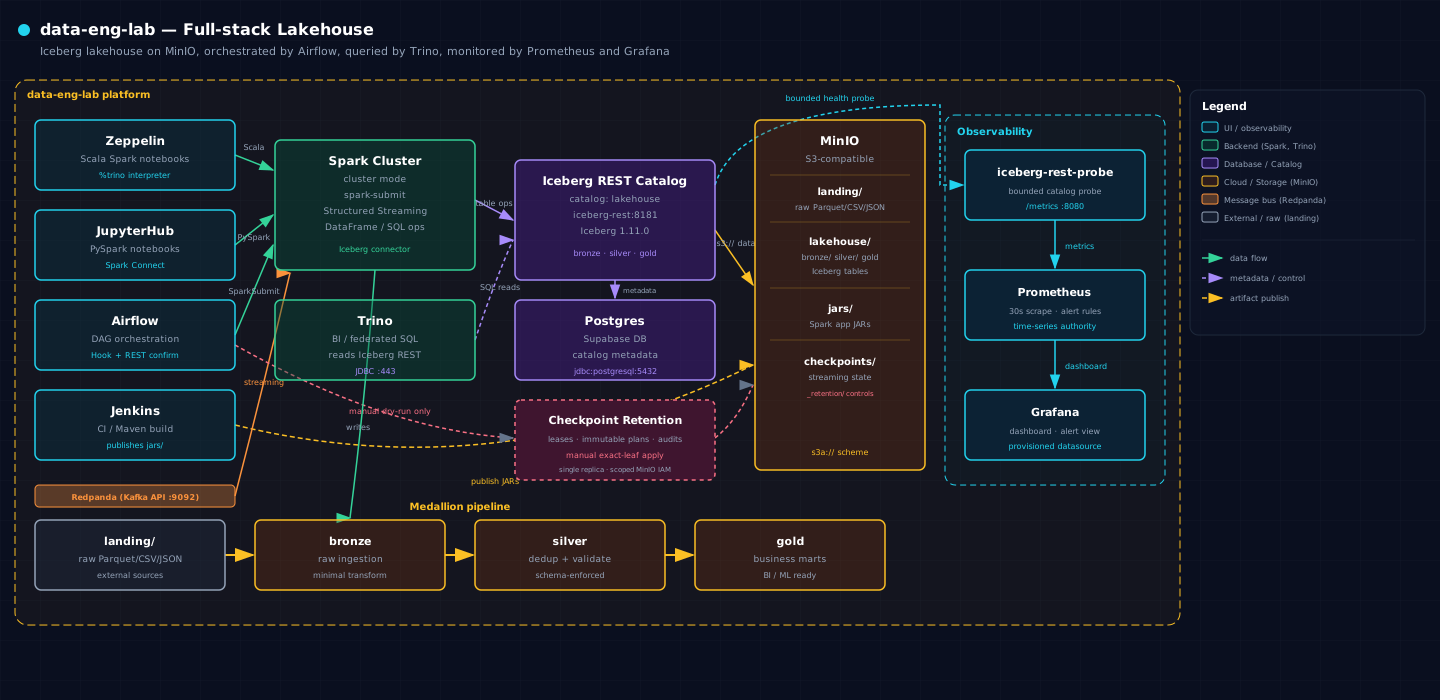
The Atlas Compose cluster provides six working layers:
- Notebook clients: JupyterHub for PySpark/PyIceberg and Zeppelin for Scala Spark.
- Compute: Spark 4.1.2 Connect server, standalone master, workers, and history server.
- Catalog: Iceberg REST backed by Postgres.
- Storage: MinIO buckets for landing data, the lakehouse, JARs, and checkpoints.
- Query and streaming: Trino plus Redpanda's Kafka-compatible API.
- Orchestration: Airflow DAGs and Jenkins application builds.
The medallion data flow is landing → bronze → silver → gold.
3. Clone and initialize Atlas
git clone https://github.com/thekaveh/data-eng-lab.git
cd data-eng-lab
make setup
uv sync --all-groups
make setup runs git submodule update --init --recursive infra and checks out the reviewed Atlas commit recorded by this repository.
4. Launch the stack
make up runs scripts/start-all.sh, which:
- Removes stale legacy overlay links.
- Backfills newly introduced upstream environment keys.
- Validates the consumer Compose overlay.
- Runs Atlas consumer
doctoragainstatlas.consumer.yml. - Starts the
data-engtrack detached and health-gates the complete track. - Writes the ignored
atlas-consumer.envhost-endpoint contract. - Registers the
bronze,silver, andgoldIceberg namespaces. - Runs Layer 1 and Layer 2 preflight checks.
All nine data-engineering services are containerized by default through the manifest's *_SOURCE: container values. This is the default development profile and appears in Atlas as Data Engineering. Ports are slot-allocated from BASE_PORT: auto; use the values in infra/.env from the host and Docker DNS names such as iceberg-rest:8181 inside the cluster.
5. Load datasets
The live MinIO service must exist before publication can use its landing bucket. make up starts services; it does not acquire datasets. After it succeeds, verify or publish the default small tier, or select another supported scale:
The downloaded registry contains NYC Taxi, TPC-H, Online Retail, GitHub Archive, and MovieLens. Synthetic event scenarios use their producer instead of a downloaded dataset. See Datasets for licenses, formats, and scenario mappings.
The dataset command verifies the active pointer, immutable manifest, bytes, and physical schemas before reuse. Consumers request an expected scale with this precedence: an explicit CLI, Airflow, or notebook parameter; then DATASET_SCALE; then the default small. The internal resolver returns one verified immutable URI set for that run and fails rather than accepting an active generation at another scale. See Datasets for refresh, verify-only, rollback, history, and recovery procedures.
6. Verify the stack and repository
A passing preflight confirms Spark ↔ MinIO ↔ Iceberg, Jupyter ↔ PyIceberg, Airflow ↔ MinIO/Spark, and Zeppelin ↔ Spark connectivity. make test remains offline and does not require the running stack.
7. Run notebooks
Zeppelin (Scala Spark)
- Open
http://localhost:${ZEPPELIN_PORT}using the slot-allocated port frominfra/.env. - Import or open
scenarios/<name>/zeppelin/notebook.zpln. - Use
%sparkfor Scala Spark cells and%trinofor Trino SQL cells.
JupyterHub (PySpark)
- Open
http://localhost:${JUPYTERHUB_PORT}using the slot-allocated port frominfra/.env. - Open
scenarios/<name>/jupyter/notebook.ipynb. - Use the preinstalled PySpark, PyIceberg, and MinIO configuration.
For exhaustive reproducibility evidence after loading all prerequisites, run make notebooks-reproducibility. It executes both notebook formats for all 19 scenarios and is intentionally separate from the PR-safe offline suite.
8. Tear down
The first command preserves volumes. COLD=1 performs a full local reset and removes the stack's volumes.
9. What next?
- Browse the Scenario catalog.
- Study the Lakehouse architecture.
- Review the accepted Atlas expectations.
- Inspect the recorded Go-live results and Go-live findings.