5.4. streaming_ingest-events-spark-iceberg
Ingest synthetic click events from the Redpanda events Kafka topic into lakehouse.bronze.events (Iceberg) via Spark Structured Streaming. Scala (Zeppelin) and PySpark (Jupyter) notebooks implement the same streaming logic; producer.py generates synthetic events for local testing.
1. Purpose
This scenario demonstrates real-time lakehouse ingestion using Kafka (Redpanda) as the source and Iceberg as the sink. It is the streaming counterpart to the batch-ingest scenario, showing how to write continuous streaming queries directly to Iceberg tables with checkpoint-based fault tolerance.
2. Data Model
2.1 Input Source
Source: redpanda:9092 → events Kafka topic (JSON messages produced by producer.py).
| Column | Type | Notes |
|---|---|---|
user_id |
string | User identifier |
event |
string | Event type (e.g., click, view) |
ts |
timestamp | Event timestamp |
Checkpoint: s3a://checkpoints/events
Checkpoint policy (#85)
Checkpoint ID streaming-events-v1 is owned by Streaming Data Engineering and classified as a durable stream. While active or uncertain it is never age-deleted. Eligibility requires reviewed retirement, a stopped or retired terminal lease, approved recovery, and a 30-day quarantine. Starting from a fresh checkpoint can duplicate append output. Manual exact-leaf retention is available through issue #86's reviewed plan/prepare/apply protocol. Automated and scheduled deletion remain disabled pending stronger MinIO cross-process CAS and conditional delete proof.
2.2 Output Tables
| Table | Layer | Key Columns |
|---|---|---|
lakehouse.bronze.events |
Bronze | user_id, event, ts |
3. Architecture
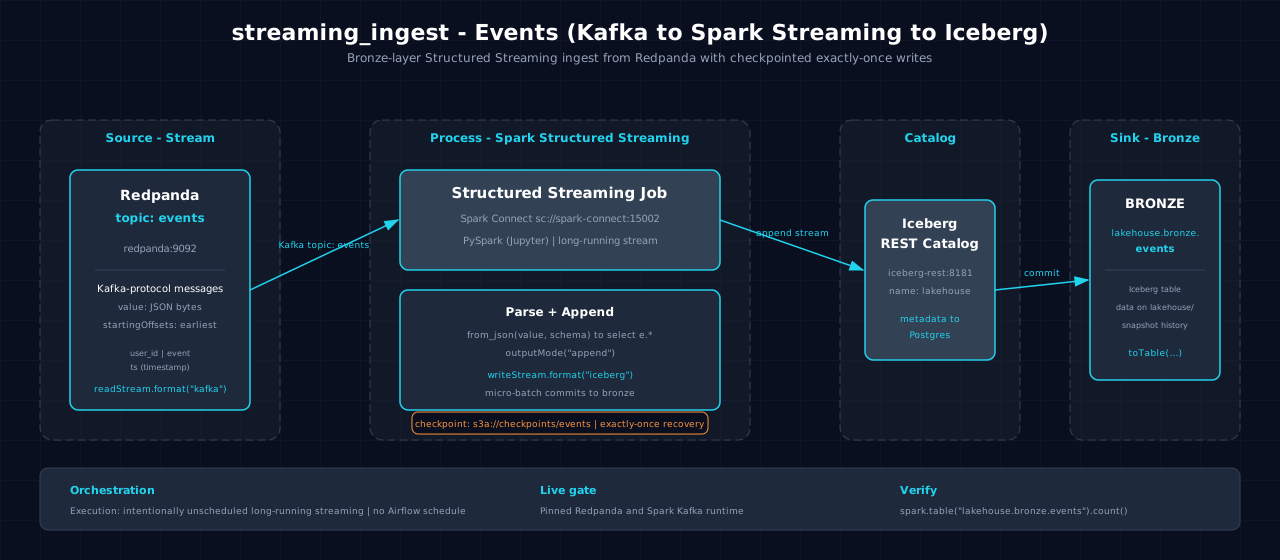
Data flows from the Redpanda events topic through Spark Structured Streaming (readStream + from_json + writeStream) into the Iceberg bronze table. Checkpointing ensures exactly-once semantics for streaming offsets.
4. Notebooks
- Zeppelin (Scala):
zeppelin/notebook.zpln— Sections: Overview, Setup, Read (readStream), Transform (from_json), Write (writeStream), Verify; 6 sections total - Jupyter (PySpark):
jupyter/notebook.ipynb— Sections: Overview, Setup, Read (readStream), Transform (from_json), Write (writeStream), Verify; 6 sections total
producer.py generates synthetic events to the events topic for end-to-end testing. Both languages implement identical streaming logic.
5. Orchestration
Classification: intentionally unscheduled long-running streaming. No Airflow DAG or batch schedule exists. An operator starts, monitors, and stops the continuous notebook query and owns its events checkpoint.
6. Usage
- Start the Atlas stack with Redpanda:
make up - Produce events:
python scenarios/streaming_ingest-events-spark-iceberg/producer.py [count](defaults to 100) - Open either notebook on the Atlas stack and run all sections
- Verify output:
7. Dependencies
- Dataset: None (synthetic events from
producer.py) - Atlas services: A1-A4 (Spark, Iceberg, S3 catalog, lakehouse catalog), A9 (Redpanda/Kafka)
- Other:
kafka-python(required byproducer.py)
8. Known Issues & Caveats
Atlas seeds only the atlas_stream_events demo topic; this scenario uses its own topic (events), which is auto-created on first produce by producer.py. Alternatively, add events to REDPANDA_DEMO_TOPICS in infra/.env. Notebook execution and Scala/PySpark parity are live-gated on Atlas A9 (Redpanda). The streaming query runs indefinitely; call query.awaitTermination() to block in both Scala and PySpark notebooks.
9. See Also
- Upstream: None — streaming source from Redpanda (no prior scenario)
- Downstream: streaming_windows-events-spark-iceberg — Consumes events for windowed aggregation
- Downstream: cdc_streaming-online_retail-spark-iceberg — Related streaming scenario using CDC topic
- Datasets
- Lakehouse Architecture