5.12. scd2-online_retail-spark-iceberg
Implements Slowly Changing Dimension Type 2 (SCD2) to track historical changes on a customer dimension, preserving full history with effective timestamps and current flags.
1. Purpose
SCD2 is a cornerstone of dimensional data warehousing, enabling time-travel queries on dimension changes. This scenario demonstrates Iceberg's native row-level UPDATE and INSERT capabilities, making SCD2 practical: efficient history tracking without full table scans or partition rewrites. When a customer's segment changes, the old row is closed (setting effective_to and is_current=false) and a new row is opened with the updated segment (effective_from, is_current=true).
2. Data Model
2.1 Input Source
Source: Online retail dimension data (inline seed in notebooks — no external dataset required).
| Column | Type | Notes |
|---|---|---|
CustomerID |
double | Customer identifier |
Name |
string | Customer name |
Segment |
string | Customer segment |
2.2 Output Tables
| Table | Layer | Key Columns |
|---|---|---|
lakehouse.gold.dim_customer_scd2 |
Gold (dimension) | CustomerID, Name, Segment, effective_from, effective_to, is_current |
3. Architecture
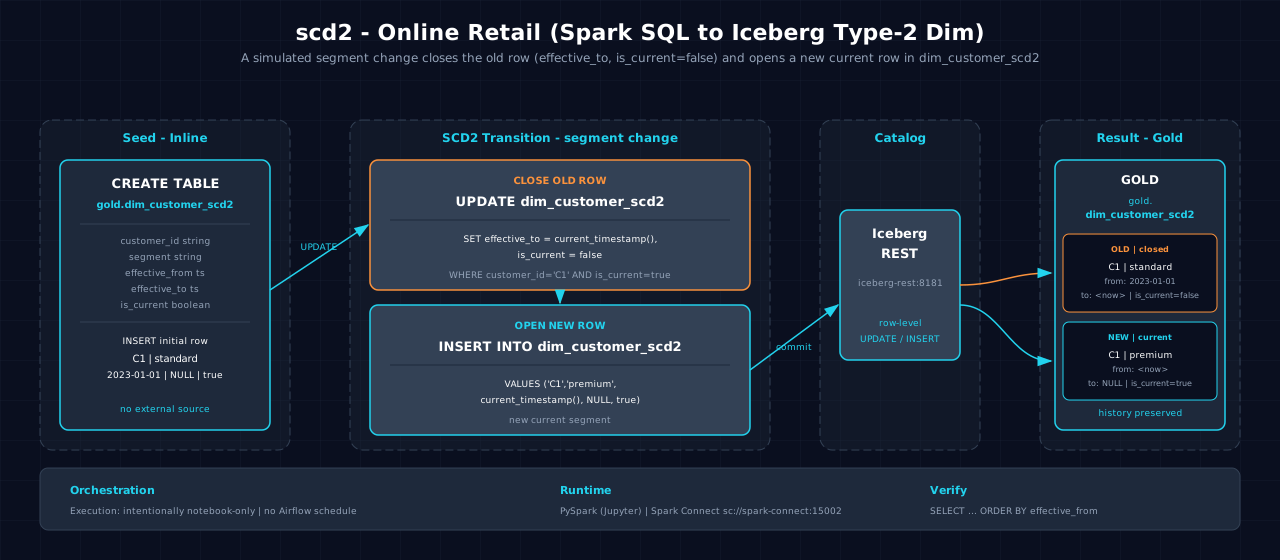
Data flows from inline seed data through Spark batch processing with SCD2 logic. The notebook seeds initial customer data, then simulates a segment change by closing the old row and opening a new row with the updated segment and effective timestamps. This demonstrates how Iceberg handles row-level updates efficiently.
4. Notebooks
- Zeppelin (Scala):
zeppelin/notebook.zpln— Sections: Overview, Seed Data, Apply SCD2 Logic (close old row, open new row), Query Historical Records, Verify - Jupyter (PySpark):
jupyter/notebook.ipynb— Same sections; same SCD2 logic using PySparkwhen()and DataFrame updates witheffective_from/effective_to/is_currenttracking
Both languages implement identical SCD2 logic: seeding, history tracking via effective timestamps and current flags, and verification sections.
5. Orchestration
Classification: intentionally notebook-only. No Airflow DAG or schedule exists. Inline customer changes teach close-and-insert history mechanics but do not define a governed production source, so run either paired notebook after resetting its table.
6. Usage
- Ensure the
goldIceberg namespace exists:scripts/register_iceberg.py - Open either notebook on the Atlas stack.
- Verify:
bash
   spark-sql -e "SELECT * FROM lakehouse.gold.dim_customer_scd2"
7. Dependencies
- Dataset: Online retail dimension data (inline seed)
- Atlas services: A1-A4 (Spark, Iceberg, S3 catalog, lakehouse catalog)
- Other: None
- Note: Iceberg row-level UPDATE is an SQL extension; ensure
iceberg.sql.extensionsis enabled in Spark configuration
8. Known Issues & Caveats
Notebook execution and Scala/PySpark parity are live-gated on Atlas A1-A4. The gold namespace must exist; run scripts/register_iceberg.py first. The notebook's seed INSERT is not guarded; re-running the full notebook accumulates seed rows. Drop the target table first for a clean demo. At scale, the inline seed can be replaced by the registered online_retail dataset.
9. See Also
- Related: incremental_upsert-online_retail-spark-iceberg — Batch form of the same CDC upsert pattern
- Related: cdc_streaming-online_retail-spark-iceberg — Streaming CDC version of upserts
- Datasets
- Lakehouse Architecture