1. Overview
A self-hosted, pre-integrated gen-AI, ML, and data platform — one Docker Compose stack
Chat, RAG, agents, distributed compute, and a full data platform — integrated services, each selectable among the deployment modes it supports.
Atlas is a self-hosted engineering platform that bundles 58 service families behind a Kong gateway and an adaptive FastAPI backend. They cover LLM inference and a gateway, vector and graph databases, workflow and DAG automation, distributed compute, object storage, notebooks, and observability.
Seven tracks preselect coherent service families, while SOURCE modes choose container, localhost, or disabled operation where supported. Kong, Supabase, Redis, LiteLLM, and the Backend API form the always-on core, so every selected workload starts from the same integrated foundation.
The launch wizard also offers the dev or prod profiles, then shows the launch summary.
1. Capabilities
Atlas organizes 58 service families. Its configurable services are grouped into 7 tracks, which can overlap. Each track preselects a working subset for one class of workload. The wizard prompts for in-track services and force-disables the rest.
Generative AI · RAG
Retrieval-augmented generation — vectors, graph, reranker, doc ingest, web search, workflow automation.
Generative AI · Engineering
Agentic apps + workflows with voice, vision, and search.
ML Engineering
Distributed training/inference + notebooks + experiment storage.
Trading / Financial Research
Read-only financial research and paper portfolios in notebooks; no live trading.
2. Quick Start
Install Docker with Docker Compose v2.20.3 or newer, uv or Python 3.10 or newer, and Git. Clone the repository, then run the commands from its root:
git clone https://github.com/thekaveh/atlas && cd atlas
./start.sh
./start.sh opens the interactive wizard. ./start.sh --track gen-ai-rag sets the track and skips that question. A source, model or key flag, such as --llm-provider-source ollama-container-gpu, skips the wizard. So do launch flags such as --base-port and --detach. Atlas then launches what .env holds, not a track's subset. Full flow, flags and troubleshooting: Quick Start.
3. Platform Topology
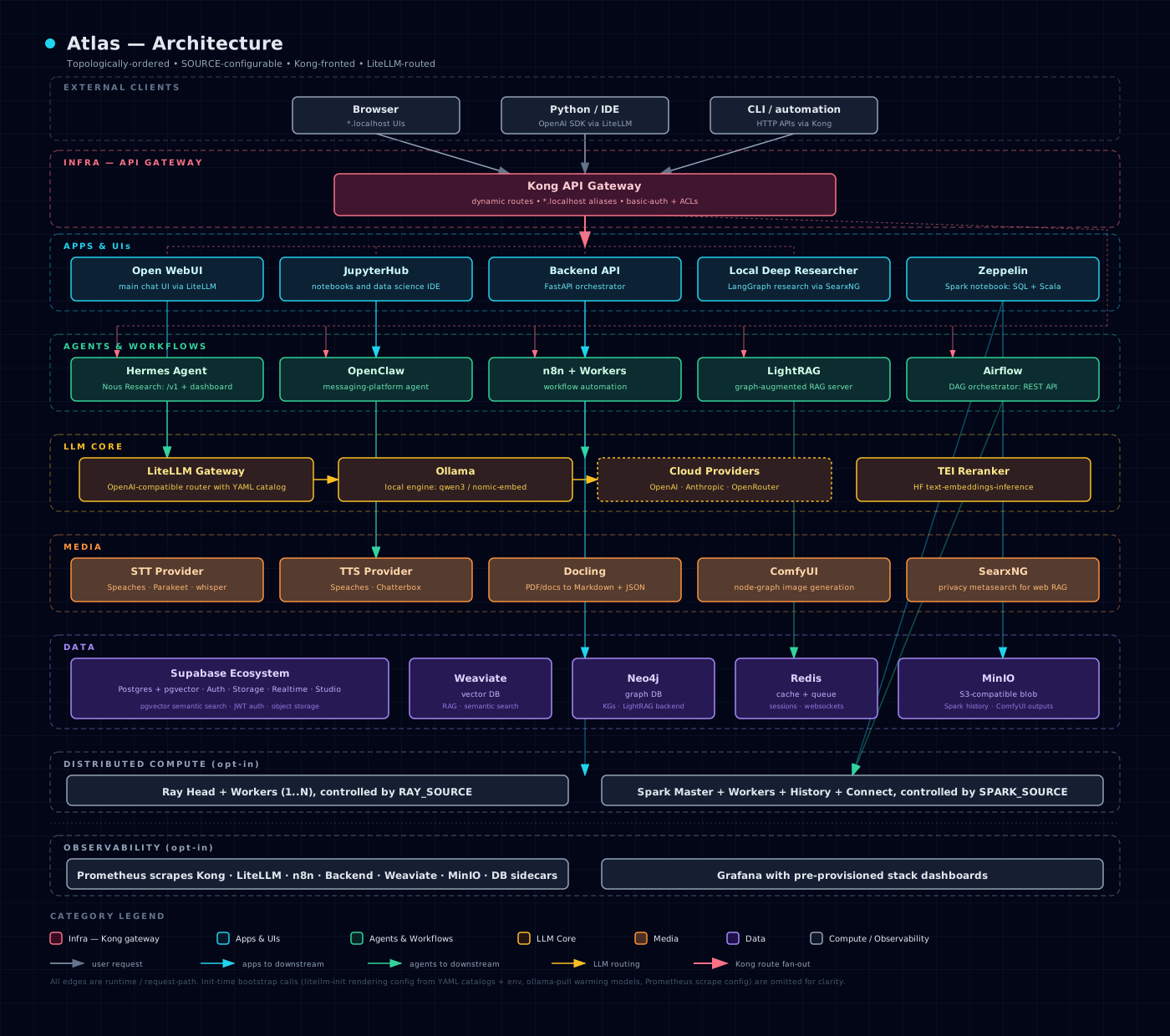
Kong routes every declared *.localhost host; LiteLLM is the default model path for Atlas-managed consumers, with explicit native-provider overrides where supported.
Per-flow diagrams (data/RAG, LLM provider routing, observability, security boundary, bootstrapper lifecycle): Architecture.
4. Documentation Map
Reference
Env vars, ports, manifest fields, and the generated SOURCE matrix for every configurable service.
5. Setup Surface
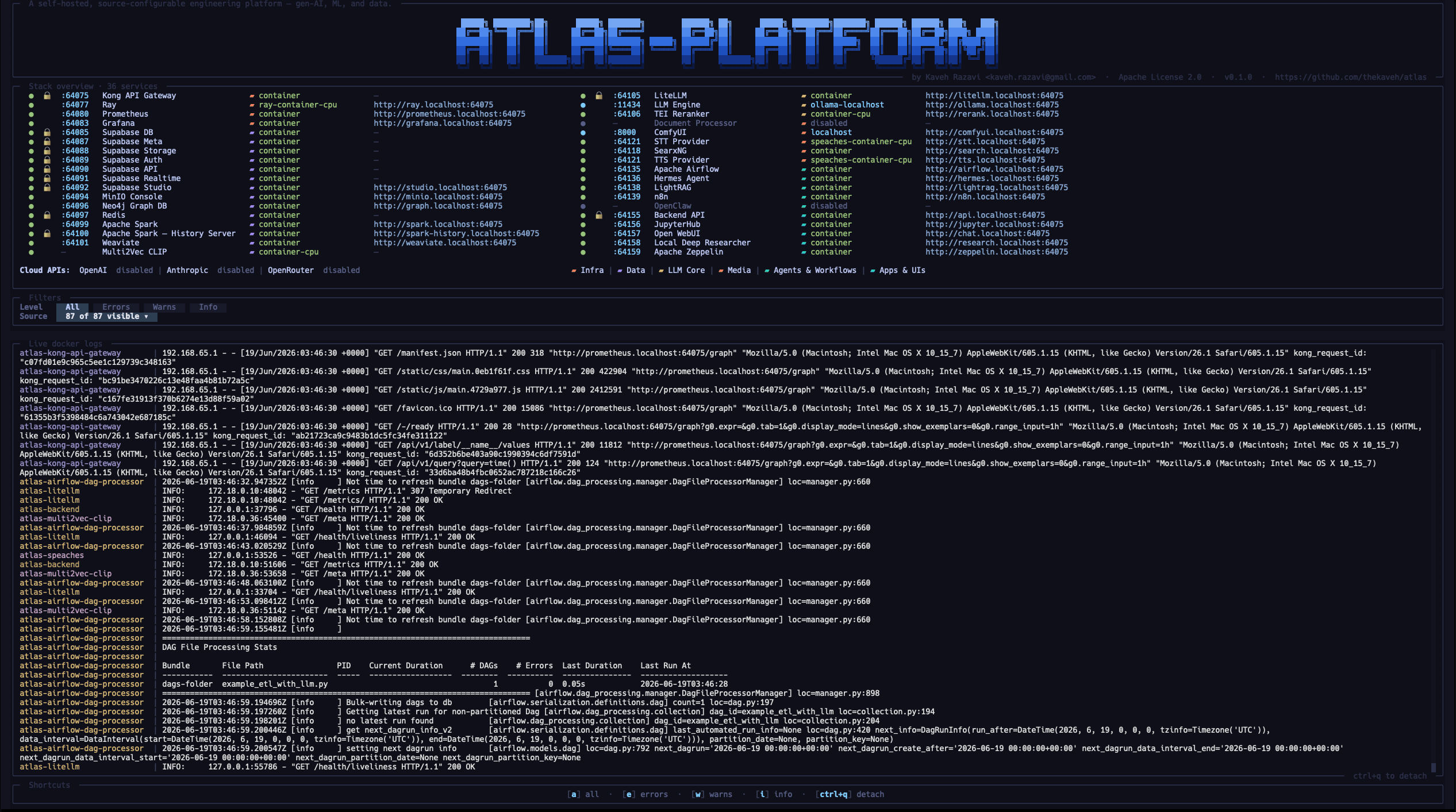
The setup wizard during a live ./start.sh launch of Atlas v0.1.0 on 2026-06-19. Its overview lists 36 services, 34 of them enabled, on base port 64075. Ollama and ComfyUI use host (localhost) sources, and the cloud APIs are off. The capture does not record the host hardware.