5.2.26. LightRAG¶
Image:
ghcr.io/hkuds/lightrag:v1.5.4Container port: 9621 (API + WebUI) · Default host port: allocated bytopology.py(agents band 63070–63089) Default: disabled
1. Overview¶
LightRAG is a graph-augmented RAG server. It ingests documents (PDF, Office, images, tables, equations) and extracts a knowledge graph with an LLM. It embeds chunks and entities in a vector store. Its query API combines graph traversal with vector search.
In this stack, LightRAG reuses existing infrastructure:
- LLM + embeddings routed through LiteLLM (
LLM_BINDING_HOST=http://litellm:4000/v1). - Vector store → Supabase pgvector (
PGVectorStorage). - Graph store → Neo4j (
Neo4JStorage).LIGHTRAG_NEO4J_URIfollowsNEO4J_GRAPH_DB_SOURCE:bolt://neo4j-graph-db:7687for the container,bolt://host.docker.internal:${NEO4J_LOCALHOST_BOLT_PORT}for a host-run Neo4j. - KV + doc-status → Redis (
RedisKVStorage). - Document parsing → LightRAG's
nativeengine for docx/md/textpack, andlegacytext extraction for everything else, including PDFs. Compose fixesLIGHTRAG_PARSER=*:native-teP,*:legacy-R;.envcannot change it. When in-stack LightRAG and Docling are both enabled, a file goes to Docling only if its name has the.[docling].hint (for examplereport.[docling].pdf). Docling is reached through an isolated adapter (LIGHTRAG_DOCLING_ENDPOINT) that holds the Docling credential (§4.3). Without that route, images get text extraction only. - Credentials → the base and embedding LLM bindings always send
LITELLM_MASTER_KEY. PointLIGHTRAG_LLM_BINDING_HOSTandLIGHTRAG_EMBEDDING_BINDING_HOSTonly at LiteLLM. Any other host, native Ollama included, also receives the master key. - Reranking is off by default. To enable it, set
LIGHTRAG_RERANK_ADAPTER_ENABLED=truewithTEI_RERANKER_SOURCEenabled (see §3.6 and the backend README §5.1).
When Supabase, Neo4j or Redis is disabled, Atlas clears that backend's connection URI but keeps the storage selector. Atlas does not select file-backed storage automatically. For a file-backed mode, set the LIGHTRAG_*_STORAGE selector yourself and provide persistence (§6).
2. Source variants¶
| Source | Scale | Endpoint | Notes |
|---|---|---|---|
container |
1 | http://lightrag:9621 |
In-stack LightRAG |
localhost |
0 | http://host.docker.internal:${LIGHTRAG_LOCALHOST_PORT} |
Host-installed LightRAG |
disabled |
0 | "" |
LightRAG off; consumers see empty endpoint |
LightRAG is off by default. To enable it, run ./start.sh --lightrag-source container, or set LIGHTRAG_SOURCE=container in .env. The gen-ai-rag track also prompts for it.
3. Configuration¶
3.1. Storage and model variables¶
Storage selectors and model bindings can be overridden via .env:
LIGHTRAG_SOURCE=disabled                            # default
LIGHTRAG_KV_STORAGE=RedisKVStorage                  # alt: JsonKVStorage
LIGHTRAG_VECTOR_STORAGE=PGVectorStorage             # alt: NanoVectorDBStorage, QdrantVectorDBStorage, ...
LIGHTRAG_GRAPH_STORAGE=Neo4JStorage                 # alt: NetworkXStorage, MemgraphStorage, AGEStorage
LIGHTRAG_DOC_STATUS_STORAGE=RedisDocStatusStorage   # alt: PGDocStatusStorage, JsonDocStatusStorage
LIGHTRAG_LLM_MODEL=                                 # empty = inherit LITELLM_DEFAULT_MODEL
LIGHTRAG_EXTRACT_LLM_MODEL=                         # empty = inherit LLM_MODEL
LIGHTRAG_KEYWORD_LLM_MODEL=                         # empty = inherit LLM_MODEL
LIGHTRAG_QUERY_LLM_MODEL=                           # empty = inherit LLM_MODEL
LIGHTRAG_EXTRACT_MAX_ASYNC_LLM=                     # empty = inherit MAX_ASYNC_LLM
LIGHTRAG_QUERY_LLM_TIMEOUT=                         # empty = inherit LLM_TIMEOUT
LIGHTRAG_QUERY_ENABLE_RERANK=false                  # rerank via backend adapter; needs LIGHTRAG_RERANK_ADAPTER_ENABLED=true + TEI
LIGHTRAG_QUERY_TOP_K=10                             # graph query KG top-k
LIGHTRAG_QUERY_CHUNK_TOP_K=5                        # graph query chunk top-k
LIGHTRAG_QUERY_MAX_TOTAL_TOKENS=12000               # graph query context budget
LIGHTRAG_EMBEDDING_MODEL=                           # empty = inherit LITELLM_EMBEDDING_MODEL
LIGHTRAG_VLM_PROCESS_ENABLE=true                    # vision LLM for images/figures
3.2. Role models¶
LightRAG v1.5 has separate LLM settings for three roles: extraction, keyword extraction and query answering. Atlas exposes them as LIGHTRAG_EXTRACT_*, LIGHTRAG_KEYWORD_* and LIGHTRAG_QUERY_*, and maps them to LightRAG's EXTRACT_*, KEYWORD_* and QUERY_*. An empty role value inherits the base LLM_* setting. When LIGHTRAG_LLM_MODEL is empty, lightrag-init resolves the base model.
For local Ollama graph RAG, use a fast non-reasoning model for EXTRACT and KEYWORD, and reserve the stronger answer model for QUERY:
LIGHTRAG_LLM_MODEL=qwen3.8:latest
LIGHTRAG_EXTRACT_LLM_MODEL=mistral-small3.2:24b
LIGHTRAG_KEYWORD_LLM_MODEL=mistral-small3.2:24b
LIGHTRAG_QUERY_LLM_MODEL=qwen3.8:latest
Atlas does not ship these model names as defaults. mistral-small3.2:24b is not in the Ollama catalog (services/ollama/models.yaml): add it to OLLAMA_CUSTOM_MODELS so Atlas pulls it and LiteLLM serves it. Without role variables, LightRAG uses one model for all roles.
3.3. Role API keys¶
Role API keys (LIGHTRAG_EXTRACT_LLM_BINDING_API_KEY, LIGHTRAG_KEYWORD_LLM_BINDING_API_KEY, LIGHTRAG_QUERY_LLM_BINDING_API_KEY) are resolved at start by init/scripts/resolve-role-keys.py. It follows LightRAG 1.5.4's own host resolution:
- An empty role host means the base
LLM_BINDING_HOST. Anazure_openairole on its own binding defaults toAZURE_OPENAI_ENDPOINTinstead. - If the role's effective host is the in-network LiteLLM (
litellm:4000), an empty key becomesLITELLM_MASTER_KEY. LiteLLM-routed roles need no key wiring. - If a role has its own binding or host that resolves anywhere else, set its key. Otherwise the container stops at start and names the variable. This keeps the master key inside LiteLLM.
- A role that only mirrors the base binding and host is left unchanged. A Bedrock role never gets a key; LightRAG signs it with AWS credentials.
Observability caveat. A role whose
*_LLM_BINDING_HOSTpoints at a native provider (for example Ollama directly) is off the LiteLLM gateway. Langfuse tracing in Atlas is gateway-level, so that role's calls produce no traces, and nothing warns. See Langfuse §4.2.
3.4. Catalog request defaults and role transport¶
A model's request_defaults in the Ollama catalog (services/ollama/models.yaml) reach the model only through LiteLLM. The catalog sets think: false on qwen3.8:latest. litellm-init renders them into the model's litellm_params.
A native LightRAG 1.5.4 binding does not send them. The Ollama binding forwards only Ollama's options object (binding_options.py#L435, lightrag_server.py#L1739-L1740), and think is a top-level field beside it. So resolve-role-keys.py reads the catalog (read-only mount) and sets each role's transport at start:
- A role that would inherit a native base stays on LiteLLM. Example:
LIGHTRAG_LLM_BINDINGandLIGHTRAG_LLM_BINDING_HOSTpoint atollamaonhttp://host.docker.internal:11434(LLM_PROVIDER_SOURCE=ollama-localhost). Take a role whose model declares catalogrequest_defaultsand that sets no binding, host or key. Atlas binds it toopenaiathttp://litellm:4000/v1with the LiteLLM master key. - LiteLLM applies the defaults, so the role sends the same request it would on the default path.
- The cost is one gateway hop for that role, which also brings it back under Langfuse tracing.
- The role's model must be one LiteLLM serves. Select catalog role models through
OLLAMA_USER_MODELSand custom models throughOLLAMA_CUSTOM_MODELS; see Ollama §5. - A routed
EXTRACTis no longer bound to Ollama, so theEXTRACT_OLLAMA_LLM_*caps below do not apply to it. - A role whose model declares none keeps the base binding. Embedding entries, and chat entries without
request_defaults, resolve as before. A role on such a model still goes native. - Explicit role settings win. A role that sets its own
LIGHTRAG_<ROLE>_LLM_BINDING,_BINDING_HOSTor_BINDING_API_KEYis never re-routed. If those settings put it on a native host, it cannot receive its model's defaults, and the start log and doctor say so. - Where to see it. At start, the container logs one
lightrag: <ROLE> role: …line per role, with binding, host, model and request defaults (never a key)../start.sh doctorreports the same in itslightrag-role-transportcheck and warns when a role loses its defaults. LightRAG's/healthshows each role'sbinding,hostandmodelunderconfiguration.role_llm_config, with keys stripped. - End-to-end test. On a development stack,
scripts/smoke-lightrag-role-models.shuploads a document, runs a query, and checks LiteLLM's logs for each role's model. The two role models must differ.LIGHTRAG_SMOKE_WAIT_SECONDS(default 30) sets the extraction wait.
3.5. Extract-role caps on native Ollama¶
To run only the EXTRACT role on native Ollama, set its model, binding, host and key:
LIGHTRAG_EXTRACT_LLM_MODEL=mistral-small3.2:24b          # required for a role on its own binding
LIGHTRAG_EXTRACT_LLM_BINDING=ollama
LIGHTRAG_EXTRACT_LLM_BINDING_HOST=http://host.docker.internal:11434
LIGHTRAG_EXTRACT_LLM_BINDING_API_KEY=ollama              # required; any value, see the key note below
LIGHTRAG_EXTRACT_OLLAMA_LLM_NUM_PREDICT=4096              # max output tokens per extract call
LIGHTRAG_EXTRACT_OLLAMA_LLM_NUM_CTX=16384                 # context window for each extract call
In LightRAG v1.5.4, a role whose binding differs from the base binding (openai, through LiteLLM) sends no provider options unless you set role-scoped ones. Atlas sets the last two lines by default, and LightRAG reads them as EXTRACT_OLLAMA_LLM_*.
- Why the caps matter. Without them a degenerate extraction generates until a timeout fires, because Ollama's own
num_predictdefault is unbounded. - Choosing
NUM_PREDICT. - A dense chunk can legitimately need several thousand output tokens, and a cap that cuts one off loses entities without any error.
- Extraction results are cached, and the cache key ignores these options, so after raising the cap clear LightRAG's LLM cache (
POST /documents/clear_cache) to re-extract. - Choosing
NUM_CTX. The same role runs three kinds of call, so the context window has to fit the largest: - the extraction prompt, about 1.75k tokens, with a paragraph chunk of up to 2000 tokens;
- the gleaning pass, which resends the first answer;
- merge summaries of up to 12000 input tokens.
16384 covers all three plus the output cap. It overrides Ollama's VRAM-based default and any OLLAMA_CONTEXT_LENGTH for these calls. If other callers load the same model at a different context length, Ollama reloads it on each switch.
- Keep them numeric. LightRAG sends a non-integer value, including an empty one, as a string, and Ollama then rejects every extract call. Compose falls back to the defaults above when a value is empty.
- When they apply. Both caps take effect only while EXTRACT is bound to Ollama. Other bindings ignore them.
- EXTRACT API key. On native Ollama the key is required, because LightRAG needs a key for a role on its own binding. Ollama ignores the value, so any string works. If it is empty, the container stops at start and names the variable (role-key rules above).
Timeouts and failed chunks are upstream behaviour. Checked against the pinned lightrag-hku 1.5.4 source:
- Per-call timeout.
LIGHTRAG_EXTRACT_LLM_TIMEOUT(EXTRACT_LLM_TIMEOUT, defaultLLM_TIMEOUT, which is 240 s) reaches the Ollama client as its HTTP timeout (lightrag_server.py#L1639-L1643,ollama.py#L157).- That timeout is per read, not per request. It works as a per-call deadline here only because extraction calls do not stream, so Ollama sends nothing until it finishes.
- The hard wall-clock cap is the worker's
asyncio.wait_forat twice the timeout (utils.py#L929-L938,#L1274-L1277). num_predictonly stops a runaway before the timeout does when the model producesNUM_PREDICTtokens within it. At the defaults that means roughly 17 tokens per second (4096 in 240 s). On slower hosts, raiseLIGHTRAG_EXTRACT_LLM_TIMEOUTtoo.- A failed chunk fails its document.
- One chunk that times out cancels the document's other chunk tasks (
operate.py#L3746-L3779). - The whole document is marked
FAILEDwith nothing merged into the graph (pipeline.py#L2534-L2554). - The drain moves on to the next document (
pipeline.py#L1998-L2029), and the failed one is re-queued on the next processing pass. - Skipping just the chunk and keeping a partial graph for that document is not configurable in 1.5.4.
3.6. Query defaults and reranking¶
Atlas exposes LightRAG's query defaults: LIGHTRAG_QUERY_ENABLE_RERANK, LIGHTRAG_QUERY_TOP_K, LIGHTRAG_QUERY_CHUNK_TOP_K and LIGHTRAG_QUERY_MAX_TOTAL_TOKENS. The numeric values default to integers, because LightRAG v1.5 parses them as integers and rejects empty strings.
Reranking. LIGHTRAG_QUERY_ENABLE_RERANK defaults to false. LightRAG's Jina/Cohere rerank clients send {query, documents}, but TEI's /rerank expects {query, texts}, so Atlas never wires LightRAG directly to TEI. To rerank, set LIGHTRAG_RERANK_ADAPTER_ENABLED=true with TEI_RERANKER_SOURCE enabled. Atlas then sets RERANK_BINDING=jina and RERANK_BINDING_HOST=http://backend:8000/lightrag/rerank, and passes the adapter's bearer token as RERANK_BINDING_API_KEY. See the backend README §5.1.
3.7. Generated and derived variables¶
The bootstrapper derives the Docling adapter endpoint; do not set it. It is set only for LIGHTRAG_SOURCE=container with Docling enabled. Localhost LightRAG gets an empty endpoint, because the adapter has no host port.
The bootstrapper generates two security variables on first launch and writes them to .env:
LIGHTRAG_API_KEY=<auto>          # X-API-Key header for document/query routes; forwarded to LiteLLM
LIGHTRAG_TOKEN_SECRET=<auto>     # JWT signing secret for /login flows
LightRAG's default WHITELIST_PATHS=/health,/api/* leaves /health and the Ollama-compatible /api/* chat routes open without a key. Atlas keeps that default, because the LiteLLM lightrag model uses /api/*.
- A Bearer header that carries the API key is parsed as a JWT and rejected with 401, even with a valid
X-API-Key. - Browser access is limited to the Kong origin (
CORS_ORIGINS=http://lightrag.localhost:${KONG_HTTP_PORT}). LightRAG's default*would let any web page read ingested documents through/api/chaton the direct port. - While
/api/*is open, a blind cross-site POST can still spend model tokens without reading the reply.
Without LIGHTRAG_TOKEN_SECRET, LightRAG uses a hardcoded default JWT key, which is a security risk. The bootstrapper generates both values only when they are absent, so values you set are kept. After rotating LIGHTRAG_API_KEY, run ./start.sh to recreate init and the gateway with the new routing key.
4. Usage¶
4.1. Web UI¶
Browse http://lightrag.localhost:${KONG_HTTP_PORT} (after --setup-hosts) or http://localhost:${LIGHTRAG_API_PORT}/webui. Upload documents, view the KG, run queries.
4.2. Native API¶
# Insert a document
curl -sX POST http://localhost:${LIGHTRAG_API_PORT}/documents/upload \
  -H "X-API-Key: ${LIGHTRAG_API_KEY}" \
  -F "file=@my-paper.pdf"

# Query
curl -sX POST http://localhost:${LIGHTRAG_API_PORT}/query \
  -H "X-API-Key: ${LIGHTRAG_API_KEY}" \
  -H "Content-Type: application/json" \
  -d '{"query": "What is graph-augmented RAG?", "mode": "hybrid"}'
/query takes a mode field: local, global, hybrid, naive, mix or bypass. The default is mix. A slash prefix in the query text does not select a mode on this route; it is sent as part of the question.
4.3. Docling adapter protocol¶
LightRAG v1.5.4 submits document parsing to POST /v1/convert/file/async (multipart field files), polls GET /v1/status/poll/{task_id}, downloads GET /v1/result/{task_id}, and probes GET /health. Atlas implements exactly those routes in docling-lightrag-adapter. The adapter, LightRAG, and docling-gpu share only docling-lightrag-network; the adapter has no published port and no backend-network membership. LightRAG receives only the adapter endpoint, while the adapter alone receives DOCLING_API_TOKEN for its upstream call.
The adapter accepts at most two outstanding jobs by default and returns 429 before reading an upload when full. Result artifacts expire after 900 seconds by default and are deleted after download, failure, cancellation, or expiry. An expired job must be resubmitted. These values are controlled by DOCLING_ADAPTER_MAX_JOBS and DOCLING_ADAPTER_RESULT_TTL_SECONDS in the Docling manifest.
4.4. Via LiteLLM (recommended for other stack services)¶
When LightRAG is enabled, LiteLLM registers it as the lightrag model. Any LiteLLM consumer (open-webui, openclaw, n8n, hermes, backend, local-deep-researcher, jupyterhub) can call it. The model uses LightRAG's Ollama-compatible /api/chat route. There, a prefix on the last user message selects the mode: /local, /global, /hybrid, /naive, /mix or /bypass. Without a prefix the mode is mix.
curl -sX POST http://localhost:${LITELLM_PORT}/v1/chat/completions \
  -H "Authorization: Bearer ${LITELLM_MASTER_KEY}" \
  -H "Content-Type: application/json" \
  -d '{
    "model": "lightrag",
    "messages": [
      {"role": "user", "content": "/hybrid What is graph-augmented RAG?"}
    ]
  }'
5. Dependencies & Integrations¶
5.1. Current — Upstream (this service calls)¶
| Service | Category |
|---|---|
| neo4j | data |
| redis | data |
| supabase | data |
| litellm ↔ | llm |
| docling-lightrag-adapter | media |
| backend ↔ | apps |
5.2. Current — Downstream (services that call this)¶
Rows marked planned are documented or intended, not wired yet.
| Service | Category | Status |
|---|---|---|
| kong | infra | current |
| litellm ↔ | llm | current |
| celery | agents | current |
| hermes | agents | planned |
| n8n | agents | current |
| backend ↔ | apps | current |
5.3. Architecture diagram¶
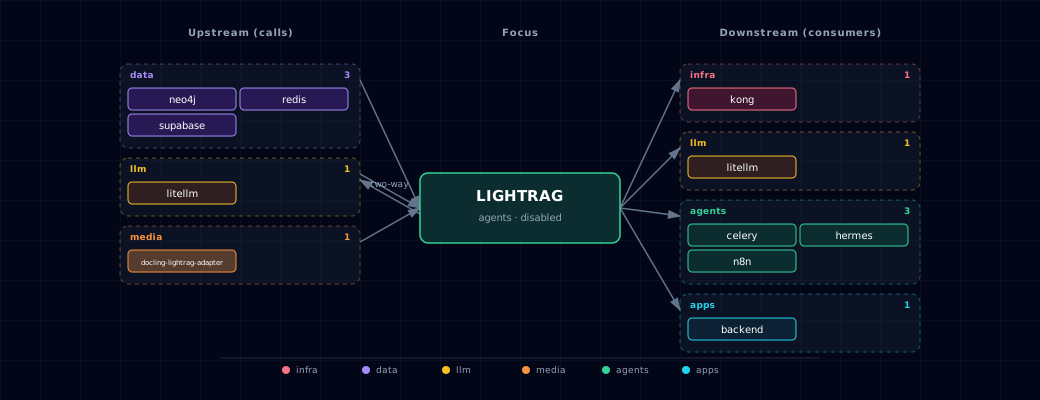
Open the full-size diagram for a full-screen view.
5.4. Future — Missing pair integrations¶
No high-confidence opportunities identified.
5.5. Future — Candidate new services¶
No high-confidence opportunities identified.
5.6. Future — Unused features in this service¶
No high-confidence opportunities identified.
6. Storage backend matrix¶
| Storage role | Default selector | Behavior when the external source is disabled |
|---|---|---|
| KV | RedisKVStorage on Redis db=2 |
Redis URI is cleared; selector remains RedisKVStorage. |
| Vector | PGVectorStorage on Supabase pgvector |
Postgres URI is cleared; selector remains PGVectorStorage. |
| Graph | Neo4JStorage on Neo4j |
Neo4j URI is cleared; selector remains Neo4JStorage. |
| Doc-status | RedisDocStatusStorage on Redis db=2 |
Redis URI is cleared; selector remains RedisDocStatusStorage. |
With a cleared URI and the default selector, LightRAG fails at start; the bootstrapper prints a warning that names the selector. To run without that backend, set the LIGHTRAG_*_STORAGE selector to a local class.
The stack backup (services/backup) does not cover the KV and doc-status data in Redis db=2. A restore therefore brings back the graph and vectors without the documents and chunks they reference.
LIGHTRAG_WORKERS has no effect: the server runs as one uvicorn process.
7. Init container¶
When lightrag-init starts, it:
- Runs after LiteLLM's Compose health gate and reads LiteLLM
/v1/models. - Resolves the base
LIGHTRAG_LLM_MODEL/LIGHTRAG_EMBEDDING_MODEL/LIGHTRAG_EMBEDDING_DIMfrom explicit overrides, LiteLLM defaults, or LiteLLM's model list. Writes LightRAG's nativeLLM_MODEL/EMBEDDING_MODEL/EMBEDDING_DIMto/app/data/.env. If no chat model can be resolved, init exits non-zero instead of starting LightRAG with an emptyLLM_MODEL. Role-specificLIGHTRAG_EXTRACT_*,LIGHTRAG_KEYWORD_*, andLIGHTRAG_QUERY_*variables are passed directly to the runtime container. - Polls Postgres for up to 120 s until it accepts connections, then runs the idempotent pgvector migration.
supabase-dbis SOURCE-replaceable, solightrag-inithas no composedepends_onon it. - Runs the Neo4j migration, which is non-fatal. It pre-creates the range index on
(:base).entity_id; otherwise LightRAG creates it on first write. It posts to the HTTP endpoint of the Bolt URI's host:neo4j-graph-db:7474, orNEO4J_LOCALHOST_HTTP_PORTforNEO4J_GRAPH_DB_SOURCE=localhost.
8. Troubleshooting¶
- First boot exceeds health-check timeout —
start_periodis 300 s. Initial tokenizer, embedding-model, and document-parser setup can take several minutes. - First boot logs missing PostgreSQL tables — expected on a cold volume. LightRAG probes for its tables, logs relation-missing errors, then creates the tables and indexes before reporting healthy.
lightrag: LightRAG <ROLE> role uses binding … and has no API key, then the container restarts. A role with its own binding or host points away from the in-network LiteLLM, and its key is empty.init/scripts/resolve-role-keys.pystops before LightRAG starts, so that host never receives the LiteLLM master key. Set the namedLIGHTRAG_<ROLE>_LLM_BINDING_API_KEYin.env; for native Ollama any value works.- A role shows
openaiathttp://litellm:4000althoughLIGHTRAG_LLM_BINDINGpoints at native Ollama — expected for a role whose model declares catalogrequest_defaults, such asthink: false. A native LightRAG 1.5.4 binding does not send them, so the role stays on LiteLLM. To run it natively and accept the reasoning cost, set its binding, host and key. See §3.4. - Empty KG after ingestion — make sure
LIGHTRAG_LLM_MODELis a chat-capable model. Some embedding-only Ollama tags produce empty triples without an error. - Rerank does not run although TEI is enabled — set
LIGHTRAG_RERANK_ADAPTER_ENABLED=true(§3.6). Without it Atlas setsRERANK_BINDING=null../start.sh doctorwarns if the flag is on but TEI or LightRAG is off. - Embedding dimension. Without
LIGHTRAG_EMBEDDING_DIM, init looks the dimension up in a built-in table: - 768: nomic-embed-text.
- 1024: qwen3-embedding:0.6b, bge-m3, mxbai-embed-large.
- 1536: text-embedding-3-small, text-embedding-ada-002.
- 3072: text-embedding-3-large.
A name that contains a table entry (for example ollama/bge-m3) also matches. For other models, init probes LiteLLM. If the probe fails, for example before ollama-pull finishes on first boot, init falls back to 768. A wrong dimension makes every vector insert fail with a dimension mismatch. Set LIGHTRAG_EMBEDDING_DIM for any model outside the table.
- Changing the embedding model or dimension. LightRAG 1.5.4 names each vector table after the embedding model and dimension, for example LIGHTRAG_VDB_CHUNKS_ollama_nomic_embed_text_768d in schema public. A new model or LIGHTRAG_EMBEDDING_DIM therefore writes to new, empty tables. Existing documents are not re-embedded, and their doc status in Redis still says processed. To change it:
1. Keep copies of your source documents. Step 2 also deletes the graph and the uploaded files.
2. On the old settings, clear all documents: curl -sX DELETE http://localhost:${LIGHTRAG_API_PORT}/documents -H "X-API-Key: ${LIGHTRAG_API_KEY}".
3. Set the new LIGHTRAG_EMBEDDING_MODEL and LIGHTRAG_EMBEDDING_DIM in .env.
4. Run ./start.sh, then upload the documents again.
5. Optional: list the old, empty tables and drop them by name:
 ```bash
 docker exec -it ${PROJECT_NAME}-supabase-db psql -U supabase_admin -d postgres -c '\dt public.lightrag_vdb_*'
 docker exec -it ${PROJECT_NAME}-supabase-db psql -U supabase_admin -d postgres -c 'DROP TABLE public.lightrag_vdb_chunks_<old_suffix>, public.lightrag_vdb_entity_<old_suffix>, public.lightrag_vdb_relation_<old_suffix>'
 ```
Do not drop the lightrag schema. It holds only Atlas's lightrag.vectors_meta marker, not the vector tables, so the drop removes no vectors.
9. Capabilities & limitations¶
Support tier: experimental — Capability contract declared; no cited cold-start, workflow, or upgrade qualification run yet (evidence at v0.1.0).
| Capability | Status | Verification | Notes |
|---|---|---|---|
| Graph-augmented retrieval through LiteLLM | supported | tested | Atlas resolves LightRAG chat and embedding models through LiteLLM and exposes graph-aware query modes. |
| External persistent storage | partial | tested | Atlas wires Supabase pgvector, Neo4j, and Redis when enabled; disabling them clears connection URIs without selecting file-backed storage implementations. |
| LightRAG reranking | partial | tested | Reranking requires TEI plus the opt-in backend adapter because direct LightRAG-to-TEI request payloads are incompatible. |