5.2.10. Cloudflare Tunnel
Egress-only public-edge service: TLS terminates at Cloudflare's network, and the tunnel proxies inbound traffic to Kong. Disabled by default. Enable it to make Atlas publicly reachable without opening inbound firewall ports.
1. Overview
cloudflared runs as one container that dials out to Cloudflare and registers as a named tunnel. TLS terminates at the Cloudflare edge, so the stack manages no certificates. The tunnel forwards every request to http://kong-api-gateway:8000, so Kong is the single internal entry point.
The service is egress-only: it publishes no host port and has no Kong route. It connects to backend-network and reaches Kong by Docker DNS name.
Image: cloudflare/cloudflared:2026.6.1 (pin a dated tag; bump deliberately).
2. Access
| Path | URL | Notes |
|---|---|---|
| Public | configured in Cloudflare dashboard | One protected public hostname per Atlas Kong host route. |
| Internal metrics | cloudflared:2000/metrics |
Prometheus-compatible; not scraped by default |
| Host port | — | None. Egress-only. |
2.1. Public hostnames
Define public hostnames and routing rules in the Cloudflare Zero Trust dashboard, not in this repository. Kong selects routes by Host (api.localhost, chat.localhost, n8n.localhost and the other aliases in Ports and Routes), so:
- Set each hostname's Origin HTTP Host Header (
httpHostHeaderin an ingress rule) to the exact Kong alias. Without it, the public Host matches no alias and Kong returns 404. - Supabase path routes (
/rest/v1,/auth/v1,/storage/v1,/graphql/v1,/realtime/v1,/pg/) answer only onlocalhost,127.0.0.1,kong-api-gateway,<PROJECT_NAME>-kong-api-gatewayandhost.docker.internal. A rule with the Host override therefore never reaches Supabase. - To expose Supabase, use a rule without the Host override and add the hostname, in lowercase, to
KONG_SUPABASE_EXTRA_HOSTS(Kong matches Host case-sensitively). The anon key alone then opens it, and the dashboard password alone opens/pg/, so put Cloudflare Access in front. Set the override on every other rule. - Add an origin to
KONG_CORS_EXTRA_ORIGINSwhen a page on one public hostname calls another. - The n8n editor's live connection fails through a tunnel: n8n checks the WebSocket
Originagainst then8n.localhosthost Kong forwards (see the n8n README). Its webhooks work.
The Host override selects the route only. Apps that pin their own origin fail on a public hostname unless you override their settings:
- MLflow:
MLFLOW_SERVER_CORS_ALLOWED_ORIGINSlists onlymlflow.localhostand loopback, so state-changing requests get 403. - Label Studio:
CSRF_TRUSTED_ORIGINS/LABEL_STUDIO_HOSTname its Kong alias, so login fails the CSRF check. - Langfuse:
NEXTAUTH_URLislangfuse.localhost, so sign-in redirects to an unreachable host.
3. Configuration
CLOUDFLARED_SOURCE=disabled               # change to "container" to enable
CLOUDFLARE_TUNNEL_TOKEN=                  # required when SOURCE=container; from Zero Trust > Networks > Tunnels
CLOUDFLARED_IMAGE=cloudflare/cloudflared:2026.6.1
# CLOUDFLARED_SCALE is auto-managed: 1 when SOURCE=container, 0 when disabled
The setup wizard offers the same container / disabled choice. For automation, set CLOUDFLARE_TUNNEL_TOKEN in .env, then run ./start.sh --cloudflared-source container --detach.
To enable:
- Create a named tunnel in the Cloudflare Zero Trust dashboard (Zero Trust > Networks > Tunnels > Add a tunnel).
- Copy the tunnel token.
- Set
CLOUDFLARED_SOURCE=containerandCLOUDFLARE_TUNNEL_TOKEN=<your-token>in.env. - In the dashboard, add a public hostname for
http://kong-api-gateway:8000(service type HTTP, URLkong-api-gateway:8000). - Set its Origin HTTP Host Header to the Kong alias, for example
api.localhost(Backend) orchat.localhost(Open WebUI). - Before users get the hostname, create a Cloudflare Access application with a least-privilege policy for it.
- Repeat steps 4–6 for each additional Atlas service you expose.
- Restart the stack:
./start.sh.
If CLOUDFLARE_TUNNEL_TOKEN is empty when CLOUDFLARED_SOURCE=container, Atlas rejects the configuration before Compose starts. This prevents an authentication-failure restart loop.
4. Architecture & wiring
Startup ordering. cloudflared depends on kong-api-gateway: { condition: service_healthy } so the gateway is ready before the tunnel connects.
No ingress port. cloudflared has no *_PORT env var. The container publishes no port; it dials out and forwards back. The metrics endpoint (TUNNEL_METRICS: 0.0.0.0:2000) is reachable only inside the network.
Scale toggle. The bootstrapper sets CLOUDFLARED_SCALE to 1 (SOURCE=container) or 0 (disabled). The compose fragment uses deploy.replicas: ${CLOUDFLARED_SCALE:-0}, so a disabled tunnel does not start.
Security posture. Cloudflare Access is required for every public Atlas hostname. Use identity-aware, least-privilege policies; an unguessable hostname is not access control. The tunnel does not replace Kong controls. After Access admits a request, Kong still applies the matched route's plugins: authentication and ACL where the route has them, and rate limiting on search.localhost. Keep both layers, with an explicit httpHostHeader that selects the intended Kong route.
5. Dependencies & Integrations
5.1. Current — Upstream (this service calls)
| Service | Category | Status |
|---|---|---|
| kong | infra | optional: public hostnames configured in the Cloudflare dashboard |
5.2. Current — Downstream (services that call this)
No downstream consumers.
5.3. Architecture diagram
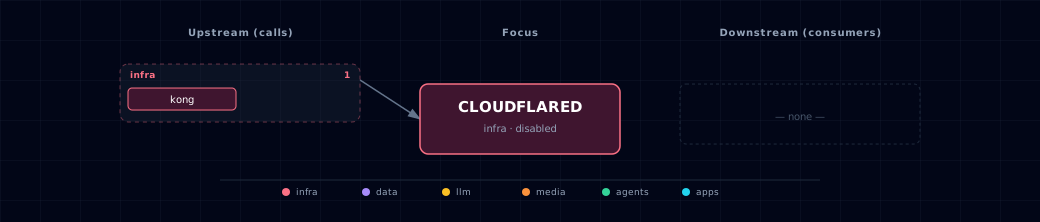
Open the full-size diagram for a full-screen view.
5.4. Future — Missing pair integrations
No high-confidence opportunities identified.
5.5. Future — Candidate new services
No high-confidence opportunities identified.
5.6. Future — Unused features in this service
No high-confidence opportunities identified.
6. Capabilities & limitations
Support tier: experimental — Capability contract declared; no cited cold-start, workflow, or upgrade qualification run yet (evidence at v0.1.0).
| Capability | Status | Verification | Notes |
|---|---|---|---|
| Outbound named-tunnel edge | supported | tested | Atlas runs cloudflared as an egress-only named tunnel to Kong and validates the required tunnel-token configuration before launch. |
| Atlas-managed public hostname routing | not-supported | documented | Public hostnames and their Origin Host Header mappings must be created in the Cloudflare dashboard; Atlas does not provision tunnel ingress rules. |
| Atlas-managed Cloudflare Access policy | not-supported | documented | Identity, application, and Access policy configuration remains external to Atlas and must be applied by the Cloudflare account operator. |