5.2.37. Ollama (LLM upstream behind LiteLLM)¶
Internal port: 11434 (no host port for ollama-container-*; reach Ollama over the Compose network)
SOURCE variable: LLM_PROVIDER_SOURCE
SOURCE options: ollama-container-cpu, ollama-container-gpu, ollama-localhost, none
For ollama-localhost, Ollama must already listen on the host at OLLAMA_LOCALHOST_PORT (default 11434). The stack does not start an Ollama container in that mode; you run the upstream.
1. Overview¶
Ollama is the local LLM engine behind the always-on LiteLLM gateway. The default consumers do not call Ollama directly: Backend, Open WebUI, n8n, JupyterHub, Local Deep Researcher, OpenClaw, Hermes Agent and Weaviate vectorization. They read LITELLM_BASE_URL + LITELLM_API_KEY, and LiteLLM routes each request to the configured Ollama upstream. See LiteLLM Gateway for the consumer-facing surface.
An operator can point a LightRAG role binding at Ollama directly. That role then bypasses LiteLLM and its catalog request defaults.
LLM_PROVIDER_SOURCE is a single-select choice for the Ollama upstream:
ollama-container-cpu/ollama-container-gpu— Ollama running inside the stack as a Docker containerollama-localhost— Ollama running natively on the host machinenone— no Ollama upstream; LiteLLM may use vLLM Metal and/or enabled cloud providers
2. Access¶
| Path | URL | Notes |
|---|---|---|
| Through LiteLLM | http://localhost:${LITELLM_PORT}/v1 |
Consumer-facing OpenAI-compatible endpoint. Use LITELLM_BASE_URL from .env. |
| Kong alias | http://ollama.localhost:${KONG_HTTP_PORT} |
Host-reachable proxy to raw Ollama /api (needs ./start.sh --setup-hosts). Bypasses LiteLLM — use it for Ollama-native calls (/api/tags, /api/pull, /api/ps). |
| Direct (internal) | http://ollama:11434 |
Reachable over the Compose network. The container publishes no host port; from the host, use the Kong alias. |
The Ollama container publishes no host port. LiteLLM owns the OpenAI-compatible surface (default LITELLM_PORT=63040). See the canonical port table at Ports and Routes.
3. Configuration¶
Configure the Ollama upstream through .env, the interactive wizard, or CLI flags:
LLM_PROVIDER_SOURCE=<option>
# Optional, only when LLM_PROVIDER_SOURCE=ollama-localhost:
OLLAMA_LOCALHOST_PORT=11434
# Parallel serving (container-* sources only) — multi-agent consumers
# (8+ concurrent requests) need OLLAMA_NUM_PARALLEL > 1 (Ollama's default is 1).
# For ollama-localhost the host daemon owns both (e.g. launchctl setenv on macOS).
OLLAMA_NUM_PARALLEL=8
OLLAMA_MAX_LOADED_MODELS=2
# KV-cache quantization — the other half of the memory budget.
OLLAMA_KV_CACHE_TYPE=q8_0
OLLAMA_FLASH_ATTENTION=1
# Residency — how long a model stays loaded, and how many fit at once.
OLLAMA_KEEP_ALIVE=
OLLAMA_MODELS_RESIDENT_MIN=
# Advisory floor for ollama-localhost only. Empty by default.
OLLAMA_PARALLEL_MIN=
KV-cache quantization. The attention KV cache is the largest per-slot memory cost, and OLLAMA_NUM_PARALLEL multiplies it: eight parallel slots hold eight KV caches. OLLAMA_KV_CACHE_TYPE=q8_0 roughly halves that for a negligible quality cost. f16 is Ollama's default (full precision); q4_0 quarters it with a measurable quality cost. On unified-memory hosts with several resident models, this is the cheapest lever.
Quantization works only when flash attention is on, so Atlas sets OLLAMA_FLASH_ATTENTION=1 explicitly. Both apply to the ollama-container-* sources. For ollama-localhost, set them on the host daemon (launchctl setenv on macOS), as for the parallel-serving variables.
Model churn on multi-model runs. A pipeline can use several models in sequence, for example a LightRAG ingest with separate extract, embed and keyword models. If OLLAMA_MAX_LOADED_MODELS is below that count, Ollama unloads one model to load the next, then reloads it soon after. There is no error: the run is slow, and ollama ps shows models cycling through Stopping….
Two levers, and they are different things:
OLLAMA_MAX_LOADED_MODELS— how many models fit resident at once. Set it to the number of distinct models one run touches.OLLAMA_KEEP_ALIVE— how long each stays after its last use. Ollama's default is 5m, so even with enough slots a slow pipeline can still evict between calls.-1means forever.
For ollama-localhost, Atlas cannot set either; the host daemon owns them. Declare OLLAMA_MODELS_RESIDENT_MIN, and ./start.sh doctor reads the daemon's configuration and reports a failure when it allows fewer resident models.
OLLAMA_KEEP_ALIVE=-1 keeps every loaded model in memory until you revert it and restart Ollama. On a large model set, that is tens of GB. Set it only for the duration of a run (see reusing Atlas).
Concurrency floor for a host daemon. On ollama-localhost, Atlas cannot set the daemon's environment; you own it. Ollama's default is one parallel slot, and it queues extra concurrent requests silently. A consumer that needs eight slots is then correct but slow, with nothing in any log. Set OLLAMA_PARALLEL_MIN to the slots your workload needs. ./start.sh doctor reads the daemon's OLLAMA_NUM_PARALLEL, fails the check below the floor, and prints the launchctl fix.
The check works only on macOS, where the daemon inherits launchctl setenv. Elsewhere, the daemon's environment depends on how it was started, with no single readable source. The check then reports skipped and never warns.
LiteLLM resolves the upstream URL from LITELLM_OLLAMA_UPSTREAM (set automatically by the bootstrapper based on LLM_PROVIDER_SOURCE). Consumers should never reference LITELLM_OLLAMA_UPSTREAM directly.
4. Integration notes¶
Inside the stack, these callers use Ollama:
- LiteLLM — for chat completions and embeddings via the OpenAI-compatible proxy.
ollama-pull— init container that pulls each model inOLLAMA_USER_MODELS∪OLLAMA_CUSTOM_MODELSthrough the native (non-OpenAI)/api/pull. The call bypasses LiteLLM. Each pull is tried up to 3 times with linear backoff. A download that stays below 1 KiB/s forOLLAMA_PULL_STALL_TIMEOUT_SECONDS(default 120) is aborted and retried. A model that still fails logs a non-fatal ERROR, and the other models are still pulled.ollama-pullruns only forollama-container-*; forollama-localhostthe bootstrapper pulls on the host (§5).- Kong — the
ollama.localhostalias (§2), for Ollama-native calls from the host. It has no Atlas authentication.
If LLM_PROVIDER_SOURCE=none, the stack starts only when vLLM Metal is managed-localhost or at least one of CLOUD_OPENAI_SOURCE, CLOUD_ANTHROPIC_SOURCE or CLOUD_OPENROUTER_SOURCE is enabled. Otherwise the bootstrapper refuses to start.
5. Models — single unified picker, source-aware¶
The interactive wizard shows one Ollama model multi-select, and a free-text "additional models to pull" step for container sources. The option list depends on the source:
ollama-container-*— the multi-select shows the livehttps://ollama.com/libraryscrape (~230 entries; exact count depends on the upstream catalog at fetch time). Nothing is pulled yet — the in-stack container is launched after wizard exit — so the library is the only meaningful discovery surface. Theollama-pullinit container fetches checked entries on first start.ollama-localhost— the multi-select merges/api/tags(models already pulled on your upstream) with the library scrape. Each row has a status badge:[pulled]: on disk on the upstream; checking it activates it immediately.[library]: catalog-only; Atlas pulls it onto the host daemon at the next start.
Each row shows:
- capability badges:
[embedding],[thinking],[vision],[tools],[audio], and[mlx]for Apple-Silicon-optimised variants; - a
[legacy]badge for models not updated in ≥ 365 days (legacy models sort below recent ones); - a pull count;
- per-variant size and description, scraped from the model's
ollama.com/librarypage. Sizes are an approximate Q4-quantization disk footprint; real downloads run ±10–15%.
A search box above the filter chips narrows the list by name (focus with Tab or /). A capability filter chip row (ALL · embedding · thinking · vision · tools · audio) narrows by capability. The two filters stack.
The multiselect excludes models that the ollama.com listing tags as cloud-only (not pullable locally). Hybrid models that publish both cloud and local variants keep their local variants.
Multi-variant models expand in place into a tree of per-tag variants (Space toggles expand/collapse and, on a leaf, that tag's selection). Selections persist to OLLAMA_USER_MODELS as a comma-separated tag list (e.g. qwen3:8b,qwen3:14b). A bare form (qwen3) and its tagged variants (qwen3:8b) are mutually exclusive — selecting one clears the other.
Expanding a model fetches and caches its ollama.com/library/{model} detail page, which supplies per-variant disk size, context window, and input modalities, driving per-variant capability badges (e.g. gemma3:4b gets [vision], gemma3:270m doesn't). On fetch failure the wizard falls back to listing-page param-count tags with the approximate Q4 size. Scrape/cache mechanics live in model_resolver / bootstrapper/utils/llm_catalog.py.
Fallbacks, all logged in the session log:
- No library scrape: the picker offers the default baseline below, without capability or size metadata (and without
[legacy], because no age data exists). /api/tagsunreachable: the merged view shows the library only. A port that answers with JSON in a shape other than Ollama's/api/tagscounts as unreachable; the start pulls no models onto it and continues.- Both down: a placeholder row explains what to fix.
The default baseline (qwen3.8:latest, qwen3-embedding:0.6b, nomic-embed-text) is marked default: true in services/ollama/models.yaml. .env.example seeds OLLAMA_USER_MODELS with it. To select nothing, uncheck everything: the wizard writes OLLAMA_USER_MODELS= and the bootstrapper keeps the blank. Then ollama-pull pulls nothing and model_resolver registers no Ollama model. Under ollama-localhost with OLLAMA_AUTO_IMPORT_LOCAL_MODELS=true, models already pulled on the host are still registered.
Only a missing OLLAMA_USER_MODELS key falls back to the baseline in the bootstrapper, and ./start.sh backfills the key. litellm-init always receives the variable, so a bare docker compose up with an .env that lacks it registers no Ollama model. When the key is unset, the wizard pre-checks the baseline. Otherwise it restores the saved selection, limited to the options shown.
When adding an embedding model to services/ollama/models.yaml, declare its output vector dimension with dim: (e.g. dim: 768 for nomic-embed-text). The wizard's embedding-default step lists models with dim: 768 first, so one of them is the default pick. The selected model's dim sets LANGMEM_EMBEDDING_DIM (default 768); for a model with no dim, the wizard asks for the dimension. See the header comments in services/ollama/models.yaml.
The Ollama · additional models to pull step takes a free-text comma-separated list. It is shown only for ollama-container-* sources and persists as OLLAMA_CUSTOM_MODELS. model_resolver adds these entries to the active model set for every Ollama source.
Pulling the active set. For ollama-container-*, ollama-pull pulls OLLAMA_USER_MODELS ∪ OLLAMA_CUSTOM_MODELS. For ollama-localhost, the bootstrapper pulls the same set onto the host daemon at every ./start.sh:
- Tags already present (per
/api/tags) are skipped. - Missing tags stream through
POST /api/pull. Ollama verifies layers, so re-runs and interrupted pulls converge. - Both sources require an explicit
status: successresponse. An empty or unfinished response counts as a failed attempt and follows the source's retry policy. - A pull whose stream sends nothing for 300 s fails as stalled. Each failed tag is retried once, then reported as a warning; the stack still starts. A pull that keeps streaming has no total limit.
- If the daemon is not running (
ollama serve), the pull is skipped with a warning and runs at the next start.
The unpullable-models doctor check names any declared tag that is missing.
| Variable | Set by | Consumed by |
|---|---|---|
OLLAMA_USER_MODELS |
Single unified Ollama models multi-select. | model_resolver (active set from YAML catalogs + env, used by litellm-init); ollama-pull for container sources; the bootstrapper's host pull for ollama-localhost. |
OLLAMA_CUSTOM_MODELS |
Wizard "additional models to pull" text step. | model_resolver (merged into active set); ollama-pull for container sources; the bootstrapper's host pull for ollama-localhost. |
6. Dependencies & Integrations¶
6.1. Current — Upstream (this service calls)¶
No upstream calls.
6.2. Current — Downstream (services that call this)¶
| Service | Category |
|---|---|
| kong | infra |
| litellm | llm |
6.3. Architecture diagram¶
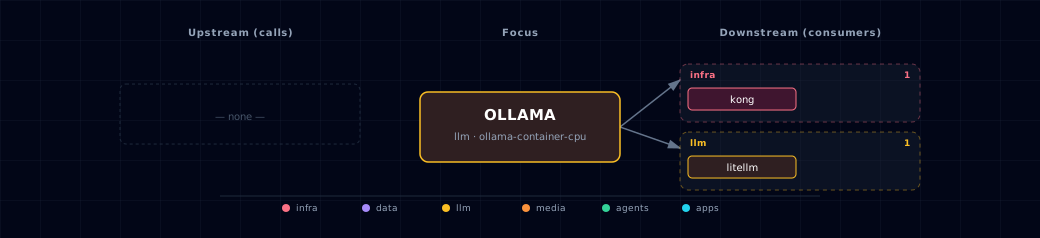
Open the full-size diagram for a full-screen view.
6.4. Future — Missing pair integrations¶
Note: backend, open-webui, n8n, jupyterhub, local-deep-researcher, hermes and weaviate all reach Ollama through LiteLLM. These pairs cover gaps where the LiteLLM proxy hides Ollama-native surface (model management, runtime introspection, private GGUF import).
- ollama ↔ backend — Why: backend has no view of Ollama runtime state.
/api/psexposes loaded models, VRAM footprint, TTL;/api/showexposes capabilities and Modelfile. An admin endpoint turns "is the model warm?" from a guess into a fact. Mechanism: backend readsOLLAMA_ENDPOINTand callsGET ${OLLAMA_ENDPOINT}/api/ps+/api/show; new/admin/llm/statusroute. Effort: small. Confidence: high. - ollama ↔ jupyterhub — Why: notebooks doing model research want raw
/api/pull,/api/create,/api/show, embeddings, and structured-outputformat— none of which round-trip cleanly through LiteLLM. Mechanism: injectOLLAMA_HOST=http://ollama:11434into singleuser env; pre-installollamaPython client. Effort: small. Confidence: high. - ollama ↔ minio — Why:
ollama-pullonly fetches from the public registry. Private GGUFs (licensed, fine-tuned, air-gapped) cannot enter the stack today; MinIO is provisioned for artifacts. Mechanism: newollama-importinit step readingOLLAMA_MINIO_BUCKETkeys, streaming each GGUF to/root/.ollama/blobs, thenPOST /api/createwith a generatedFROM ./blobModelfile. Effort: medium. Confidence: medium. - ollama ↔ n8n — Why: n8n workflows call LiteLLM but cannot drive
/api/pull. So "nightly, ensureqwen3:8bis pulled" or "on webhook, hot-swap a model" cannot be authored. Mechanism: ship an n8n credential pointing athttp://ollama:11434; n8n's HTTP Request node handles streamingpullprogress lines. Effort: small. Confidence: medium.
6.5. Future — Candidate new services¶
- OpenLIT (details) — Headline: OpenTelemetry-native observability for LLM + vector calls with first-class Ollama instrumentation. Wires into: backend, hermes, jupyterhub, weaviate, litellm.
6.6. Future — Unused features in this service¶
/api/ps+/api/showsurface — Why pursue: gives UI and ops scripts visibility into VRAM occupancy, model capabilities, load TTL. Effort: small.- Native structured-output
format(JSON schema) — Why pursue: richer than the OpenAIresponse_formatLiteLLM forwards; useful for hermes skills and backend agents that need strict schemas. Effort: medium. - Modelfile customization pipeline — Why pursue: stack-specific system prompts, templates, ADAPTERs (LoRA) cannot be authored today;
ollama-pullonly consumes public tags. Effort: medium. - Per-model
keep_aliveoverrides — Why pursue:OLLAMA_KEEP_ALIVEis global; a per-requestkeep_alivewould keep hot models resident without pinning all of them. Effort: small.
7. Troubleshooting¶
# Check Ollama container status
docker compose ps ollama

# Check Ollama logs
docker compose logs -f ollama

# Verify LiteLLM can reach Ollama (from inside the network). The LiteLLM image has
# no curl. For ollama-localhost, use the LITELLM_OLLAMA_UPSTREAM URL from .env.
docker exec ${PROJECT_NAME}-litellm python -c \
  "import urllib.request; print(urllib.request.urlopen('http://ollama:11434/api/tags', timeout=5).read().decode())"
For general startup and routing issues, see Troubleshooting. For LiteLLM-specific debugging (model registration, virtual keys, spend logs), see LiteLLM Gateway.
8. Capabilities & limitations¶
Support tier: experimental — Capability contract declared; no cited cold-start, workflow, or upgrade qualification run yet (evidence at v0.1.0).
| Capability | Status | Verification | Notes |
|---|---|---|---|
| Local Ollama source selection | supported | tested | Atlas resolves CPU and NVIDIA containers, an existing host daemon, or no Ollama upstream behind the same LiteLLM contract. |
| Declared model provisioning | partial | tested | Selected and custom models are pulled for container and localhost sources, but per-model failures are non-fatal and can leave a registered model unavailable until retried. |
| Parallelism and residency tuning | partial | tested | Atlas applies parallel slots, loaded-model limits, KV-cache quantization, flash attention, and keep-alive to containers; host daemons remain operator-owned with macOS-only advisory probes. |
| Authenticated raw Ollama administration | not-supported | documented | The raw ollama.localhost Kong alias is CORS-only and exposes native model-management APIs without Atlas authentication; restrict network access or use an authentication proxy. |
| Deploy-resource environment override | stubbed | documented | OLLAMA_DEPLOY_RESOURCES is projected by service configuration, but the Compose fragment does not consume it; CPU and GPU reservations come from typed source runtime data. |