5.2.28. Neo4j LLM Graph Builder
1. Overview
Neo4j LLM Graph Builder is a disabled-by-default Atlas apps service. It turns documents and web sources into a Neo4j knowledge graph and lets you chat over that graph. It complements LightRAG with an operator-facing document-to-graph UI over Atlas's Neo4j and LiteLLM.
Atlas builds the upstream Neo4j Labs React/FastAPI pair from a pinned git ref, because upstream documents source builds, not stable official images. The pin is LLM_GRAPH_BUILDER_REF=4a412f4688cf4096976045c019edc0a7f6ddcb6b.
2. Access
- Direct frontend URL:
http://localhost:${LLM_GRAPH_BUILDER_PORT}. The page loads, but its API calls go to the Kong origin below; use the Kong URL for a working UI. - Kong frontend URL:
http://graphbuilder.localhost:${KONG_HTTP_PORT} - Browser API path:
http://graphbuilder.localhost:${KONG_HTTP_PORT}/atlas-api. Kong strips/atlas-apiand forwards to the backend. The frontend is built with this same-origin URL, because the browser resends the Kong Basic credential only to the origin that challenged it. Upstream axios sends no credentials cross-origin. After an upgrade, rebuild the frontend image (docker compose build llm-graph-builder-frontend) to bake in the URL. - Kong backend API URL for scripts:
http://graphbuilder-api.localhost:${KONG_HTTP_PORT} - Internal frontend URL:
http://llm-graph-builder-frontend:8080 - Internal backend URL:
http://llm-graph-builder-backend:8000
Kong creates both Graph Builder routes only when LLM_GRAPH_BUILDER_SOURCE=container. Both routes use the same dashboard-user basic-auth, acl, and cors protections as other disabled-by-default browser tools.
3. Configuration
LLM_GRAPH_BUILDER_SOURCE=disabled|containercontrols whether the service runs. The default isdisabled.LLM_GRAPH_BUILDER_PORTis assigned by the apps-category port allocator.LLM_GRAPH_BUILDER_MODEL_ID=atlas_litellmis the model name shown in the Graph Builder UI. Keep it. The compose fragment exports onlyLLM_MODEL_CONFIG_ATLAS_LITELLM, and Graph Builder looks upLLM_MODEL_CONFIG_<ID>. Any other id fails every extraction and chat.LLM_GRAPH_BUILDER_LLM_MODELselects the LiteLLM model alias. Empty meansLITELLM_DEFAULT_MODEL. If that is also empty, Atlas usesgpt-4o-mini, LiteLLM's OpenAI route, which needs an OpenAI key. A local-only stack must set one of the two.LLM_GRAPH_BUILDER_NEO4J_DATABASE=neo4jcontrols the database name passed to the upstream backend. Use a dedicated database on Neo4j editions that support multiple databases.LLM_GRAPH_BUILDER_REACT_APP_SOURCES=local,wiki,websets the source types in the UI. S3 is not offered, because its endpoint configuration is not proven against MinIO.LLM_GRAPH_BUILDER_DIFFBOT_API_KEYoptionally enables upstream Diffbot-backed features; the default Atlas LiteLLM model path leaves it blank.LLM_GRAPH_BUILDER_GCP_LOG_METRICS_ENABLED=falseandLLM_GRAPH_BUILDER_GCS_FILE_CACHE=falsekeep Google Cloud integrations off by default. Either one needsLLM_GRAPH_BUILDER_GCP_PROJECT_IDand an absolute host path inLLM_GRAPH_BUILDER_GCP_CREDENTIALS_FILE. GCS caching also needsLLM_GRAPH_BUILDER_GCS_UPLOAD_BUCKETandLLM_GRAPH_BUILDER_GCS_FAILED_BUCKET.- Existing
DIFFBOT_API_KEYandGOOGLE_CLOUD_PROJECTvalues remain fallback inputs for compatibility. Prefer the namespaced variables in new configurations. LLM_GRAPH_BUILDER_REFpins the upstream source build.
4. Setup Wizard
Graph Builder appears in the gen-ai-rag and all tracks. It is in the apps category, because its main surface is a browser UI with its own API service. It is disabled by default.
Sources: container and disabled only. There is no localhost source: upstream runs the frontend and backend as separate development processes.
5. Architecture & Wiring
Graph Builder depends on in-stack Neo4j and LiteLLM. Atlas fails before compose if the service is enabled while NEO4J_GRAPH_DB_SOURCE is disabled or localhost. The compose dependency graph and the internal URI bolt://neo4j-graph-db:7687 need the in-stack container.
Upstream requires Neo4j 5.23 or later with APOC. Atlas pins Neo4j 5.26.x and loads APOC core (NEO4J_PLUGINS=["apoc"], from the jar the image ships in labs/). Graph Builder's extraction (apoc.merge.node), auto-connect, duplicate merging and neighbour views need it. APOC extended is not installed.
LiteLLM is exposed to Graph Builder as an OpenAI-compatible model named atlas_litellm. The upstream backend reads LLM_MODEL_CONFIG_ATLAS_LITELLM, which Atlas auto-manages as:
<selected LiteLLM model>,http://litellm:4000/v1,${LITELLM_MASTER_KEY}
Use a model that does structured extraction reliably. Tiny local models can start but produce poor or invalid graphs. Set LLM_GRAPH_BUILDER_LLM_MODEL to a capable LiteLLM alias.
MinIO and Docling are integration points, not dependencies. MinIO needs endpoint-compatible S3 wiring before S3 source ingestion works. Docling is a companion extractor, not a Graph Builder backend dependency.
Optional Google Cloud features use the pinned upstream contract. Atlas maps the namespaced settings to GCP_LOG_METRICS_ENABLED, GCS_FILE_CACHE, PROJECT_ID, BUCKET_UPLOAD_FILE and BUCKET_FAILED_FILE. The ADC JSON is mounted read-only at /run/secrets/atlas-llm-graph-builder-gcp.json. When both features are off, the credential setting must be blank, and a tracked empty placeholder occupies that path. Before Compose runs, validation rejects ambiguous booleans, credentials set while both features are off, and unreadable or incomplete ADC documents.
6. Sample Document-To-Graph Workflow
- Start Atlas with Neo4j, LiteLLM, and Graph Builder enabled, for example:
./start.sh --track gen-ai-rag --neo4j-graph-db-source container --llm-graph-builder-source container
- Open
http://graphbuilder.localhost:${KONG_HTTP_PORT}and sign in through Kong's dashboard credentials. - Confirm the Neo4j connection uses
NEO4J_URI,${GRAPH_DB_USER:-neo4j}, and${GRAPH_DB_PASSWORD}from Atlas. - Select
atlas_litellmas the LLM and upload a small PDF or text file. - Generate the graph, then inspect nodes and relationships in the app or in Neo4j Browser at
http://graph.localhost:${KONG_HTTP_PORT}. - Ask a chat question against the processed source and verify citations/provenance before using the graph downstream.
7. Namespace And Collision Guardrails
The upstream app writes labels such as Document, Chunk and __Entity__, plus labels extracted from source content. It has no namespace switch. To prevent collisions with other Neo4j workloads:
- Prefer a dedicated value for
LLM_GRAPH_BUILDER_NEO4J_DATABASEon Neo4j editions that support multiple databases. - If using the shared
neo4jdatabase, prefix custom schema labels or source names with an Atlas project namespace. - Avoid running destructive cleanup/enhancement operations against a database that contains unrelated graph data.
- Keep a small pilot document set until label conventions and downstream GraphRAG use are clear.
8. Rollback
Set LLM_GRAPH_BUILDER_SOURCE=disabled or rerun:
./start.sh --llm-graph-builder-source disabled
The frontend and backend containers scale to zero. Kong removes graphbuilder.localhost and graphbuilder-api.localhost, and generated endpoints are blanked. The rollback leaves graph data in the configured Neo4j database; delete it in Neo4j if you no longer need it.
9. Troubleshooting
- Kong route missing: confirm
LLM_GRAPH_BUILDER_SOURCE=container, rerun./start.sh, and ensure--setup-hostshas added the aliases. - API calls fail in the browser (401 or CORS): open the UI at
http://graphbuilder.localhost:${KONG_HTTP_PORT}. The frontend calls the same-origin/atlas-apipath. An older image that targetsgraphbuilder-api.localhostneeds a rebuild:docker compose build llm-graph-builder-frontend. - Model selector errors: confirm
LLM_GRAPH_BUILDER_LITELLM_MODEL_CONFIGis generated and that the selected LiteLLM model exists. - Neo4j connection fails: use in-stack
NEO4J_GRAPH_DB_SOURCE=container. - Poor graph quality: choose a stronger structured-extraction model via
LLM_GRAPH_BUILDER_LLM_MODEL.
10. Dependencies & Integrations
10.1. Current — Upstream (this service calls)
| Service | Category |
|---|---|
| neo4j | data |
| litellm | llm |
10.2. Current — Downstream (services that call this)
| Service | Category |
|---|---|
| kong | infra |
10.3. Architecture diagram
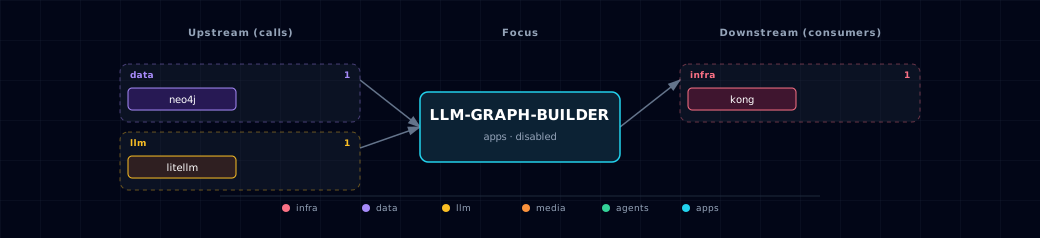
Open the full-size diagram for a full-screen view.
10.4. Future — Missing pair integrations
- Add endpoint-compatible MinIO S3 source configuration once upstream supports or Atlas patches boto endpoint overrides cleanly.
- Add a Docling handoff workflow for already-extracted text and metadata.
10.5. Future — Candidate new services
No high-confidence opportunities identified.
10.6. Future — Unused features in this service
- Upstream token usage tracking can be revisited after Atlas has a shared token telemetry store.
11. Capabilities & limitations
Support tier: experimental — Capability contract declared; no cited cold-start, workflow, or upgrade qualification run yet (evidence at v0.1.0).
| Capability | Status | Verification | Notes |
|---|---|---|---|
| Document-to-Neo4j graph workflow | partial | tested | Atlas builds the pinned upstream UI/backend and wires Neo4j (with APOC core) plus LiteLLM; APOC extended procedures are not installed. |
| LiteLLM extraction and graph chat | partial | tested | Atlas exposes one OpenAI-compatible model alias, while graph quality and structured extraction remain dependent on the operator-selected model. |
| Graph Builder access control | partial | tested | Kong protects both browser and backend aliases with Basic Auth and ACL. The host-published frontend skips app auth, and the internal backend sets authentication off. |
| Optional Google Cloud features | partial | tested | Atlas validates complete logging or GCS-cache configuration and mounts ADC read-only, but the disabled default uses a placeholder and no live cloud operation is certified. |
| Graph namespace and rollback isolation | partial | documented | Disabling containers preserves generated Neo4j data, while upstream labels share the selected database and Atlas cannot prevent collisions or destructive cleanup in a shared database. |
| Turn-key MinIO and Docling ingestion | not-supported | documented | MinIO endpoint-compatible S3 ingestion and a direct Docling handoff are integration points only. In the stock Atlas path, operators must use local, wiki, or web sources. |