2.2. Interactive Setup Wizard¶
The interactive Textual wizard configures every service step by step. It opens when you run ./start.sh with no arguments.
1. Quick Start¶
./start.sh
Sections 2–7 describe the questions: their order (§2), prompt kinds (§3), the LLM, ComfyUI and numeric steps (§4–§6) and the stack-level options (§7). Sections 8–11 cover the launch: the summary, the log screen, stop actions, every key (§10) and progress. Sections 12–18 are reference material.
1.1. Terminal size and compact layout¶
The wizard needs a terminal of at least 60 columns × 20 rows. Below 30 rows it uses a compact layout. The logo shrinks to a one-line strip, and the stack overview is hidden while a question is open. The prompt, its choices, the command summary and the move, mark, next and back actions get the rows. The overview returns on the Setup tab after launch.
Growing the terminal to 30 rows or more restores the full logo and overview. Typed text, selections, scroll position and focus are kept. The full shortcut list needs at least 132 columns as well. Narrower layouts keep the prompt's essential keys and name Ctrl+Q quit in the footer title.
Smaller terminals (59×20, 60×19 or less) use the linear stdout flow. To choose that flow at any size, run ./start.sh --no-tui.
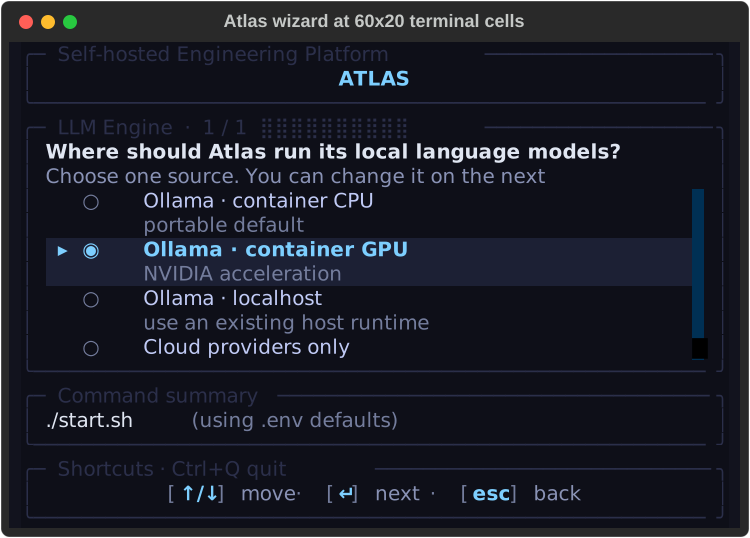
At 60×20 the selected row, prompt, command and next/back actions stay visible. Subtitles are capped at two rows. On a destructive step, Ctrl+R shows the full text (§7.1).
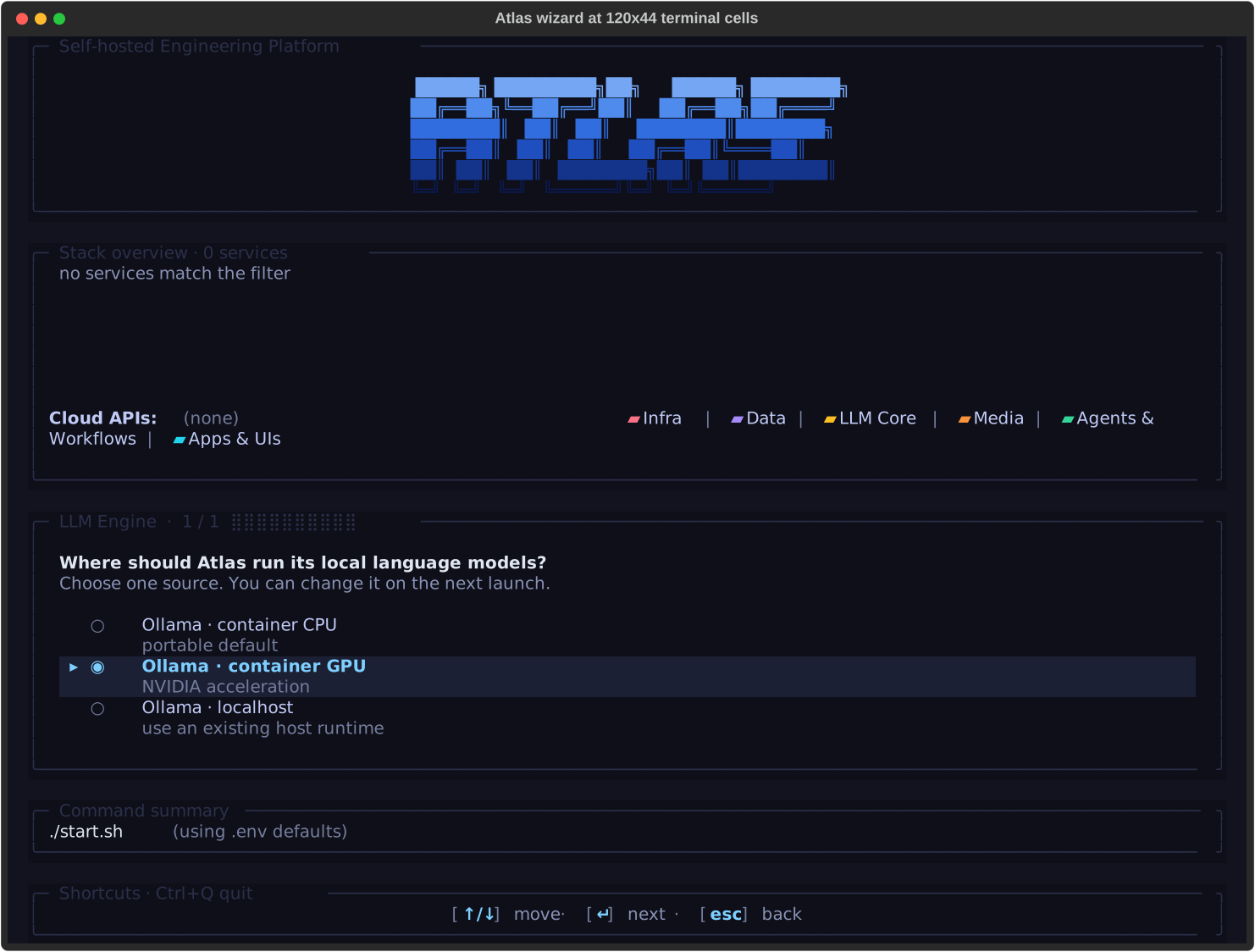
At 120×44 the full logo, stack overview and work area are shown.
The dark palette meets the WCAG 2.2 AA normal-text ratio of 4.5:1; the faintest text measures 4.54:1. Selection and status also use cursor glyphs, checkbox text, icons and words, not color alone. The wizard is keyboard-operable; screen-reader support is not tested.
The screenshots use the dark theme and Textual's headless renderer at the stated cell sizes. Fonts, emoji width and inline images vary between terminal emulators.
2. Step Order¶
Service-source steps follow the topology order in bootstrapper/services/topology.py, the same order as the stack overview. The LLM cluster comes right after the LLM Engine step. The shape is roughly:
first  Track (skipped when --track is passed)
       Profile: dev or production hardening (skipped when --profile is passed)
       Base port
       Project name (Docker Compose namespace / container family → PROJECT_NAME)
…      Service-source steps, in topology order
       (… Weaviate, …, LLM Engine, ollama-related, …, ComfyUI, …)
…      LLM cluster (spliced right after the LLM Engine step):
         Ollama  ·  models               (single unified multiselect)
         Ollama  ·  additional models    (free-text, container only)
         OpenAI key + models
         Anthropic key + models
         OpenRouter key + models
         LLM defaults  ·  chat model      (single-select)
         LLM defaults  ·  embedding model (single-select, dimension-sensitive)
         LLM defaults  ·  vision model    (single-select, skippable)
…      Remaining service-source steps, including:
         ComfyUI  ·  models               (multiselect, after the ComfyUI source step)
         FAL Cloud Media  ·  API key      (secret, after ComfyUI; in tracks that include FAL)
near-end  Cold start
near-end  Hosts setup · /etc/hosts
last   Confirm — Launch the stack with this configuration?
A step gated by a skip_if_prev predicate is left out when its precondition is not met. For example, a cloud provider's models step appears only when its CLOUD_*_SOURCE is enabled after the API-key step, which is always shown. Ollama steps appear only when LLM_PROVIDER_SOURCE is an ollama-* value.
3. Prompt Kinds¶
Each wizard step uses one of five prompt widgets, chosen by the question type:
| Kind | Used for | UX |
|---|---|---|
options |
Single-select from a small fixed set: every *_SOURCE, Cold start, Hosts setup · /etc/hosts, and the LLM defaults pickers (chat / embedding / vision, §4.6). |
Up/Down arrows + Enter; the current .env value is pre-highlighted. |
number |
Numeric prompts (Base port). |
Single-line input. Enter keeps the displayed default. A non-number or out-of-range value is refused, and the hint shows the reason (§7.2). Overview ports follow the confirmed base, also for sources you change later. |
secret |
API keys (OPENAI_API_KEY, ANTHROPIC_API_KEY, OPENROUTER_API_KEY). |
Masked input with a live character count. With a saved key, the hint says what Enter does. Type a new key to replace it, or a word from §4.4.1 (enable, disable, remove/clear). |
multiselect |
Cloud and Ollama model lists. | Scrollable [selected] / [ ] rows; Space toggles, Enter confirms. Cloud lists pre-check the default-active models your account returns. Ollama lists depend on the source, and your selection replaces the baseline (§4.2). |
text |
Free-text entries — the Project name step (Docker Compose namespace, persisted to PROJECT_NAME) and the Ollama "additional models to pull" step. |
Single-line input, trimmed. The project name is lower-cased and validated. Enter keeps the current name. An invalid name keeps you on the step and shows the reason. |
Throughout: Up/Down to move, Enter to confirm, Space to toggle multiselect rows, Esc returns to the previous step, Ctrl+C (or Ctrl+Q) quits.
4. LLM Cluster Steps in Detail¶
4.1. LLM Engine (single-select)¶
LLM_PROVIDER_SOURCE choice — ollama-container-cpu, ollama-container-gpu, ollama-localhost, or none (no Ollama upstream). LiteLLM always runs and has no prompt of its own. It is the default front door for Atlas-managed LLM consumers. The Generative AI · Engineering and All / Custom tracks ask about vLLM Metal in a later step. Other tracks force-disable it without a prompt.
The wizard refuses to launch when LLM Engine = none, vLLM Metal is disabled and every cloud provider is disabled. LiteLLM would then have nothing to route to. A managed vLLM-Metal-only stack is valid.
4.2. Ollama · models (multiselect)¶
A multiselect shown for every ollama-* source. The Ollama README §5 describes the list: its sources, row badges, size estimates, sort order, fallbacks and default baseline. In short:
ollama-container-*lists the livehttps://ollama.com/librarycatalog. Theollama-pullinit container pulls the checked models at start.ollama-localhostmerges the host's pulled models ([pulled], active at once) with the catalog ([library]). The bootstrapper pulls checked[library]models onto the host daemon at start.
Each row has two lines. Line 1 shows capability badges, status badges and the pull count. Line 2 shows size variants, the description and updated X ago.
Search. Press Tab or /, or click, to focus the search box, then type to filter by name. Tab, Enter or Esc returns to the list. The arrow keys still move through the list while you type. Other wizard keys are off while search has focus.
Filter. Press f or click a chip to filter by capability (ALL, embedding, thinking, vision, tools, audio). A row must match both the chip and the search. Filters only hide rows; hidden checked rows stay checked.
Variants. Press Space on a multi-variant row to expand it in place. Press Space on a leaf to toggle that tag, and on the parent again to collapse. Single-variant rows toggle directly. Expanding fetches real sizes, context window and per-tag capabilities in the background; a failed fetch keeps the estimates.
A model is saved either as its bare name (pulls :latest) or as tags (qwen3:8b,qwen3:14b), never both. The latest leaf selects the bare name. The parent checkbox is green when any leaf is checked.
Saved selection. The selection is saved as OLLAMA_USER_MODELS. .env.example seeds it with the default baseline, so a fresh clone opens with the baseline checked. If the key is missing, the wizard pre-checks the baseline. Later visits restore the saved value. Saved models that are not in the list (for example hf.co/...) appear as saved rows and stay checked.
Unchecking everything writes OLLAMA_USER_MODELS=. Nothing is pulled and no Ollama model is registered. The exception is ollama-localhost with OLLAMA_AUTO_IMPORT_LOCAL_MODELS=true (the default): models already pulled on the host are still registered.
4.3. Ollama · additional models to pull (text)¶
Shown only for ollama-container-* sources. Free-text comma-separated list, e.g. mistral:7b,phi4:latest. Used when an entry isn't surfaced by the library scrape but you still want it pulled at startup. Persists as OLLAMA_CUSTOM_MODELS.
4.4. Cloud key + model pairs (secret + multiselect)¶
Each cloud provider gets two consecutive steps. The API-key step is always shown; the models step only when the provider ends up enabled:
- API key (
secretkind). A masked input; there are no option rows. Turning a provider on or off and storing or deleting its key are separate actions (§4.4.1). The hint under the input always says what Enter will do. -
Models (
multiselect). Live fetch from the provider's models endpoint:- OpenAI —
GET /v1/models(filtered to the chat / o-series /text-embedding-3-*set). - Anthropic —
GET /v1/models(Anthropic's documented endpoint). - OpenRouter —
GET /api/v1/models. The listing needs no key. Routing requests through OpenRouter still needsOPENROUTER_API_KEY, so do not skip the key step.
The default-active subset of
bootstrapper/utils/llm_catalog.pyis intersected with what your account returns, and the result is pre-checked. Selections persist asOPENAI_USER_MODELS,ANTHROPIC_USER_MODELS,OPENROUTER_USER_MODELS. - OpenAI —
4.4.1. Turning a provider off is not the same as deleting its key¶
CLOUD_<PROVIDER>_SOURCE and <PROVIDER>_API_KEY are two separate facts, so the key step accepts one word per intent. With a key already saved:
| You type | What happens |
|---|---|
| Enter (nothing) | Nothing changes. A provider that is off stays off and keeps its key; one that is on stays on. |
enable |
Turns the provider on using the saved key. The key is not rewritten. |
disable |
Turns the provider off and keeps the key, so re-enabling later needs no re-paste. |
| a new key | Replaces the key and turns the provider on. |
remove |
Deletes the key and turns the provider off. The only action that erases a credential. |
clear is a synonym for remove. Matching ignores case and surrounding spaces.
Unchecking every model in the model step turns the provider off and keeps the key; the step heading says so.
With no saved key, type a key and press Enter to enable the provider, or press Enter on an empty input to leave it disabled.
The model step is skipped for a provider that will end up off.
Your key never appears in the command preview. Each action previews as --cloud-<provider>-source enabled or disabled. A new key previews as --<provider>-api-key <set>, because that line is meant to be copied into a shell.
The fal.ai key step (FAL Cloud Media, after ComfyUI) uses the same words for FAL_SOURCE and FAL_API_KEY. It has no model step. Its actions preview as --fal-source enabled or disabled, and a new key as --fal-api-key <set>. The overview's FAL Cloud Media row updates as soon as you answer.
4.4.2. Where the listed models came from¶
The caption above the list always names the source of the list. A listed model is therefore never mistaken for proof that your key works:
Live from the provider · key accepted · Space toggles, Enter confirms. The provider answered and these are its own models. Each row is badgedlive.Curated catalog · credentials unverified · <reason> · Esc re-enters the key and retries · Space toggles, Enter confirms. The provider did not answer usefully, so the list is the bundled catalog frombootstrapper/utils/llm_catalog.py. Each row is badgedcatalog. The reason is one of:- no API key was supplied
- the provider rejected the key
- the provider rate-limited the request
- the provider returned an error
- the request timed out
- the provider could not be reached
- the provider's reply could not be read
- the provider listed no usable models
A rejected key, a timed-out request and an empty listing get three different captions. To recover, press Esc to return to the key step, correct the key, and press Enter. That clears the cached result and fetches again (§4.5). The key is never written to the caption or to the launch log.
Models saved in *_USER_MODELS that neither source lists appear badged saved and stay checked. One failed lookup therefore cannot drop them from the saved list.
The failure reason also appears in the launch log (see Troubleshooting).
4.5. Splash + cache + back-invalidation¶
Live fetches run in the background, so the wizard stays responsive. A Fetching <provider> models… placeholder shows until the options arrive. The result is cached for the session, so moving forward and back does not fetch again. Going back with Esc clears the cache for that provider and every later step, so the next visit fetches again. Use this after you change an API key.
4.6. LLM defaults · chat / embedding / vision (single-select)¶
After the cloud key/model pairs, the wizard asks for the default model per role from everything you selected (Ollama and cloud). These are three consecutive options steps, each pre-highlighting the current .env value:
- Chat / content →
LITELLM_DEFAULT_MODEL. The backend and Open WebUI use it when no model is named. It is pre-selected to your saved default if still offered, else to the highest-priority content-capable model in your selection. -
Embedding →
LITELLM_EMBEDDING_MODELand its dimensionLANGMEM_EMBEDDING_DIM. For a curated model the wizard readsdim:fromservices/*/models.yaml. Backend and the Supabase memory migration use the same value. Every start re-derives the dimension if the catalog value changed (for example,qwen3-embedding:0.6bis 1024).Existing 768-dimension deployments keep working. A 1024-, 1536- or 3072-dimension model starts a lossless expand, re-embed and validate rollout at the next start. Backend checks the model's real output before it accepts traffic. A custom model needs an explicit
LANGMEM_EMBEDDING_DIMfrom 1 to 4,000 (pgvector's halfvec HNSW limit). The dimension step refusesclear, non-numbers and out-of-range values before launch. It refuses empty input when no dimension is saved; with a saved value, Enter keeps it. -
Vision →
LITELLM_VISION_MODEL. The first option is — none / skip — because vision routing is optional. The step is skipped when no vision-capable model is selected.
All three persist to .env. litellm-init reads them (through model_resolver) on the next docker compose up. The three steps are skipped when no LLM provider is active.
5. ComfyUI Model Picker¶
ComfyUI · models is a multiselect shown for every COMFYUI_SOURCE except disabled: container-cpu, container-gpu, localhost and managed-localhost-mps. Its catalog (bootstrapper/utils/comfyui_library.py) merges four inputs, so its size changes with the live search results:
- a live Hugging Face search (image, image-edit, video, audio and 3D models);
- anonymous civitai LoRAs;
- a curated allowlist;
- the optional
services/comfyui/custom-models.yamlfile.
Each row shows:
- a category chip:
[image],[image-edit],[video],[audio],[3d], or[Custom]forcustom-models.yamlentries; [family], category, size in GB, and[precision],[variant]and[license]when the catalog sets them;[pulled]when every file is already in the<project>-comfyui-modelsvolume. Docker Desktop keeps that volume inside its VM, where the host cannot read it. There, a missing[pulled]does not mean the model is absent;- warning badges (nothing is hidden):
node: <nodes>,requires GPU,requires N GB VRAM,requires N GB RAM, and license restrictions.
Custom nodes. For container sources, Atlas installs only allowlisted nodes from services/comfyui/custom-nodes.yaml, at pinned commits and from hash-verified locks. Unknown, unallowlisted or unconstrained nodes are not installed; this currently includes 3D-Pack. The ComfyUI README §6 gives the rules and the 3D-Pack reasons.
Search, chips and variants work as in the Ollama picker (§4.2). The chips are ALL image image-edit video audio 3d. Hugging Face repositories with a common family root share one parent row. For example, TRELLIS · 6 variants holds all microsoft--TRELLIS-* and gqk--TRELLIS-* repositories. Selections are saved as full repository names. Single-entry families, civitai IDs, allowlist entries and custom entries stay flat.
The first open waits while file sizes load from Hugging Face: one request per repository, 10 at a time, each with a 15 s timeout. A failed size lookup shows 0.00 GB and does not block the catalog.
At start, the result depends on the source:
container-cpu/container-gpu: the init containers download the selected models and install the required nodes.localhost:comfyui-initdoes not run. The bootstrapper still writes the manifest, so the backend/comfyui/db/modelsendpoint (used by Open WebUI and n8n) lists the active set. You put the files in your host ComfyUI'smodels/<target_dir>/.managed-localhost-mps: Atlas downloads the models intoCOMFYUI_MPS_MODELS_PATHand installs allowlisted nodes into the host ComfyUI (ComfyUI README §9).
The selection is saved as COMFYUI_USER_MODELS (comma-separated catalog names). --comfyui-models takes the same list, and --comfyui-custom-models-file PATH replaces the default custom-models.yaml path.
One entry can be a bundle, for example diffusion weights, a text encoder and a VAE. Selecting it downloads every file to its target directory. The bundle schema is documented with services/comfyui/models.yaml.
If both the Hugging Face and civitai requests fail with network errors, the wizard uses the bundled allowlist (bootstrapper/utils/comfyui_library.py::list_fallback()) and logs a warning. An empty but successful (200 OK) Hugging Face reply does not trigger the fallback.
6. Inline secondary numeric inputs¶
These service rows mount an inline numeric input alongside the source prompt
via the SecondaryNumberInput widget (see ui.textual.widgets.prompt_panel).
Selections persist as a sibling env var:
| Row | Env var | Default | Range | Visible when |
|---|---|---|---|---|
| Ray | RAY_WORKER_COUNT |
2 |
0..64 | ray-container-cpu, ray-container-gpu |
| Spark | SPARK_WORKER_COUNT |
2 |
1..8 | container |
| Prometheus | PROMETHEUS_RETENTION_DAYS |
7 |
1..365 | container |
| ComfyUI, Document Processor, Apache Tika, Hermes Agent, OpenClaw, LLM Engine, Neo4j, Weaviate, STT/TTS providers, LightRAG, TEI Reranker | that option's *_LOCALHOST_PORT (e.g. OLLAMA_LOCALHOST_PORT) |
the current .env value |
1024..65535 | the service's localhost-type option (localhost, ollama-localhost, docling-localhost, managed-localhost-mps, …) |
The input appears on the source step itself, so you pick the source and the number in one step. A value outside the listed range is refused, not clamped (§7.2).
Contributors declare a new inline input with a manifest secondary_number block; the service runbook documents the field.
7. Stack Options¶
The wizard also asks these stack-level questions. Track and profile come first, then base port and project name, before any service source. Cold start and hosts come last.
- Track. Every track asks about the LLM Engine, Prometheus, Grafana and the cloud-provider keys. Being asked is not the same as running: Prometheus and Grafana ship disabled, and a blank key leaves its provider off. The always-running core (Supabase, Kong, Redis, LiteLLM, Backend) is never asked. Picking a track dims the service rows it excludes.
- Profile. Both shipped profiles bind published ports to
127.0.0.1:.prodadds log rotation, turns Prometheus and Grafana on, and hides localhost sources. Underprod, the Prometheus and Grafana steps default tocontainer; choosingdisabledthere wins. A source that your consumer manifest or.env.usersets keeps its value as the default, as under--no-tui. The CLI-flag launch overview applies the same rule. Per-service resource limits come from.env, not from the profile. - Base port for all services. Enter keeps the displayed default: the
BASE_PORTin.env(63000 in.env.example), orautowhenBASE_PORTis unset orauto.autoselects a free port block at launch. Every later port display uses the confirmed value. - Project name prefixes every container, volume and the network, and is saved as
PROJECT_NAME. Enter keeps the current name. Give a submodule consumer its own name so that it does not collide with another Atlas stack. -
Cold start defaults to No. Press Ctrl+R to read every consequence first (§7.1). Yes removes this project's containers and Compose-managed volumes, with the database records, object files, workflow and chat history, models and caches stored there. It re-creates
.envand regenerates keys and passwords. Bind-mounted files and external volumes remain. Back up needed data and configuration first.Answers you kept with Enter are carried into the new
.env. These are each cloud API key with its state and model list, the fal.ai key and state, and the Ollama and ComfyUI model lists. Answerremoveto drop a key. -
Hosts file enables friendly URLs such as
chat.localhostandn8n.localhost(§18).
7.1. Reading a destructive warning in full¶
On a destructive step, the compact layout shows only two subtitle rows. At the 60×20 floor that cuts off part of the cold-start warning.
Press Ctrl+R on such a step for a full-screen, read-only review. It shows the complete warning and what each choice does, including the project and volume scope. Scroll with ↑ ↓ PgUp PgDn. Close it with Esc, Ctrl+R or q.
The review confirms nothing. Your selection does not change, and the safe choice stays selected. The footer shows ctrl+r review whenever the step offers it.
7.2. Invalid numbers are refused, not adjusted¶
A numeric entry is accepted as typed or refused. It is never clamped into range, and never replaced by the previous value.
On the base-port step, typing 70000 keeps you on the step and replaces the hint under the input with:
70000 — choose 1024–65000, or enter auto
Typing six gives 'six' is not a number — choose 1024–65000, or enter auto. The message names that step's own bounds, and mentions auto only where auto is valid. Editing the field restores the normal hint. Nothing is written to .env and no port is recomputed until the value is accepted.
Empty input keeps the displayed default. auto (any case) is a valid value on the base-port step only; on other steps it is refused.
The inline numeric inputs (§6) follow the same rule. A refused value there shows a Value out of range panel below the option list, and that row's env var stays unwritten.
8. Pre-Launch Summary¶
Before launching, a configuration summary inside the same anchored info-box shows:
- Every service with its selected source, alias (when hosts are configured), and direct port.
- Hosted endpoints (e.g.,
chat.localhost:63000) if hosts file entries are configured. - A separate Cloud APIs sub-section lists OpenAI / Anthropic / OpenRouter status. Each shows
enabled · key setwith a check mark,disabled, orenabled · key MISSINGwith a warning mark. Cloud providers don't run as containers, so they render below the services grid rather than alongside real services. - Color-coded source choices (container = green, localhost / cloud = cyan, off = slate).
You confirm to launch (the Launch the stack with this configuration? step is the wizard's final question), or cancel to exit without changes.
8.1. What "started" means, and what it does not¶
All services started means Compose converged: every planned container was created and reported up. It does not mean the stack was checked, because the post-start probes run after that line. Each probe reports one outcome:
| Outcome | Meaning |
|---|---|
verified |
The probe ran and found nothing wrong. |
failed |
The probe ran and found a problem — for example a published port that differs from .env. |
unverified |
The probe raised. The launch is not a clean success, and the reason is in the Logs tab. |
skipped |
The probe does not apply to this configuration. Labelled with its reason — a skip is not a pass. The ComfyUI host-models check, for instance, applies only to COMFYUI_SOURCE=localhost. |
The launch then ends with one result block that names each stage. --no-tui prints the same block for the same outcomes. Only its next action differs: it points at the output above instead of the Logs tab.
⚠️  Launch result: unverified — started, but not verified: ports · containers are up
  ✓ Configuration saved — .env and generated configuration written
  ✓ Compose converged — containers started; required init containers succeeded
  – Service health — skipped: not awaited; containers were started without waiting for healthchecks, and `docker compose ps` shows live health
  ? Application verification — ports unverified (RuntimeError: …) · comfyui-models skipped (applies only to COMFYUI_SOURCE=localhost; this run uses container-cpu)
  Next: check the Logs tab for the reason before relying on these services; `docker compose ps` shows what is running.
The result is verified only when every applicable probe passed. A probe that found a problem makes it degraded, and one that raised makes it unverified. Either also raises a warning toast, visible from the Setup tab. Only ./start.sh --detach (and --json) waits for service health, through the detached status summary. A stack that is not running or healthy there is failed.
The readiness gates set the exit code. They are the setup steps, docker compose up, the required one-shot init containers, n8n reactivation and, under --detach, the detached health summary. Post-start probes are advisory. They qualify the result but never fail a launch whose containers converged. Under --no-tui, a probe that raised is also reported as unverified.
9. Streaming Logs¶
After you confirm, the same screen switches from prompts to the launch phase:
- The brand panel stays pinned at the top while logs flow.
- Two tabs appear on its bottom border,
[▸ Setup ] [ Logs ]. Setup holds the stack overview, the step prompts and the command summary. Logs holds the filter chips and the log pane. Each tab gets the full height. - Switch with
1/2, cycle withShift+Tab, or click a tab. Logs stays dimmed and its keys do nothing until the launch phase begins. The bottom shortcut bar shows the keys for the current tab. - Unseen-error marker: an error logged while you are on Setup adds a red
!to the Logs label ([ Logs! ]). Unlike the failure toast, the marker stays until you open the tab. Warnings do not set it. - The Logs pane streams
docker composebuild, up, port-verify andlogs -foutput, line by line. - Container names (for example
atlas-supabase-db,atlas-ollama-pull) are color-coded frombootstrapper/ui/textual/palette.py::SOURCE_COLORS. Other names get a stable hue from a small md5-based palette. - The full output is also written to an owner-only
${TMPDIR:-/tmp}/atlas-launch-<timestamp>-<unique>.log(Python's temporary directory; under/var/folderson macOS). See Troubleshooting. - Once the stack is up,
Ctrl+Qdetaches and services keep running. The log pane then listsctrl+q,ctrl+sandctrl+xwith their effects (§9.2). During startup,Ctrl+Qonly reminds you thatCtrl+Ccancels. Ctrl+Cduring startup sends SIGINT and can leave a Compose step half-done. Containers already started keep running, configuration written so far is kept, and no data is deleted. After the screen closes, a notice says so. It also says if this start stopped a previous stack to free its ports.- During the wait for one-shot init containers (up to 900 s),
Ctrl+Creturns within seconds. It takes longer only ifdocker compose pshangs. The wizard's cold-start volume removal (down --volumes) also stops onCtrl+C; the notice then says volumes may already be removed. - Exit codes:
130only whenCtrl+Cinterrupts a running launch. After the launch ends,Ctrl+Ckeeps its result (0started,1failed) and prints no notice. - A failed init container's error line ends with its last 40 log lines.
- To follow logs later, set
COMPOSE_PROJECT_NAMEas shown at the top of Troubleshooting, then rundocker compose logs -f <service>.
9.1. Recovery without deleting data¶
A permission failure does not prove an ownership mismatch. Before you change permissions, identify the failing service, the container path, the effective UID/GID and the host mount mapping. Also check whether the mount is read-only. When that evidence is missing, the recovery hint says the diagnosis is incomplete. It never recommends a world-writable volumes tree.
For an authentication failure, check service availability and health first. Then compare the effective project and env configuration with the configuration that initialized the installation. If stored credentials differ, keep the volume. Recover the matching configuration, or follow the service's credential-recovery procedure after a verified backup.
A rejected password does not prove that a volume is stale, and deletion does not repair authentication. For connection and DNS failures, check the host, port and network; do not reset keys.
Keep the session log for diagnosis, and check it for secrets before you share it. Detach with Ctrl+Q, fix the diagnosed cause, and retry the original launch command with the same project and consumer options. These hints do not repair permissions, reset credentials or delete anything.
9.2. Separate stop and destructive cold stop¶
After launch, Ctrl+S stops the project and keeps its volumes. Ctrl+X is a separate, destructive cold stop. Its warning names the project. It removes Compose-managed named volumes and attached anonymous volumes, with the database records, object files, workflow and chat history, models and caches stored there. Bind mounts, external volumes, .env and managed host processes remain. Unlike cold start, cold stop does not regenerate configuration.
Both need the same key pressed twice within eight seconds. A different key arms its own confirmation, and an expired confirmation needs a new first press. The cold-stop warning stays in the session log. Back up needed data before you confirm. Detaching never deletes data.
While a stop runs, a second stop, a cold stop, Ctrl+Q and Ctrl+C are refused with a warning. Wait for the result. If the stop hangs (for example, the Docker daemon stalls), press Ctrl+Q or Ctrl+C again within 5 seconds to leave. The result is then unknown; check with ./stop.sh or docker compose ls.
The stop's Compose command is stopped after 600 seconds, and its output goes to the log pane. The stop acts on the project this screen started, even if .env changes meanwhile. If Docker cannot list the project's volumes afterwards, cold stop reports a problem, not success.
The four ways out are distinct:
| Action | Services | Configuration (.env) |
Persistent data |
|---|---|---|---|
Detach (Ctrl+Q; Ctrl+C while following logs under --no-tui) |
keep running | kept | not deleted |
Cancel startup (Ctrl+C while starting) |
containers already started keep running | what was written so far is kept | not deleted |
Stop (Ctrl+S twice, or ./stop.sh) |
containers stop | kept | not deleted (volumes kept) |
Cold stop (Ctrl+X twice, or ./stop.sh --cold) |
containers stop | kept | deleted (Compose-managed volumes) |
Of these four exit actions, only cold stop deletes data, and only after the second Ctrl+X or with the --cold flag. Cancelling never deletes anything. Declining the --no-tui pre-launch summary starts nothing and keeps the configuration written so far. Under --cold, the cold cleanup has already run by then (volumes removed, .env recreated), and the cancel message says so.
10. Navigation¶
| Key | Action |
|---|---|
Up/Down |
Navigate between options or rows |
j / k |
Move down / up (same as Down/Up; off while search has focus) |
Space |
Toggle a row in a multiselect |
Enter |
Confirm the current selection |
Esc |
Return to the previous step (and from the first visible step, exit, including when --track/--profile pre-answered the steps before it) |
Tab or / |
Focus the model search box (model pickers) |
f |
Cycle the capability filter chips (model pickers) |
1 / 2 |
Jump to the Setup / Logs tab (Logs only after launch begins) |
Shift+Tab |
Cycle to the previous tab |
a e w i |
After launch: show all log lines, errors, warnings or info |
s |
Logs tab: open the filter-by-source picker |
y / Y |
After launch: copy the visible log lines / the session log's first segment |
Ctrl+R |
Review the full warning on a destructive step (§7.1) |
Ctrl+O |
Review the whole command, every service's details and every answered decision (§10.1, §10.2) |
Ctrl+S / Ctrl+X (twice) |
After launch: stop / cold stop (§9.2) |
Ctrl+Q |
Quit the wizard |
10.1. Reviewing the command and service details by keyboard¶
The command summary shows at most four rows. The service table shows a row's source options, dependencies and URLs only in a mouse tooltip. Neither takes keyboard focus.
Press Ctrl+O for a full-screen, read-only view, available down to the 60×20 floor. It has three pages during setup and two after launch. Tab moves to the next page and Shift+Tab to the previous one:
- Command lists the generated
./start.shcommand, one flag per line, in copyable shell form. Scroll with↑↓PgUpPgDn. - Services lists every service. Moving with
↑↓shows that service's card, the same text as its tooltip. - Decisions (setup only) lists every answered step, in wizard order, with its current answer (§10.2).
Press y to copy the command through OSC 52; a terminal without OSC 52 leaves the clipboard unchanged. A flag named like a secret (password, secret, token or key) shows and copies as '<set>'. Esc, Ctrl+O or q closes the view with your step, cursor and selections unchanged. On Decisions the search box has focus, so q and y are typed there; use Esc or Ctrl+O to close. The command summary's border shows ctrl+o details.
10.2. Jumping to a previous decision¶
To change an earlier answer, you do not need to press Esc back through every step. Press Ctrl+O, then Tab to the Decisions page. Type words from a step title or service name, such as ollama models, to narrow the list. Move with ↑ ↓ PgUp PgDn, then press Enter to jump to that step.
The step opens with its current answer selected. When you confirm a new answer with Enter, the wizard:
- keeps every answer that does not depend on it;
- clears dependent answers and asks them again, in wizard order. This includes a choice the wizard no longer offers, such as a default chat model you just deselected. Provider model lists keep your saved picks;
- drops the answers of steps the change hides, such as model picks for an engine you turned off;
- returns to the step where you opened the view, with the same search, highlight and scroll position on Decisions.
Confirming the answer you already had changes nothing. The command summary updates with each answer, and matches what a straight run with the same answers produces. Besides the base-port, track, profile, source, cloud, Ollama, cold and hosts flags, it names --project, --comfyui-models, --ray-worker-count, --spark-workers and --prometheus-retention-days when you answer those steps. Deselecting every Ollama model shows --ollama-models "".
During an edit, Esc returns to the Decisions page. Esc on the step you jumped to, before you confirm, changes nothing. If your edit cleared an answer, you must answer that step first; Esc there says so and stays.
A second Esc leaves the edit and steps back as usual. Going forward then visits every step, so no answer is skipped. To change another step, open the view again; you still return to where you first opened it.
A jump leaves the current step without confirming it, so an unconfirmed selection there is lost. API keys and secret-named steps show as <set> (or keep current, clear, disable or enable), never their value.
11. Progress Tracking¶
The prompt panel's top border shows the step title, a counter and a progress bar, for example Weaviate · source · 4 / 12 ⣿⣿⣿⣀⣀⣀⣀⣀⣀⣀ · 9 skipped. The counter counts only the steps this run will ask: 4 / 12 means three are done and eight follow.
Steps hidden by the track or by an earlier answer are not in the total. They appear only as N skipped, which is cut first on a narrow terminal. The count is recomputed on every step, so it shrinks when an answer hides later steps. Going back or changing the track never puts the position past the total. An unanswered later step counts until an answer hides it.
12. When to Use the Wizard vs CLI Flags¶
| Scenario | Approach |
|---|---|
| First time setting up the stack | Wizard (./start.sh) |
| Exploring available service options | Wizard |
| Changing one or two services | CLI flags (./start.sh --llm-provider-source ollama-localhost) |
| CI/CD or scripted deployments | CLI flags or .env file |
| Repeating a previous configuration | CLI flags (copy from wizard's command preview) |
13. Relationship to .env and CLI Flags¶
The wizard uses your current .env values as defaults, with two exceptions. A source that the selected profile declares defaults to the profile's value. A .env value that the step does not offer falls back to the manifest's default. The wizard produces the same --*-source overrides as CLI flags. After you confirm, they are applied to .env and the stack launches.
- Wizard selections are persistent in
.envand carry over to future runs - Configuration flags skip the whole wizard and apply directly. These are:
- any
--*-source, model-list or API-key flag; --ray-worker-count,--spark-workers,--prometheus-retention-daysand--comfyui-custom-models-file;--base-port,--cold,--setup-hosts,--skip-hosts,--detachand--json.
- any
- Selection flags keep the wizard.
--trackand--profilepre-answer and hide their own steps; a consumer manifest'sprofile:hides the profile step too.--projectand--consumerchange no prompt.
14. Requirements¶
The TUI needs three Python libraries, all declared in bootstrapper/pyproject.toml:
- textual — the wizard prompts and the launch phase (pinned summary, log pane, filter chips), in one Textual app.
- rich — styled text inside Textual widgets, and the
--no-tuipre-launch summary table. - textual-image — the splash poster, drawn with the terminal's image protocol where supported.
Python ≥ 3.10 is required. The linear stdout flow runs instead when stdin is not a TTY, the terminal is smaller than 60×20, or you pass --no-tui. It prints a pre-launch summary table and streams docker compose output.
If you pass no configuration flag (§13) and no --track, the linear flow asks for a track on stdin. It then writes out-of-track services to .env as disabled. Without a terminal (cron, systemd, CI, ssh without -t), it takes gen-ai-rag without asking. Scripted runs should therefore pass --track all (no filtering) or --track <key>.
15. Brand Customization¶
The metadata on the pinned info-box's border (brand name, tagline, version, author, author email, license, repo URL) is overridable via BRAND_* environment variables. Defaults are Atlas's identity; forks can rebrand the wizard by editing the BRAND_* block in .env:
BRAND_NAME=Atlas
BRAND_TAGLINE=A self-hosted, source-configurable, multi-disciplinary engineering platform — gen-AI, ML, and data.
BRAND_VERSION=0.1.0
BRAND_AUTHOR=Kaveh Razavi
BRAND_AUTHOR_EMAIL=kaveh.razavi@gmail.com
BRAND_LICENSE=Apache License 2.0
BRAND_REPO_URL=https://github.com/thekaveh/atlas
BRAND_LOGO_FILE=
Empty values fall back to the canonical defaults (encoded in bootstrapper/wizard/model/state.py::AppState). See .env.example for the latest documented block.
15.1. Block-art logo (BRAND_LOGO_FILE)¶
The ASCII block-art logo in the brand panel and the --no-tui banner defaults to ATLAS (an ANSI-Shadow figlet). To replace it, point BRAND_LOGO_FILE at a text file; leave it empty to keep ATLAS. Generate art with any figlet tool, for example figlet -f "ANSI Shadow" "My Brand".
bootstrapper/utils/brand_logo.py documents the file layout: a wide lockup, plus an optional narrow version after a --- line for small terminals. Both the TUI and the banner read it.
The globe splash (
atlas_hero.py, generated from a source image bybootstrapper/scripts/generate_logo.py) is a separate asset.BRAND_LOGO_FILEdoes not change it.
16. Configurable Services¶
The wizard discovers every configurable service from its services/<name>/service.yml manifest. The table below is a representative subset. The wizard also prompts for other track services per bootstrapper/tracks.yml. Examples are MLflow, Label Studio, Verba, Langfuse, LLM Graph Builder, Jenkins, Celery, MCP Servers, Iceberg REST, Trino, Redpanda and Tika. For the complete set, run ./start.sh --list-tracks or see Source configuration.
| Service | Options |
|---|---|
| LiteLLM Gateway | locked / always-on (no choice; mandatory front door for every LLM consumer) |
| LLM Engine (Ollama upstream) | ollama-container-cpu, ollama-container-gpu, ollama-localhost, none |
| ComfyUI | container-cpu, container-gpu, localhost, managed-localhost-mps, disabled |
| Weaviate | container, localhost, disabled |
| Multi2Vec CLIP | container-cpu, container-gpu, disabled |
| Neo4j Graph DB | container, localhost, disabled |
| STT Provider | speaches-container-cpu, speaches-container-gpu, parakeet-container-gpu, parakeet-localhost, whisper-cpp-localhost, disabled |
| TTS Provider | speaches-container-cpu, speaches-container-gpu, chatterbox-container-gpu, chatterbox-localhost, disabled |
| Document Processor (Docling) | docling-container-gpu, docling-localhost, disabled |
| OpenClaw | container, localhost, disabled |
| Hermes Agent | container, localhost, disabled |
| n8n | container, disabled |
| SearxNG | container, disabled |
| Crawl4AI | container, disabled |
| JupyterHub | container, disabled |
| LightRAG | container, localhost, disabled |
| Ray | ray-container-cpu, ray-container-gpu, disabled (with inline RAY_WORKER_COUNT input on container variants) |
| Spark cluster | container, disabled (with inline SPARK_WORKER_COUNT input on container, default 2, range 1..8) |
| Zeppelin | container, disabled (requires Spark — ZEPPELIN_SOURCE=container with SPARK_SOURCE=disabled errors at bootstrap) |
| Airflow | container, disabled |
| TEI Reranker | container-cpu, container-gpu, localhost, disabled |
| Prometheus | container, disabled (with inline PROMETHEUS_RETENTION_DAYS input on container, default 7, range 1..365) |
| Grafana | container, disabled |
| Open WebUI | container, disabled |
| MinIO Console | container, disabled |
| Local Deep Researcher | container, disabled |
16.1. Cloud LLM providers (not auto-discovered)¶
OpenAI, Anthropic and OpenRouter are not regular services: they run no container (services/cloud-providers/service.yml is a virtual manifest). The wizard asks for each as a key and model pair, right after the LLM Engine step:
| API | Key var | Wizard step |
|---|---|---|
| OpenAI | OPENAI_API_KEY |
OpenAI Cloud · API key then OpenAI Cloud · models |
| Anthropic | ANTHROPIC_API_KEY |
Anthropic Cloud · API key then Anthropic Cloud · models |
| OpenRouter | OPENROUTER_API_KEY |
OpenRouter Cloud · API key then OpenRouter Cloud · models |
Source toggles are persisted as CLOUD_OPENAI_SOURCE / CLOUD_ANTHROPIC_SOURCE / CLOUD_OPENROUTER_SOURCE (enabled / disabled). They render in the Cloud APIs sub-section of the stack overview, separate from the services grid.
A new service appears in the wizard only after it completes the registration steps in the service runbook, including its CLI key in source_mapping.
17. Dependency Validation¶
Dependencies are checked at launch, not while you answer the prompts. If a service's required dependency is disabled, the service is reported and disabled too; an example is n8n with Weaviate disabled. If a service you picked does not start, check the launch log. The gen-ai-eng track includes n8n but not Weaviate, so n8n is disabled there unless you also pass --weaviate-source container.
Source validation enforces the "LiteLLM must have an upstream" rule and stops the launch before anything starts. The rule needs LLM Engine != none, at least one cloud provider enabled, or VLLM_METAL_SOURCE=managed-localhost.
18. Hosts File Setup¶
The hosts file configuration step enables friendly URLs routed through Kong API Gateway:
| Option | Behavior |
|---|---|
| Default | Checks /etc/hosts for required entries, warns if missing |
| Setup now | Adds missing entries to /etc/hosts. The wizard cannot show a sudo password prompt, so this works only when sudo needs no password. Otherwise the launch continues with a warning; then run ./start.sh --setup-hosts from a terminal. |
| Skip | No hosts check, use localhost:PORT URLs only |
None of the three options stops the launch: missing entries affect only the friendly *.localhost URLs.
When hosts are configured, the pre-launch summary table shows both the direct localhost:PORT URL and the friendly service.localhost:KONG_PORT URL for applicable services.