5.2.23. Kong API Gateway¶
Kong is Atlas's API gateway. It routes *.localhost requests to services, using a configuration that ./start.sh generates from the current SOURCE settings. It also applies authentication, CORS and timeouts per route.
1. Overview¶
Kong runs DB-less (KONG_DATABASE: "off") and loads one declarative file. It is the entry point for most browser and API traffic to the stack.
2. Dynamic Configuration¶
bootstrapper/utils/kong_config_generator.py builds the Kong configuration on every ./start.sh:
- Route generation: each enabled service gets its routes.
- Disabled services: a service with
*_SOURCE=disabledgets no route. - Health check (advisory): the generator probes localhost-sourced services and warns if they are down. It creates the route either way.
volumes/api/kong-dynamic.yml is a generated runtime file, not a checked-in file. It is in .gitignore and reflects the resolved SOURCE state at the last ./start.sh. A direct docker compose up from a clean checkout fails because the bind-mount source does not exist. Always start through ./start.sh, which writes the file before it runs compose.
Validate the generator contract without ./start.sh. The checker copies .env.example to a temporary directory, runs kong_config_generator against it, and checks the output. It does not read your local volumes/api/kong-dynamic.yml, which depends on your .env.
uv run --project bootstrapper python scripts/check-kong-routes.py
python3 scripts/check-kong-routes.py also works if PyYAML is installed in your system Python. Otherwise it prints FAIL import: PyYAML is required to parse Kong config and exits with status 2. The uv form uses the project's pinned dependencies.
3. Service Routing¶
3.1. Always-Available Routes (Supabase)¶
/on barelocalhost→ Atlas service directory and health dashboard/auth/v1/→ Supabase Auth service/rest/v1/→ Supabase API (PostgREST)/graphql/v1→ Supabase GraphQL/realtime/v1/→ Supabase Realtime/storage/v1/→ Supabase Storage (key-auth)./storage/v1/object/public/,/storage/v1/object/sign/and/storage/v1/object/upload/sign/carry CORS only. Browsers and outside services fetch public-bucket and signed URLs without anapikey; Storage enforces the bucket's public flag or the signed token./pg/→ Supabase Meta servicesupabase-studio.localhost→ Supabase Studio dashboard
Allowed Host names. The path routes answer only on these Hosts:
localhost,127.0.0.1,kong-api-gateway(the in-network name),<PROJECT_NAME>-kong-api-gateway(the container name) andhost.docker.internal.- Each bare hostname or IPv4 address in
KONG_SUPABASE_EXTRA_HOSTS. Use it for a tunnel hostname, the LAN address whenHOST_BIND_IPexposes Kong, or the host of a customAPI_EXTERNAL_URL/SITE_URL.
Any other Host gets 404, so a public hostname does not reach Supabase by accident. A Host header with a port still matches. Matching is case-sensitive, so list hosts in lowercase. IPv6 literals cannot be listed.
Consumers. The key-auth services also carry an acl that admits only the anon (SUPABASE_ANON_KEY) and admin (SUPABASE_SERVICE_KEY) groups, as upstream Supabase does. Another Kong key, such as BACKEND_KONG_API_KEY, gets 403 there.
3.2. Dynamic Routes (Based on SOURCE)¶
Kong publishes one <alias>.localhost host per enabled service. Ports and Routes §2 lists every host, its SOURCE condition and its auth gate. The generated §13.1 table lists every service Kong proxies; volumes/api/kong-dynamic.yml is the exact route set for your .env.
Example: curl http://lightrag.localhost:${KONG_HTTP_PORT}/health
Localhost sources. Each *-localhost source still gets a Kong route that proxies through host.docker.internal to the host.
- Kong's compose entry sets
extra_hosts: ["host.docker.internal:${HOST_GATEWAY_IP}"], so this works on Linux Docker. Docker Desktop resolves the name itself. - For a non-default host port, set
<SVC>_LOCALHOST_PORT. The in-container consumers (runtime_sc.<svc>.localhost.environment) and the Kong generator both read it and usehttp://host.docker.internal:${<SVC>_LOCALHOST_PORT}.
4. SOURCE-Based Configuration¶
4.1. ComfyUI Routes¶
# Generated based on COMFYUI_SOURCE (simplified)
if source == 'managed-localhost-mps':
    service['url'] = localhost_url('COMFYUI_MPS_LOCALHOST_PORT', '8188')
elif source == 'localhost':
    service['url'] = localhost_url('COMFYUI_LOCALHOST_PORT', '8000')
else:  # container-cpu / container-gpu
    service['url'] = 'http://comfyui:18188/'
# No route created if source == 'disabled'
4.2. Proxy timeouts¶
Kong 3.x has no global proxy-timeout setting, and its per-service default is 60 s. The generator therefore writes read_timeout and write_timeout on every service in kong-dynamic.yml:
| Service | Timeout |
|---|---|
| Default (including n8n, so long webhooks are not cut off) | 300 s |
docling-api |
DOCLING_INFERENCE_TIMEOUT_SECONDS + 30 s (930 s by default) |
asset-baker |
ASSET_BAKER_TIMEOUT_SECONDS + 30 s (630 s by default) |
Backend api.localhost |
3,630 s, or the Docling value + 30 s if larger. Backend requests wait on Docling or on a ComfyUI job of up to 3,600 s. |
| Backend plugin services | the plugin's own values; the Backend value for any field the plugin does not set |
litellm-gateway, ollama-api |
630 s, for slow non-streaming completions |
Kong retries only on connection errors (KONG_NGINX_PROXY_PROXY_NEXT_UPSTREAM=error). A request that times out on connect, send or read fails after one wait and is not re-sent.
4.3. Localhost Service Health Checks¶
check_localhost_service() opens a TCP connection to each localhost-sourced service with a 2-second timeout. If it fails, the generator prints a warning and still creates the route. The route returns errors until the host service starts.
5. Authentication¶
Kong applies one of three schemes per route:
- API key (
key-auth): Supabase API services and protected Backend routes. Backend routes explicitly setkey_names: [apikey]andkey_in_query: truefor browser WebSockets. - Basic (
basic-auth): protected dashboards. - Pass-through: services that handle their own auth.
On a Basic-auth route Kong reads the dashboard credential from Authorization or Proxy-Authorization. Some clients need Authorization for the service's own token: Crawl4AI's Bearer, Label Studio's Token, and Langfuse's public-API Basic pk:sk. They send the dashboard credential as Proxy-Authorization: Basic … alongside it. Trino's route strips the credential before forwarding (hide_credentials), because Trino rejects any password over plain HTTP.
Blocked paths. Two routes answer 403 at the gateway and never reach the upstream. Use the internal network for these paths:
s3.minio.localhost: the MinIO metrics paths (/minio/v2/metrics,/minio/metrics/v3,/minio/prometheus/metrics).prometheus.localhost:/-/quitand/-/reload.
5.1. Forwarded headers¶
Kong runs with KONG_PORT_MAPS=${KONG_HTTP_PORT}:8000,${KONG_HTTPS_PORT}:8443. X-Forwarded-Port therefore carries the published port, so upstreams that build absolute URLs from it (Trino redirects and nextUri) point back at Kong.
Kong sets X-Forwarded-Host itself, without a port, and overwrites any value a plugin adds. The n8n route therefore also adds an RFC 7239 Forwarded: host=n8n.localhost:<port>;proto=http header, which n8n's editor origin check reads first. That header names the HTTP port, so n8n's editor live connection works through Kong over HTTP only.
A client inside the Docker network that calls kong-api-gateway:8000 directly also sees the published port in X-Forwarded-Port. Supabase Storage builds S3 signatures and resumable-upload (TUS) URLs from it. S3 or TUS calls through Kong from another container therefore need STORAGE_PUBLIC_URL. Atlas's own containers use only the Storage REST API.
6. CORS Handling¶
Every service gets a CORS plugin. A bare {'name': 'cors'} answers Access-Control-Allow-Origin: *, which would let any website the operator visits read responses from the no-login services. The generator (_with_local_cors) scopes each plugin:
- Allowed origins: any
*.localhost,localhostor127.0.0.1page on any port, plus the exact origins inKONG_CORS_EXTRA_ORIGINS(for a LAN or tunnel front-end). Other origins get noAccess-Control-Allow-Origin. KONG_CORS_EXTRA_ORIGINSformat: entries are normalised to the browser's form: lowercase, no trailing slash, no default port. A wildcard or path is ignored with a warning.- Not an authentication boundary: simple cross-site requests, such as plain POSTs, still reach the upstream.
- Kong never adds
Access-Control-Allow-Credentials, but an upstream's own header passes through for allowed origins. [::1]origins cannot match, because Kong drops the brackets. Uselocalhostor127.0.0.1.- Upstream CORS settings, such as
BACKEND_CORS_ORIGINS, apply only inside what Kong allows.
7. Rate Limiting¶
Some services include rate limiting for protection:
# SearxNG example
{
    'name': 'rate-limiting',
    'config': {
        'minute': 60,
        'hour': 1000,
        'policy': 'local'
    }
}
8. WebSocket Support¶
Kong supports WebSocket connections for real-time services:
{
    'name': 'realtime-v1-ws',
    'url': 'http://supabase-realtime:4000/socket',
    'protocol': 'ws',
    # ...
}
9. Configuration Generation Process¶
- Startup:
./start.shrunsgenerate_kong_configurationafter service configuration and dependency checks, and before LiteLLM configuration. - Environment parsing: the generator reads SOURCE values from the parsed
.env. - Health checks: the generator probes localhost-sourced services and warns if they are down (§4.3).
- Route generation: only enabled services get routes.
- File writing: the configuration is written to
volumes/api/kong-dynamic.yml. - Kong startup: Kong loads the generated file from
/home/kong/kong.yml.
Kong loads only the plugins named in KONG_PLUGINS (services/kong/compose.yml). DB-less Kong rejects the whole declarative file if it names any other plugin, which takes down every route. A generator change that emits a new plugin must add it to KONG_PLUGINS. tests/test_kong_route_and_auth_invariants.py checks every emitted plugin against the list.
10. Debugging Kong Configuration¶
10.1. View Generated Configuration¶
# Check what configuration was generated
cat volumes/api/kong-dynamic.yml

# View Kong logs
docker logs ${PROJECT_NAME}-kong-api-gateway -f

# Test Kong routing end-to-end (proxies SearXNG's /healthz through Kong;
# the bare-localhost root serves the generated Atlas dashboard)
curl -H 'Host: search.localhost' http://localhost:${KONG_HTTP_PORT}/healthz
10.2. Verify Routes¶
# Validate the generated declarative config inside the running gateway
docker exec ${PROJECT_NAME}-kong-api-gateway kong config parse /home/kong/kong.yml
# List hosts and paths Kong will route
grep -nE '^\s+(hosts|paths):' -A2 volumes/api/kong-dynamic.yml

# Test specific routes
curl -H "Host: comfyui.localhost" http://localhost:${KONG_HTTP_PORT}/
curl -H "Host: n8n.localhost" http://localhost:${KONG_HTTP_PORT}/
curl -H "Host: jupyter.localhost" http://localhost:${KONG_HTTP_PORT}/
curl -H "Host: openclaw.localhost" http://localhost:${KONG_HTTP_PORT}/
curl -H "Host: hermes.localhost" http://localhost:${KONG_HTTP_PORT}/
curl -H "Host: api.localhost" http://localhost:${KONG_HTTP_PORT}/health
# If BACKEND_KONG_AUTH=key-auth:
curl -H "Host: api.localhost" -H "apikey: ${BACKEND_KONG_API_KEY}" http://localhost:${KONG_HTTP_PORT}/health
curl -H "Host: litellm.localhost" http://localhost:${KONG_HTTP_PORT}/ui/
curl -H "Host: minio.localhost" http://localhost:${KONG_HTTP_PORT}/
curl -H "Host: spark.localhost" http://localhost:${KONG_HTTP_PORT}/
curl -H "Host: spark-history.localhost" http://localhost:${KONG_HTTP_PORT}/
curl -u "${DASHBOARD_USERNAME}:${DASHBOARD_PASSWORD}" -H "Host: trino.localhost" http://localhost:${KONG_HTTP_PORT}/
curl -u "${DASHBOARD_USERNAME}:${DASHBOARD_PASSWORD}" -H "Host: redpanda.localhost" http://localhost:${KONG_HTTP_PORT}/
curl -H "Host: airflow.localhost" http://localhost:${KONG_HTTP_PORT}/
# Airflow REST API (same alias). 3.x is JWT-only — exchange password
# for a token via /auth/token, then call /api/v2/ with Bearer auth:
TOKEN=$(curl -fsS -X POST -H "Host: airflow.localhost" \
  -H 'Content-Type: application/json' \
  -d "{\"username\":\"admin\",\"password\":\"${AIRFLOW_ADMIN_PASSWORD}\"}" \
  http://localhost:${KONG_HTTP_PORT}/auth/token | jq -r .access_token)
curl -H "Host: airflow.localhost" -H "Authorization: Bearer $TOKEN" \
  http://localhost:${KONG_HTTP_PORT}/api/v2/dags
11. Advanced Configuration¶
For advanced Kong configuration needs, modify the KongConfigGenerator class in bootstrapper/utils/kong_config_generator.py.
Key methods:
- generate_kong_config() - Main configuration generator
- check_localhost_service() - Health check implementation
- generate_*_service() - Service-specific route generators
12. Integration with Other Services¶
§13 lists the services Kong proxies and the services that call Kong.
13. Dependencies & Integrations¶
13.1. Current — Upstream (this service calls)¶
| Service | Category | Status |
|---|---|---|
| grafana | infra | current |
| langfuse | infra | current |
| prometheus ↔ | infra | current |
| ray | infra | optional: RAY_SOURCE=ray-container-cpu or ray-container-gpu |
| minio | data | current |
| neo4j | data | current |
| redpanda | data | current |
| spark | data | current |
| supabase | data | current |
| trino | data | current |
| weaviate | data | current |
| litellm | llm | current |
| ollama | llm | current |
| tei-reranker | llm | current |
| asset-baker | media | current |
| asset-worker | media | current |
| comfyui | media | current |
| crawl4ai | media | current |
| doc-processor | media | current |
| searxng | media | current |
| stt-provider | media | current |
| tika | media | current |
| tts-provider | media | current |
| airflow | agents | current |
| celery | agents | current |
| hermes | agents | current |
| lightrag | agents | current |
| mcp-servers | agents | current |
| n8n | agents | current |
| openclaw | agents | current |
| trueforge | agents | optional: TRUEFORGE_SOURCE=container |
| backend ↔ | apps | current |
| jenkins | apps | current |
| jupyterhub | apps | current |
| label-studio | apps | current |
| llm-graph-builder | apps | current |
| local-deep-researcher | apps | current |
| mlflow | apps | current |
| open-webui | apps | current |
| verba | apps | current |
13.2. Current — Downstream (services that call this)¶
| Service | Category | Status |
|---|---|---|
| cloudflared | infra | optional: public hostnames configured in the Cloudflare dashboard |
| prometheus ↔ | infra | current |
| backend ↔ | apps | current |
13.3. Architecture diagram¶
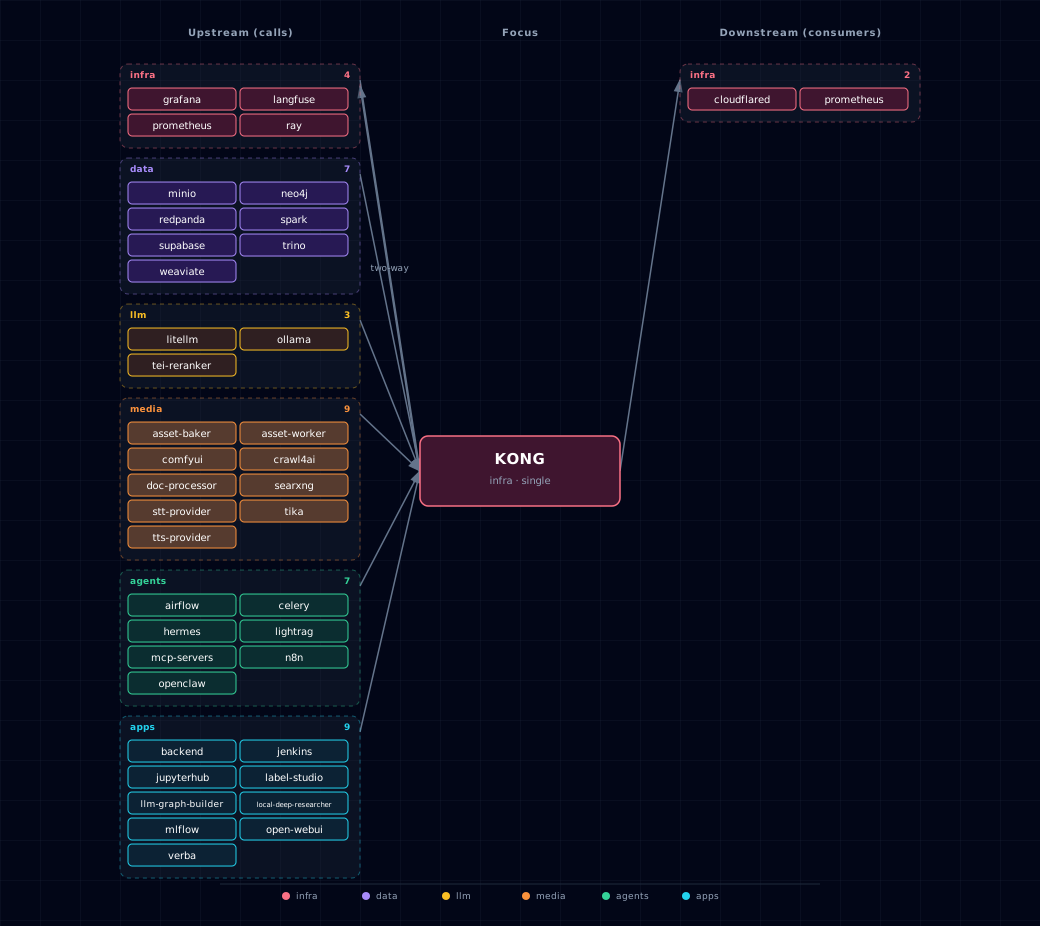
Open the full-size diagram for a full-screen view.
13.4. Future — Missing pair integrations¶
- kong ↔ multi2vec-clip — Why: with CLIP's raw
/vectorsendpoint behind Kong, backend, n8n and jupyterhub could compute embeddings without a Weaviate query. This enables re-ranking and offline batch jobs. Mechanism: aliasclip.localhost→http://multi2vec-clip:8080/vectors, gated byMULTI2VEC_CLIP_SOURCE != disabled, CORS plugin only. Effort: small. Confidence: low.
13.5. Future — Candidate new services¶
- Keycloak — Headline: self-hosted OIDC/OAuth2 provider. It would replace per-service basic-auth with one SSO layer behind Kong. Wires into: kong, jupyterhub, open-webui, n8n, minio, neo4j, openclaw, backend.
13.6. Future — Unused features in this service¶
- Per-consumer metrics — Why pursue: the global
prometheusplugin runs withper_consumer: false, so metrics cannot be split by API consumer. Effort: small. opentelemetryplugin — Why pursue: emit OTLP spans for every gateway hop so requests through Kong → LiteLLM → Ollama can be stitched into a single trace. Effort: small.jwtplugin (replacing per-route basic-auth) — Why pursue: validate JWTs against the Supabase GoTrue keys in.env. This would secure jupyter, n8n, openclaw and hermes without a new identity service. Effort: medium.request-size-limitingplugin — Why pursue: ComfyUI and Docling routes accept arbitrarily large multipart uploads; a 100 MB cap at the gateway prevents accidental host OOM. Effort: small.correlation-idplugin — Why pursue: injectX-Request-IDon ingress so backend/litellm/hermes logs become joinable across the request path. Effort: small.ai-proxyplugin — Why pursue: Kong's AI Gateway normalizes OpenAI/Anthropic/Ollama request shapes at the edge, worth evaluating as a comparison (not replacement) for LiteLLM's role. Effort: large.ai-prompt-guardplugin — Why pursue: regex allow/deny on prompt content at the gateway gives a defense-in-depth layer before LiteLLM. Effort: medium.- Health-check active probing — Why pursue: swap the one-shot TCP probe at startup for Kong's
healthchecks.activeblock so localhost services auto-recover when they bounce. Effort: small. - Admin API on a private host port — Why pursue: Kong's admin API binds to container loopback (
127.0.0.1:8001). The image has nocurlto query it. Publishing read-only/statuson an internal host port would serve external health dashboards. Effort: small.
14. Troubleshooting¶
14.1. Common Issues¶
Route not found (404) - Check if service SOURCE is enabled - Verify service is running and healthy - Check hosts file configuration
Connection refused - For localhost routes, ensure service is running on specified port - Check firewall settings for localhost services - Verify Docker network connectivity
Authentication errors - Check if service requires API key authentication - Verify Supabase keys are properly generated - Ensure proper headers are sent
14.2. Debug Commands¶
# Check Kong gateway status
docker compose ps | grep kong

# View detailed Kong configuration
docker exec ${PROJECT_NAME}-kong-api-gateway cat /home/kong/kong.yml

# Check that the gateway is up (the image has no curl or wget)
docker exec ${PROJECT_NAME}-kong-api-gateway kong health
15. Capabilities & limitations¶
Support tier: experimental — Capability contract declared; no cited cold-start, workflow, or upgrade qualification run yet (evidence at v0.1.0).
| Capability | Status | Verification | Notes |
|---|---|---|---|
| SOURCE-aware dynamic gateway routing | supported | tested | The bootstrapper generates DB-less Kong routes for enabled container and localhost sources, including service-specific upstream paths and health contracts. |
| Route authentication and traffic policy | partial | tested | Atlas applies Basic, key-auth, pass-through, rate-limit, and CORS policies per route, but it does not enforce one uniform identity policy across every upstream. |
| Direct Compose startup from a clean checkout | not-supported | documented | Kong requires the declarative configuration generated by the Atlas startup pipeline, so operators must use ./start.sh before Compose can launch the gateway. |