5.2.39. OpenClaw AI Agent Service¶
Open-source AI agent for messaging platforms with web-based administration dashboard.
1. Overview¶
The OpenClaw service provides an LLM-backed agent that connects to messaging apps:
- Messaging channels: WhatsApp, Telegram, Discord, Slack, Signal and others (upstream
docs/channels/index.mdin the image). iMessage needs a signed-in Mac running theimsgbridge. - Workspace files: Read, create, and manage files in a dedicated workspace
- Skills: Bundled skills include
githubandgog(Google Calendar, Gmail, Drive). They need theghandgogbinaries, which the pinned image (2026.6.10) does not contain. - Web Dashboard: Browser-based admin panel for configuration and approvals
- Multi-Provider LLM: Models come through LiteLLM (§2). Direct Anthropic and OpenAI keys are optional overrides (§4.3).
2. Architecture¶
OpenClaw runs as a single gateway process that:
- Serves the web dashboard on the configured gateway port. The container-mode stack default is 63076; localhost mode uses
OPENCLAW_LOCALHOST_PORTand defaults to 63065 unless you point it at OpenClaw's native/default 18789. - Manages messaging platform connections (bridge) on the configured bridge port. The container-mode stack default is 63077.
- Stores configuration in
~/.openclaw/directory - Stores workspace files in
~/.openclaw/workspace/
OpenClaw reaches models through LiteLLM. The container gets LITELLM_API_KEY (the LiteLLM master key), which OpenClaw's bundled litellm provider reads. Its default base URL http://localhost:4000 does not resolve in the container. openclaw-init therefore sets models.providers.litellm.baseUrl to http://litellm:4000 when it is unset. It keeps an operator value and does not patch a JSON5 config (see below). OpenClaw does not read LITELLM_BASE_URL.
Select models from the litellm provider. Its built-in default litellm/claude-opus-4-6 works only if LiteLLM serves a model with that name. You can also point the openai provider at LiteLLM (§7). Keep OPENCLAW_OPENAI_API_KEY empty then, or a real OpenAI key goes to LiteLLM. OPENCLAW_OPENAI_API_KEY and OPENCLAW_ANTHROPIC_API_KEY bypass LiteLLM (§4.3).
Container Mode Initialization: When running in container mode, an openclaw-init container runs first to:
- Set correct volume permissions (uid 1000/node) on config and workspace volumes
- Pre-configure the gateway for non-loopback binding (gateway.controlUi.dangerouslyAllowHostHeaderOriginFallback)
OpenClaw accepts JSON5 (comments, trailing commas), but jq does not. openclaw-init leaves a config that jq cannot parse unpatched and logs a warning. Set models.providers.litellm.baseUrl and gateway.controlUi.dangerouslyAllowHostHeaderOriginFallback in that file yourself.
The gateway container starts with --bind lan to listen on all interfaces (required for Docker networking).
3. Quick Start¶
3.1. Container Mode (Docker)¶
Step 1: Configure source
Edit .env:
OPENCLAW_SOURCE=container
Step 2: Start the stack
./start.sh
Or use CLI override:
./start.sh --openclaw-source container
Step 3: Access the dashboard
Open http://localhost:${OPENCLAW_GATEWAY_PORT} (default 63076) or http://openclaw.localhost:${KONG_HTTP_PORT} (via Kong; default port 63000).
Step 4: Run onboarding (from the repository root)
PROJECT_NAME=$(grep '^PROJECT_NAME=' .env | cut -d= -f2-)
docker exec -it ${PROJECT_NAME}-openclaw-gateway openclaw onboard
Note:
- OpenClaw is disabled by default - you must explicitly enable it
- First run requires onboarding to configure messaging channels; the bundled litellm provider is pre-pointed at the gateway by openclaw-init
3.2. Localhost Mode (Native)¶
Step 1: Install OpenClaw
# Requires Node.js 22+
npm install -g openclaw
Step 2: Run onboarding
openclaw onboard --install-daemon
Step 3: Start the gateway
openclaw gateway --port 63065
Step 4: Start the stack with OpenClaw localhost
./start.sh --openclaw-source localhost
Or edit .env:
OPENCLAW_SOURCE=localhost
# Optional: if your local OpenClaw runs on its native/default 18789 instead:
# OPENCLAW_LOCALHOST_PORT=18789
# (URL is derived as http://host.docker.internal:18789 at compose-render time.)
3.3. Disable OpenClaw¶
OPENCLAW_SOURCE=disabled
4. Configuration¶
4.1. Environment Variables¶
| Variable | Description | Default |
|---|---|---|
OPENCLAW_SOURCE |
Service source (container, localhost, disabled) | disabled |
OPENCLAW_IMAGE |
Docker image | ghcr.io/openclaw/openclaw:2026.6.10 |
OPENCLAW_GATEWAY_PORT |
Gateway HTTP port | 63076 |
OPENCLAW_BRIDGE_PORT |
Bridge port | 63077 |
OPENCLAW_GATEWAY_TOKEN |
Bearer token for the gateway API and dashboard; generated into .env at startup when empty and kept afterwards |
generated |
OPENCLAW_SCALE |
Container replicas (set by bootstrapper) | 0 |
4.2. LLM Configuration¶
By default OpenClaw is wired into the stack's LiteLLM gateway via:
| Variable | Description | Default |
|---|---|---|
LITELLM_BASE_URL |
OpenAI-compatible URL of the LiteLLM proxy | http://litellm:4000 (in-network) |
LITELLM_API_KEY |
Bearer key for LiteLLM (equals LITELLM_MASTER_KEY) |
auto-generated |
4.3. Optional Direct-Provider Overrides¶
These keys let OpenClaw call a provider directly, without LiteLLM. Use them for a separate budget or key, or for a model that LiteLLM does not serve.
| Variable | Description | Default |
|---|---|---|
OPENCLAW_ANTHROPIC_API_KEY |
Anthropic API key for OpenClaw | Empty by default; set only to bypass LiteLLM with a dedicated OpenClaw key |
OPENCLAW_OPENAI_API_KEY |
OpenAI API key for OpenClaw | Empty by default; set only to bypass LiteLLM with a dedicated OpenClaw key |
4.4. Localhost-Specific¶
| Variable | Description | Default |
|---|---|---|
OPENCLAW_LOCALHOST_PORT |
Host port of a native OpenClaw (its own slot, separate from OPENCLAW_GATEWAY_PORT). Set it to 18789 if your local OpenClaw uses its native default port. Compose derives the URL http://host.docker.internal:${OPENCLAW_LOCALHOST_PORT}. |
63065 |
5. LLM Routing and Model Selection¶
OpenClaw gets LLM access from the always-on LiteLLM gateway (variables in §4.2–§4.3):
- Default path (LiteLLM): the bundled
litellmprovider (key fromLITELLM_API_KEY, base URL set byopenclaw-init) or a repurposedopenaiprovider (§7) calls the gateway. LiteLLM routes to every Ollama, OpenAI, Anthropic or OpenRouter upstream that the stack enables. Use the model IDs that LiteLLM serves (for exampleollama/qwen3.8:latest,gpt-4o,claude-sonnet-4-6). - Anthropic override: set
OPENCLAW_ANTHROPIC_API_KEYin.envto call Anthropic directly. When it is unset, OpenClaw reaches Anthropic only through LiteLLM. - OpenAI override: set
OPENCLAW_OPENAI_API_KEYin.envto call OpenAI directly. When it is unset, OpenClaw does not inherit the stack-wideOPENAI_API_KEY.
Provider selection. OpenClaw uses the provider named in the selected model id (litellm/<model>, anthropic/<model>, openai/<model>). An override key takes effect only when you select a model from that provider. To keep every request on LiteLLM (budget tracking, spend logs), select litellm/ models and leave both OPENCLAW_*_API_KEY overrides empty.
6. Web Dashboard¶
The OpenClaw gateway includes a built-in web dashboard for administration:
- Direct access:
http://localhost:${OPENCLAW_GATEWAY_PORT}(default 63076) - Via Kong:
http://openclaw.localhost:${KONG_HTTP_PORT}(default port 63000)
The dashboard provides: - Chat interface for interacting with the agent - Configuration management - Execution approvals - Channel status monitoring
Security: The dashboard is an admin surface and requires OPENCLAW_GATEWAY_TOKEN (read it with grep '^OPENCLAW_GATEWAY_TOKEN=' .env). Atlas generates the token at startup when it is empty, because the gateway refuses to bind to the LAN without a token.
7. Interactive CLI Usage¶
Run OpenClaw CLI commands inside the container. Run from the repository root; the first line reads the values the later commands use from .env:
env_get() { grep "^$1=" .env | cut -d= -f2-; }; PROJECT_NAME=$(env_get PROJECT_NAME)

# Run onboarding
docker exec -it ${PROJECT_NAME}-openclaw-gateway openclaw onboard

# Point OpenClaw's OpenAI provider at LiteLLM (base URL and gateway key)
docker exec -it ${PROJECT_NAME}-openclaw-gateway openclaw config set models.providers.openai.baseUrl "http://litellm:4000/v1"
docker exec -it ${PROJECT_NAME}-openclaw-gateway sh -c 'openclaw config set models.providers.openai.apiKey "$LITELLM_API_KEY"'

# Check health
docker exec -it ${PROJECT_NAME}-openclaw-gateway openclaw doctor

# View gateway status
docker exec -it ${PROJECT_NAME}-openclaw-gateway openclaw gateway probe

# Read the gateway token
env_get OPENCLAW_GATEWAY_TOKEN
8. Health Check¶
Use the env_get helper and PROJECT_NAME from §7.
# Direct health check
curl http://localhost:$(env_get OPENCLAW_GATEWAY_PORT)/healthz

# Deep health check (the container's environment supplies the token)
docker exec ${PROJECT_NAME}-openclaw-gateway sh -c 'node openclaw.mjs health --token "$OPENCLAW_GATEWAY_TOKEN"'
9. Source Modes¶
9.1. container¶
Runs OpenClaw gateway in a Docker container.
Best for: Standard deployment, messaging app integrations
Resources: Atlas sets no memory limit and has not measured the gateway's memory use. Upstream's 2 GB guidance applies to building the image, which Atlas does not do.
Setup: Automatic via docker-compose
9.2. localhost¶
Connects to OpenClaw running natively on the host machine.
Best for: Development, custom configurations, persistent settings
Resources: Node.js 22+, npm
Setup: Manual — see §3.2 (openclaw gateway --port 63065, or set OPENCLAW_LOCALHOST_PORT to your port).
9.3. disabled¶
No OpenClaw agent (default).
Best for: When messaging agent functionality is not needed
Impact: No messaging platform integration available
10. Required Services¶
10.1. Required¶
- LiteLLM — the gateway container waits for
litellmto be healthy (depends_on). No other service requires OpenClaw.
10.2. LLM access¶
See §5.
11. References¶
- OpenClaw Documentation
- OpenClaw Docker Guide
- LiteLLM Gateway — the OpenAI-compatible front door OpenClaw points at by default
- Hermes Agent — the agent runtime.
HERMES_ENDPOINTandHERMES_API_KEYare set in this container, but no OpenClaw-to-Hermes bridge exists yet. - OpenClaw GitHub Repository
12. Dependencies & Integrations¶
12.1. Current — Upstream (this service calls)¶
| Service | Category | Status |
|---|---|---|
| litellm | llm | optional: openclaw-init sets models.providers.litellm.baseUrl when unset; an operator value is kept |
12.2. Current — Downstream (services that call this)¶
| Service | Category |
|---|---|
| kong | infra |
12.3. Architecture diagram¶
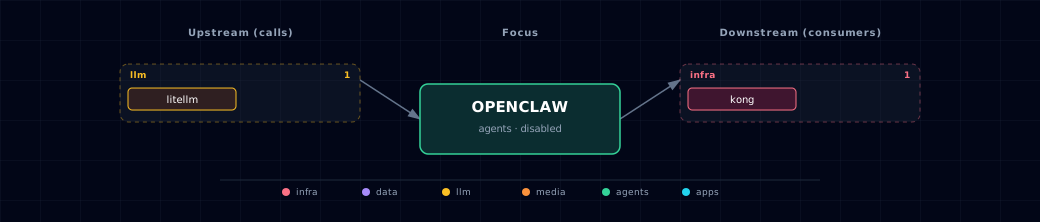
Open the full-size diagram for a full-screen view.
12.4. Future — Missing pair integrations¶
- openclaw ↔ hermes — Why: OpenClaw is positioned as a channel adapter (40+ messaging surfaces); Hermes is the programmable agent runtime already in the stack. The compose file already passes
HERMES_ENDPOINT/HERMES_API_KEY— only the bridge wiring is missing. Mechanism: OpenClaw skill or webhook plugin forwarding inbound messages tohttp://hermes:8642/v1/chat/completions; replies posted back via OpenClaw'ssendRPC. Effort: medium. Confidence: high. - openclaw ↔ n8n — Why: OpenClaw webhooks name n8n as a main trigger. n8n gives non-developers a visual way to connect messaging events to stack workflows. Mechanism: n8n HTTP Request node →
POST http://openclaw-gateway:18789/webhooks/<route>withAuthorization: Bearer <route-secret>. Effort: small. Confidence: high. - openclaw ↔ minio — Why: Workspace files, voice notes, and media attachments live only in the
openclaw-workspaceDocker volume — not addressable by other stack services. Mechanism: configure S3 backend withendpoint=http://minio:9000, dedicatedopenclawbucket alongside the existingMINIO_BUCKET_*set. Effort: small. Confidence: medium. - openclaw ↔ doc-processor — Why: OpenClaw handles chat PDF and Office attachments poorly. doc-processor (Docling) produces structured Markdown and chunks that the rest of the stack uses. Mechanism: custom OpenClaw skill posting attachments to
${DOCLING_ENDPOINT}/v1/document/convert; persist markdown to workspace + MinIO. Effort: medium. Confidence: high. - openclaw ↔ weaviate — Why: OpenClaw lists "memory search across persistent knowledge bases" but has no backend wired; Weaviate is the stack's vector DB. Mechanism: skill or MCP server bridging to
http://weaviate:8080/v1/objects(REST) or:50051(gRPC); embedding via LiteLLM's embeddings endpoint. Effort: medium. Confidence: medium. - openclaw ↔ searxng — Why: OpenClaw ships web-search tools with multiple providers but defaults to commercial APIs; SearXNG is the stack's privacy-preserving metasearch. Mechanism: set OpenClaw's web-search provider to a custom HTTP backend pointing at
${SEARXNG_INTERNAL_URL}/search?format=json&q=.... Effort: small. Confidence: medium.
12.5. Future — Candidate new services¶
- Honcho (details) — Headline: hosted/self-hostable user-memory store explicitly listed as an OpenClaw memory-engine backend. Wires into: hermes, backend, local-deep-researcher.
12.6. Future — Unused features in this service¶
- MCP CLI / external MCP server support — Why pursue: lets OpenClaw use any MCP server (Neo4j, Weaviate, GitHub) over stdio, SSE or streamable HTTP. RAG and graph tools then need no bespoke skills. Effort: medium.
- Webhooks plugin (inbound TaskFlow trigger) — Why pursue: standard surface for n8n/CI/external triggers; auth model already defined. Effort: small.
- Sandbox runners (Docker/SSH backends) — Why pursue: non-main sessions can run tools in Docker sandboxes — meaningfully safer than current host-bound execution. Effort: medium.
- Local TTS/STT providers — Why pursue: stack already runs
tts-providerandstt-provider; swap OpenClaw's cloud STT/TTS for local providers to keep voice fully on-device. Effort: small. - Memory engines (Honcho / QMD search) — Why pursue: persistent cross-session memory currently absent. Effort: medium.
- S3 / object-storage backend — Why pursue: wire workspace + media to MinIO for cross-service file sharing. Effort: small.
13. Troubleshooting¶
13.1. Permission Denied on Startup¶
Problem: EACCES: permission denied, open '/home/node/.openclaw/openclaw.json'
Solution:
1. The openclaw-init container should fix this automatically on startup
2. If it persists, set PROJECT_NAME as in §7 and run: docker run --rm -v ${PROJECT_NAME}-openclaw-config:/data alpine chown -R 1000:1000 /data
3. Restart the gateway: docker restart ${PROJECT_NAME}-openclaw-gateway
13.2. Gateway Won't Start¶
Problem: OpenClaw container fails to start
Solution:
1. Check logs (set PROJECT_NAME as in §7): docker logs ${PROJECT_NAME}-openclaw-gateway
2. Verify image is available: docker pull ghcr.io/openclaw/openclaw:2026.6.10
3. Ensure ports 63076/63077 (the gateway and bridge defaults; OPENCLAW_GATEWAY_PORT / OPENCLAW_BRIDGE_PORT) are free
4. Check docker logs for an exit code 137 (out of memory) and give Docker more memory if you see it
13.3. Can't See LLM Models¶
Problem: OpenClaw doesn't see any models
Solution:
1. Verify LiteLLM is healthy: curl http://localhost:63040/health/liveliness (63040 is the default LITELLM_PORT)
2. List the models LiteLLM serves: curl -H "Authorization: Bearer $(grep '^LITELLM_MASTER_KEY=' .env | cut -d= -f2-)" http://localhost:63040/v1/models
3. Check the provider config (baseUrl must be http://litellm:4000; set PROJECT_NAME as in §7): docker exec ${PROJECT_NAME}-openclaw-gateway openclaw config get models.providers.litellm. Check models.providers.openai only if you repurposed it (§7).
4. Confirm that LITELLM_API_KEY is set in the OpenClaw container environment
5. For Ollama models, set LLM_PROVIDER_SOURCE to an ollama-* value (not none), so LiteLLM has an Ollama upstream
13.4. Dashboard Not Loading¶
Problem: Web dashboard returns errors
Solution:
1. Check the health endpoint: curl http://localhost:63076/healthz (default OPENCLAW_GATEWAY_PORT)
2. Wait for startup (20s start period)
3. If using Kong, verify hosts file: ./start.sh --setup-hosts
4. Sign in with OPENCLAW_GATEWAY_TOKEN from .env; it is always required
13.5. Port Already in Use¶
Problem: Port 63076 (gateway) or 63077 (bridge) is occupied
Solution:
# Use different base port
./start.sh --base-port 64000

# Or check what's using the port
lsof -i :63076
14. Capabilities & limitations¶
Support tier: experimental — Capability contract declared; no cited cold-start, workflow, or upgrade qualification run yet (evidence at v0.1.0).
| Capability | Status | Verification | Notes |
|---|---|---|---|
| LiteLLM-backed messaging agent gateway | partial | tested | Atlas injects the LiteLLM key, and openclaw-init points the bundled litellm provider at http://litellm:4000 when its baseUrl is unset. Messaging channels and approvals require onboarding and are not exercised against live platforms. |
| Container and operator-host sources | partial | tested | Atlas initializes and runs the container source, while localhost mode only resolves an existing operator-managed gateway and cannot guarantee its version, onboarding, or supervision. |
| Direct cloud-provider overrides | partial | tested | Optional OpenClaw-specific Anthropic or OpenAI keys can bypass LiteLLM, which also bypasses Atlas gateway accounting and centralized provider routing. |
| OpenClaw gateway authentication | partial | tested | OPENCLAW_GATEWAY_TOKEN, generated at startup, protects the gateway API and dashboard; the CORS-only Kong route adds no Atlas authentication of its own. Direct gateway ports are loopback-only by default; an operator who deliberately publishes them remotely must secure that exposure separately. |
| Agent configuration and workspace persistence | partial | tested | Config and workspace data persist in local named volumes, with no MinIO sharing, backup workflow, replication, or tenant-isolated workspace topology. |
| Hermes and n8n message bridges | stubbed | tested | Hermes endpoint variables are injected and OpenClaw webhooks are documented, but Atlas ships no live forwarding implementation between OpenClaw, Hermes, or n8n. |
| Untrusted agent command isolation | not-supported | documented | OpenClaw can manage files and execute commands from messaging workflows, while Atlas configures no mandatory sandbox runner or per-channel authorization policy. |