5.2.50. Supabase Ecosystem¶
Supabase provides Postgres, Auth, Storage, Realtime, and a management dashboard that Atlas builds on.
1. Overview¶
Atlas runs these Supabase services:
- PostgreSQL Database - Primary database with pgvector and PostGIS extensions
- Auth Service (GoTrue) - User authentication and JWT management
- Storage Service - File storage and management
- API Service (PostgREST) - Auto-generated REST API
- Realtime Service - WebSocket connections for live updates (not functional yet; see §4.5)
- Studio Dashboard - Web-based database management interface
2. Database Setup Process¶
The database initialization follows a staged process managed by Docker Compose dependencies:
2.1. Base Database Initialization (supabase-db service)¶
- Uses the standard
supabase/postgresimage - On first start with an empty data volume, runs internal initialization scripts from
/docker-entrypoint-initdb.d/ - Base scripts handle:
- Setting up PostgreSQL
- Creating the database named by
SUPABASE_DB_NAME(passed to the image asPOSTGRES_DB) - Creating standard Supabase roles (
anon,authenticated,service_role) - Enabling necessary extensions (
pgcrypto,uuid-ossp) - Setting up basic
authandstorageschemas
IMPORTANT: The SUPABASE_DB_USER in your .env file must be set to supabase_admin. This is required by the base image's internal scripts.
Host connections require SCRAM passwords:
- PostgreSQL uses the image's own configuration (
-D /etc/postgresql) and its/etc/postgresql/pg_hba.conf, as upstream Supabase does. - That
pg_hba.confrequiresscram-sha-256for every network range. It trusts only in-container connections: loopback, plus the local socket forsupabase_adminand peer-mapped users. - The
supabase-db-configvolume holds/etc/postgresql-custom, includingpgsodium_root.key. Without that key, Vault and pgsodium secrets cannot be decrypted, so keep this volume with the data volume. - On start, the wrapper rewrites legacy
trustorpasswordhost rules in the data directory'spg_hba.conftoscram-sha-256. Local socket rules and explicit rejects stay. - A file with
md5host rules is reported and left unchanged, because MD5-only role verifiers must be migrated first. - Application containers use generated scoped roles. Only database initialization and backup/restore use
SUPABASE_DB_USER.
2.2. supabase_admin password drift¶
Error: password authentication failed for user "supabase_admin".
Cause: Postgres sets the supabase_admin password once, when the supabase-db-data volume is created, and never re-syncs it. SUPABASE_DB_PASSWORD ships as the placeholder password, and the first ./start.sh replaces it with a random value. If .env later gets a new password while the volume stays, clients send the new value and the role still holds the old one. This happens, for example, when .env is regenerated from .env.example after a ./stop.sh without --cold.
./start.sh does not rotate the password when the <project>_supabase-db-data volume exists. It warns instead.
To recover, do one of these:
- Set
SUPABASE_DB_PASSWORDin.envback to the value the volume was created with. - Run
./stop.sh --cold, then./start.sh. This deletes all volumes and data, and creates the role and.envpassword together.
2.3. Custom Post-Initialization (supabase-db-init service)¶
- A dedicated, short-lived service using
postgres:15.19-alpineimage - Depends on
supabase-dband waits until it's ready usingpg_isready - Executes the
.sqlfiles from./services/supabase/db/scripts/in alphabetical order - Then runs
05-scoped-roles.sh, which creates the scoped per-service logins and grants - Then executes optional downstream-owned
.sqlfiles from./services/supabase/db/_user/in alphabetical order
Role and database names must fit PostgreSQL's 63-byte identifier limit. The role provisioner rejects longer names before it changes logins, ownership or grants. The length check preserves each accepted name's spelling, including punctuation and spaces.
The seeding layout has two tiers. Core scaffolding lives in the 0x-prefixed files. Per-service "vertical slice" files (10 and up) each own one service's tables, migrations and seeds. db-init-runner.sh runs them in alphabetical order. A slice can reference a table from a lower-numbered slice, for example public.users in 10 from slices 13 and 14.
The Atlas-owned scripts do this work:
- Enabling extensions:
vector,postgis,pgcrypto(01-extensions.sql) - Ensuring schemas
authandstorageexist (02-schemas.sql) - Creating custom types for Supabase Auth / GoTrue (
03-auth-types.sql) - GoTrue migration sync shim (
03b-gotrue-migration-sync.sql) - Setting up storage schema and tables (
04-storage.sql) - Creating the scoped per-service logins, databases and grants (
05-scoped-roles.sh; run after the SQL pass, before the_userscripts) - Granting appropriate permissions to standard roles (
06-permissions.sql) - Creating shared functions like
public.healthandupdate_updated_at_column()(07-functions.sql) 10-users.sql—public.userstable (shared user identity, referenced by downstream slices)12-comfyui.sql—public.comfyui_workflowsandpublic.comfyui_generationstables (runtime app state), their indexes, and the default workflow seed rows. The guarded drop of the retiredpublic.comfyui_modelstable is in16-decommission-comfyui-models.sql.13-backend-research.sql—researchschema and research tables (public.research_sessions,public.research_results,public.research_sources,public.research_logs) (owned by backend / local-deep-researcher)14-backend-memory.sql— LangMem memory tables (public.memory_facts,public.memory_sessions,public.memory_consolidation_log) and the embedding-schema state (owned by Backend / LangMem). WhenLANGMEM_EMBEDDING_DIMchanges, Backend re-embeds every mismatched row before the dimension constraint is validated. The dimension limit is 4,000. The legacyuser_idVARCHAR→UUID migration is guarded per table. A table with a non-UUIDuser_idkeeps its legacy shape and logs aWARNING; DB init continues.15-decommission-llms.sql— drops the retiredpublic.llmscatalog table on existing volumes (idempotentDROP TABLE IF EXISTS). Fresh installs never create it. The LLM model catalogs areservices/ollama/models.yamlandservices/litellm/models.yaml, resolved bybootstrapper/utils/model_resolver.py.16-decommission-comfyui-models.sql— drops the retiredpublic.comfyui_modelscatalog table on existing volumes (idempotentDROP TABLE IF EXISTS). The ComfyUI model catalog isservices/comfyui/models.yamlplus thecustom-models.yamlsidecar, resolved bybootstrapper/utils/comfyui_resolver.pyat start.public.comfyui_workflowsandpublic.comfyui_generationsare runtime app state and are not affected.17-backend-media-ledger.sql—public.media_spend_ledger(Backend media spend and recovery ledger, with row-level security)
Two helper scripts in the same directory are not part of the SQL pass:
db-init-runner.sh— thesupabase-db-initentry point that runs the passes aboveenforce-scram-host-auth.sh— thesupabase-dbstart wrapper that rewrites legacy host rules to SCRAM (§2.1)
All Atlas-owned SQL scripts use IF NOT EXISTS logic to allow safe re-runs.
2.4. Downstream user migrations¶
Downstream projects can add local Supabase SQL without editing Atlas-owned
files by placing scripts in ./services/supabase/db/_user/. The
supabase-db-init container mounts that directory read-only at /user-scripts
and runs its *.sql files after every Atlas-owned script in
./services/supabase/db/scripts/ has completed successfully.
The ordering contract is:
- Atlas-owned SQL in
db/scripts/, sorted lexically. - User-owned SQL in
db/_user/, sorted lexically.
The user slot is optional. A fresh checkout works with no user SQL files.
The _user directory ignores local SQL by default, so downstream migrations do
not enter upstream Atlas PRs by accident. Prefix user files with numbers such
as 10-project-schema.sql and 20-seed-reference-data.sql to make ordering
explicit.
Write user SQL to be idempotent. Use patterns such as CREATE SCHEMA IF NOT
EXISTS, CREATE TABLE IF NOT EXISTS, guarded ALTER TABLE blocks, and
conflict-safe seed statements. If a user SQL file fails, psql stops
(ON_ERROR_STOP=1) and supabase-db-init fails. Services gated on
supabase-db-init then do not start against a partially initialized database.
2.5. Service Dependencies¶
Containers with depends_on: { supabase-db-init: { condition: service_completed_successfully } } start only after base and custom initialization complete. Supabase's sub-services have it. So does at least one container of each service below. Other services do not wait for it.
- Airflow, Backend, Celery, ComfyUI, Iceberg REST, JupyterHub
- Label Studio, Langfuse, LiteLLM, MCP servers, MLflow, n8n
- Ollama (
ollama-pull), Open WebUI, Supavisor, TrueForge
3. Authentication System¶
The stack uses Supabase Auth (GoTrue) for user authentication and management with JWT tokens.
3.1. Key Components¶
supabase-auth (GoTrue):
- Issues JWTs upon successful login/sign-up
- Validates JWTs presented to its endpoints
- Configured via
GOTRUE_*environment variables - Sign-ups enabled by default (
GOTRUE_DISABLE_SIGNUP="false") - Emails auto-confirmed for local development (
GOTRUE_MAILER_AUTOCONFIRM="true") - Together these let anyone who can reach the auth endpoint mint an
authenticatedtoken. The Backend accepts that token on/media/generate(including the paid FAL provider),/media/spend, research and memory routes. Kong binds to loopback by default. - Media budgets do not contain this. They are off by default (
MEDIA_BUDGET_ENABLED=false). When on, caps apply per consumer and perproject(a free-text request field), so each new account and project name starts with a fresh cap. - Before you widen
HOST_BIND_IPor publish the gateway, disable sign-up. Use a Compose override that setsGOTRUE_DISABLE_SIGNUP: "true"onsupabase-auth. The fragment hard-codes"false", so a.enventry has no effect. - Default privileges grant
anonSELECT andauthenticatedALL on futurepublictables.06-permissions.sqlrevokes both from everypublictable without row-level security, and db-init re-applies it after thedb/_user/scripts. A table created later, outside db-init, stays exposed through PostgREST until the next db-init run, so enable RLS (or revoke) when you create it.
supabase-api (PostgREST):
- Expects valid JWT in
Authorization: Bearer <token>header - Validates JWT signature using
PGRST_JWT_SECRET(shared with auth) - Enforces database permissions based on JWT role claim via PostgreSQL RLS
supabase-storage:
- Accepts JWTs passed via Kong. Atlas hardens the
storageschema (noanon/authenticatedgrants, row-level security off), so only the service-role key can read or write objects. User and anon tokens get "permission denied".
kong-api-gateway:
- Routes authenticated requests to backend services
- Relies on upstream services for JWT validation
3.2. JWT Keys (.env file)¶
SUPABASE_JWT_SECRET: Secret key for signing/verifying JWTs (consistent across all services)SUPABASE_ANON_KEY: Pre-generated JWT foranonrole (public access)SUPABASE_SERVICE_KEY: Pre-generated JWT forservice_role(admin privileges)
3.3. Setup and Usage¶
- Generate Keys: start.py automatically generates secure JWT keys during first run or cold start
- Client Authentication: Implement login flow using
/auth/v1/token?grant_type=password - Anonymous Access: Use
SUPABASE_ANON_KEYfor public requests - Service Role Access: Use
SUPABASE_SERVICE_KEYfor admin operations (handle securely) - User Management: Use the Kong-protected Supabase Studio route at
http://supabase-studio.localhost:${KONG_HTTP_PORT}(Studio's own port is not published).
Supabase Auth identities are synchronized into public.users by the
idempotent public.handle_auth_user_sync() trigger in 10-users.sql. The same
script backfills existing auth.users rows. This keeps the authenticated JWT
subject usable as the owner foreign key for Backend research and memory data.
Profile names come from raw_user_meta_data.name, then full_name, then the
email local part, with a stable fallback. Existing matching rows are updated,
while unrelated legacy public.users rows remain intact.
Deleting an Auth account deletes its synchronized owner row and cascades the
associated research and memory records through their existing foreign keys.
Row-level security lets an authenticated user read or update only the row
whose id matches auth.uid(). The service role can manage all rows.
Anonymous callers have no policy. The synchronization function is trigger-only:
execute privilege is revoked from public API roles despite its required
SECURITY DEFINER ownership.
4. Individual Services¶
SUPABASE_{META,STORAGE,AUTH,API,REALTIME,STUDIO}_SOURCE=disabled scales that container to 0, and the port check skips it. The bootstrapper writes the matching SUPABASE_<X>_SCALE. Kong and Realtime depend on these sub-services optionally (required: false), so they start without the disabled ones. Routes to a disabled sub-service return 503. The database (SUPABASE_DB_SOURCE) stays required.
4.1. PostgreSQL Database¶
- Access: Direct connection via standard PostgreSQL client
- Port:
${SUPABASE_DB_PORT}(default: 63012) - Extensions: pgvector, PostGIS, uuid-ossp, pgcrypto
4.2. Auth Service (GoTrue)¶
- Access: through Kong at
/auth/v1only. GoTrue is not published on the host, because it answers any browser origin. With sign-up and auto-confirm on, any web page open in your browser could create an account and read its token.SUPABASE_AUTH_PORTstays reserved but is not bound. - Purpose: User registration, login, password recovery, email confirmation
- Features: JWT authentication, user management, password policies
- Port: GoTrue listens on 9999 (
GOTRUE_API_PORT; its own default is 8081). Kong's/auth/v1routes and Storage'sGOTRUE_URLpoint there, and the container healthcheck probes/healththere. - Token claims:
GOTRUE_JWT_AUDandGOTRUE_JWT_DEFAULT_GROUP_NAMEareauthenticated, so user tokens carry theaudandrolethe backend and PostgREST require. Users stored with an emptyaudandroleare repaired on the next start. - Profile sync: the
auth.users→public.userssync runs as the no-login roleatlas_auth_sync. Init statements that write another role's table run as that role, so code planted by that role never runs as the init superuser. - Limits: GoTrue's
SITE_URL(http://supabase-studio:3000) andAPI_EXTERNAL_URL(http://supabase-auth:9999) are container-internal. SMTP points at a local relay that does not exist. Email confirmation, recovery, magic-link and OAuth redirect links therefore do not work from a browser; the stock defaults auto-confirm sign-ups instead.
4.3. Storage Service¶
- Access:
http://localhost:${SUPABASE_STORAGE_PORT}(default: 63015) - Features:
- Secure file storage and management
- Service-role access only: the hardened
storageschema grants nothing toanon/authenticated - Integration with authentication system
- Support for various file types
- Through Kong,
/storage/v1/needs theapikeyheader./storage/v1/object/public/,/storage/v1/object/sign/and/storage/v1/object/upload/sign/do not, so<img>tags and outside services can fetch public and signed URLs and PUT to signed upload URLs. - Resumable (TUS) uploads work through Kong:
REQUEST_ALLOW_X_FORWARDED_PATH=truekeeps the/storage/v1prefix in the uploadLocationheader, which Studio's file browser follows - The
defaultbucket is private. Theurlthat the backend's/storage/uploadreturns (a public-object URL on the internal Kong host) is not fetchable as-is. Fetch through the backend or Studio, or create a signed URL.
4.4. API Service (PostgREST)¶
- Access:
http://localhost:${SUPABASE_API_PORT}(default: 63017) - Purpose: Auto-generated REST API for database operations
- Features:
- Automatic API generation from database schema
- Row Level Security (RLS) enforcement
- Not yet functional: Realtime subscriptions (see §4.5) and the
/graphql/v1route. That route returns 404 because thepg_graphqlextension is not installed andgraphql_publicis not an exposed schema.
4.5. Realtime Service¶
- Access: WebSocket at
http://localhost:${SUPABASE_REALTIME_PORT}(default: 63018) - Purpose: Live database change notifications
- Status: not functional yet. Realtime v2.112 serves only tenants it has seeded, and Atlas does not seed one.
SEED_SELF_HOST,API_JWT_SECRETandDB_ENC_KEYare not set. Realtime takes the tenant from the first label of the request host, which the Kong and direct URLs do not carry. Every connection is therefore refused as an unknown tenant. Nothing in the stack subscribes today.
Realtime is an Erlang node. The image ships one fixed release cookie, so Atlas binds its epmd, Erlang distribution and gen_rpc listeners to the container's loopback (ERL_AFLAGS inet_dist_use_interface, ERL_EPMD_ADDRESS, GEN_RPC_SOCKET_IP). Other containers on backend-network reach only the HTTP/WebSocket port 4000. A single Realtime node needs no cluster traffic.
Realtime creates and manages its own logical replication slots. Database initialization does not create a supabase_realtime_slot. It drops an idle slot of that name on startup, because Realtime never uses it and it only retains WAL.
4.6. Studio Dashboard¶
- Protected access:
http://supabase-studio.localhost:${KONG_HTTP_PORT} - Direct access: none. Studio has no application authentication. Its pg-meta proxy accepts form-encoded POSTs that a web page can send cross-site. A loopback port would let any page open in your browser run SQL, so Studio is not published on the host.
SUPABASE_STUDIO_PORTstays reserved but is not bound. - Purpose: Web-based database management interface
- Credentials:
DASHBOARD_USERNAME/DASHBOARD_PASSWORDprotect the Kongsupabase-studio.localhostroute (default userkong_admin; the password is auto-generated on first./start.sh). Studio is reached only through that route. - Features:
- Database schema visualization
- Query editor and runner
- User management interface
- Storage file browser
- Real-time monitoring
4.7. postgres-exporter (observability sidecar)¶
- Image:
prometheuscommunity/postgres-exporter:v0.19.1 - Access:
http://localhost:${POSTGRES_EXPORTER_PORT}/metrics(in-container9187) - Purpose: Prometheus exporter exposing
pg_stat_*views as a/metricsendpoint for the observability bundle. - Configuration: connects to
supabase-db:5432as${POSTGRES_EXPORTER_DB_USER}, a dedicatedpg_monitorlogin; it does not receive the database-owner credential. It scrapes only the primary database. Auto-discovery is off because the per-service databases (airflow,langfuse, …) revokeCONNECTfrom it, which would holdpg_exporter_last_scrape_errorat 1. - Lifecycle: scales 1↔0 with
PROMETHEUS_SOURCE. The bootstrapper's_generate_prometheus_config()hook writesPOSTGRES_EXPORTER_SCALEfrom that switch, so the sidecar is dormant when Prometheus is off. ThePostgres + RedisGrafana dashboard shows connections, query rate and table sizes from its output.
5. Environment Variables¶
Key environment variables for Supabase configuration:
# Database
SUPABASE_DB_NAME=postgres                         # passed to the image as POSTGRES_DB
SUPABASE_DB_USER=supabase_admin
SUPABASE_DB_PASSWORD=password                     # placeholder; rotated on first start
SUPABASE_DB_PORT=63012
SUPABASE_AUTH_DB_PASSWORD=atlas-db-password       # rotated on first start
SUPABASE_STORAGE_DB_PASSWORD=atlas-db-password    # rotated on first start
SUPABASE_API_DB_PASSWORD=atlas-db-password        # rotated on first start

# Authentication
SUPABASE_JWT_SECRET=your_jwt_secret
SUPABASE_ANON_KEY=generated_anon_key
SUPABASE_SERVICE_KEY=generated_service_key

# Service Ports
SUPABASE_AUTH_PORT=63016          # reserved, not bound (use Kong /auth/v1)
SUPABASE_API_PORT=63017
SUPABASE_STORAGE_PORT=63015
SUPABASE_STUDIO_PORT=63019
SUPABASE_REALTIME_PORT=63018

# Dashboard Credentials (password auto-rotated on first launch)
DASHBOARD_USERNAME=kong_admin
DASHBOARD_PASSWORD=<auto-generated into .env>
5.1. Security note — pg-meta host port¶
supabase-meta (pg-meta) is not published on the host. It is an
auth-less HTTP API that executes SQL as a dedicated dashboard_user member,
and it answers any browser origin (CORS *). Even a loopback-only publish
would let any web page open in the operator's browser query auth.users.
Studio and the Kong /pg/ route (Basic authentication + dashboard_user ACL)
reach it over the internal Docker network. SUPABASE_META_PORT stays
reserved in the port block but is not bound.
5.2. Security note — writable public schema¶
Open WebUI, LightRAG, pg-meta and Realtime roles can create objects in
public. PostgreSQL resolves an unqualified call to the best type match on the
search path. A planted public overload can therefore beat a pg_catalog
built-in and run as whoever calls it.
Every SECURITY DEFINER function in the database pins a search_path without
public. Atlas's own functions use pg_catalog, pg_temp (or an empty path)
and qualify public objects. 01-extensions.sql pins PostGIS's
ST_EstimatedExtent the same way, so call its schema-qualified three-argument
form: the two-argument form does not find a table by search path.
Init runs as a superuser, so db-init-runner protects it in three ways:
- Every init
psqlcall usessearch_path=public,auth,extensions. The superuser's saved path also names a schema literally called"\$user", which any role withCREATEon the database could add ahead ofpublic. - It refuses to run while a non-superuser owns a function or operator named
like a superuser-owned one in
pg_catalog,public,authorextensions. Superuser-run slices still call some routines (format,=,<>,vector_dims) without exact argument types. - It refuses to run while a trigger on a superuser-owned table calls a function
that a non-superuser owns.
anon,authenticatedandservice_rolehold noTRIGGERprivilege onpublictables, and init inserts the default storage bucket as the table's owner.
Each service database (LiteLLM, Airflow, Langfuse and the others) is owned by
its service role, which therefore owns that database's public schema. Init's
ownership pass there runs with search_path = pg_catalog, pg_temp and
schema-qualified built-ins, so nothing the role plants in it runs as the
superuser.
When init refuses, it names each object. Drop them, then restart. The backup
and restore scripts resolve nothing through public (search_path =
pg_catalog, pg_temp). Downstream SQL in db/_user/ runs as the init
superuser too: qualify calls the same way.
6. Integration Points¶
§9 lists the services that call Supabase, generated from the manifests.
7. Common Operations¶
7.1. Connect to Database¶
# Using psql
psql -h localhost -p ${SUPABASE_DB_PORT} -U supabase_admin -d postgres

# Using Docker
docker exec -it ${PROJECT_NAME}-supabase-db psql -U supabase_admin -d postgres
7.2. Check Service Health¶
# Database
docker exec ${PROJECT_NAME}-supabase-db pg_isready

# Services
curl -I http://localhost:${SUPABASE_API_PORT}/   # PostgREST serves its OpenAPI root; it has no /health on this port
docker exec ${PROJECT_NAME}-supabase-auth wget -qO- http://localhost:9999/health
7.3. View Logs¶
docker logs ${PROJECT_NAME}-supabase-db -f
docker logs ${PROJECT_NAME}-supabase-auth -f
docker logs ${PROJECT_NAME}-supabase-api -f
docker logs ${PROJECT_NAME}-supabase-studio -f
8. LightRAG schema¶
When LIGHTRAG_SOURCE != disabled and SUPABASE_DB_SOURCE != disabled, lightrag-init runs migrate-pgvector.sql. It runs CREATE EXTENSION IF NOT EXISTS vector and creates a lightrag schema. LightRAG's PGVectorStorage manages tables under that schema at runtime.
9. Dependencies & Integrations¶
9.1. Current — Upstream (this service calls)¶
No upstream calls.
9.2. Current — Downstream (services that call this)¶
| Service | Category | Status |
|---|---|---|
| backup | infra | optional: BACKUP_SOURCE=container; runs on demand, not resident |
| kong | infra | current |
| langfuse | infra | current |
| prometheus | infra | current |
| iceberg-rest | data | current |
| supavisor | data | current |
| litellm | llm | current |
| airflow | agents | current |
| celery | agents | current |
| lightrag | agents | current |
| mcp-servers | agents | current |
| n8n | agents | current |
| trueforge | agents | current |
| backend | apps | current |
| jupyterhub | apps | current |
| label-studio | apps | current |
| mlflow | apps | current |
| open-webui | apps | current |
| zeppelin | apps | current |
9.3. Architecture diagram¶
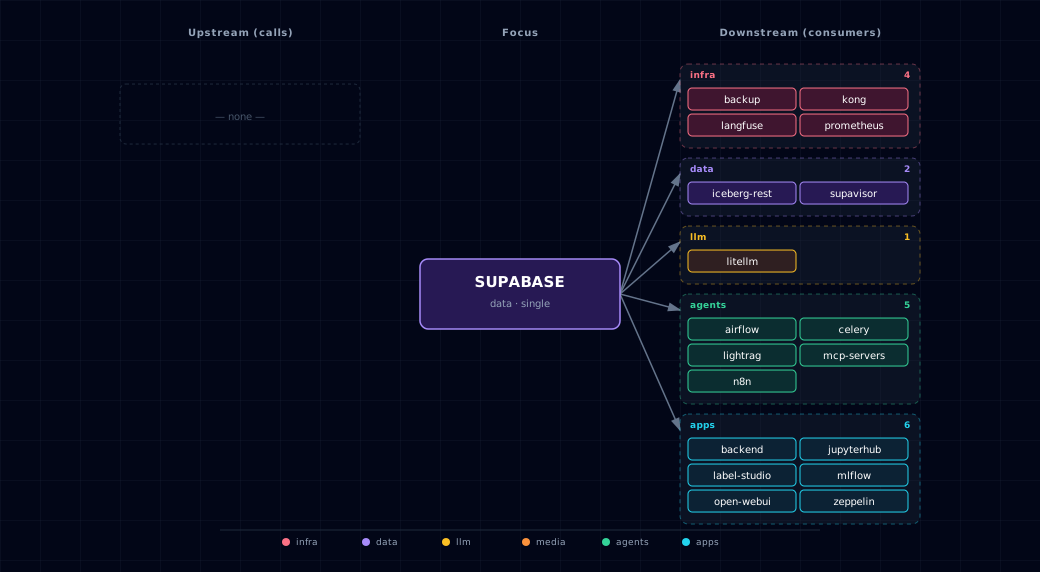
Open the full-size diagram for a full-screen view.
9.4. Future — Missing pair integrations¶
- supabase ↔ hermes — Why: Hermes persists agent state only to a
hermes-datavolume; its manifest declares no Postgres or Redis dependency. Postgres-backed sessions, skills and tool-call history would survive restarts, allow several replicas, and be queryable across the stack. Mechanism: a scopedHERMES_DB_USERrole created by05-scoped-roles.sh, owning ahermesschema;hermes-initcreates tables withIF NOT EXISTS. Effort: medium. Confidence: medium. - supabase ↔ doc-processor — Why: docling extracts structured chunks that today flow only into Weaviate as vectors. Raw chunk text and source metadata in Postgres would give RLS-scoped tenant isolation, exact-match search, and a source row to rebuild Weaviate from. Mechanism: docling writes via PostgREST at
http://supabase-api:3000/rest/v1/doc_chunksusingSUPABASE_SERVICE_KEY; embeddings still go to Weaviate. Effort: medium. Confidence: medium. - supabase ↔ openclaw — Why: OpenClaw is the messaging-platform gateway and depends only on litellm. Conversation history, user-to-channel mappings and rate-limit counters live in memory. Mechanism: a scoped
OPENCLAW_DB_USERrole created by05-scoped-roles.sh, owning anopenclawschema; a smallopenclaw-initSQL script seeds the tables. Effort: small. Confidence: medium. - supabase ↔ tts-provider — Why: generated audio is ephemeral. Storing TTS output in
supabase-storagekeyed by(user_id, text_hash, voice)gives a cache that skips re-synthesis of identical input, and a per-user history. Mechanism:PUT http://supabase-storage:5000/object/tts/<user>/<hash>.wavwithSUPABASE_SERVICE_KEY; metadata row via PostgREST. Effort: small. Confidence: high. - supabase ↔ stt-provider — Why: parakeet/speaches transcripts vanish after the response. A
transcriptstable keyed by the caller's JWTsubenables history search, RAG over meetings, and per-user RLS isolation. Mechanism: stt-provider POSTs to PostgREST/rest/v1/transcriptswith the forwardedAuthorization: Bearer <jwt>header so RLS picks up the user. Effort: small. Confidence: medium.
9.5. Future — Candidate new services¶
- Supabase Edge Functions (Deno) — Headline: self-hosted Deno serverless layer that lets Postgres triggers and Kong routes invoke short TypeScript handlers without n8n. Wires into: litellm, n8n, supabase-storage, kong.
- imgproxy — Headline: on-the-fly image transform and resize sidecar; Supabase Storage's
IMGPROXY_URLsetting is built to call it. Wires into: supabase-storage, minio, comfyui, open-webui, backend.
9.6. Future — Unused features in this service¶
pg_cron+pg_netextensions — Why pursue: enables scheduled jobs and outbound HTTP from inside Postgres (database webhooks to Hermes/n8n/Edge Functions);01-extensions.sqlenables onlyvector/postgis/pgcrypto. Effort: small.- Database Webhooks — Why pursue: lets row-level changes trigger LiteLLM calls or n8n flows without a polling worker; depends on
pg_net. Effort: small. - Row-Level Security policy coverage — Why pursue: the
public.users, backend research, memory and media-spend-ledger tables define RLS policies. The ComfyUI workflow and generation tables have no table-specific RLS, because they hold shared app state. Finish the per-table policy model before exposing those tables through PostgREST broadly. Effort: medium. - GoTrue OAuth providers (Google, GitHub) — Why pursue: the stack ships with email-only login; SSO needs only
GOTRUE_EXTERNAL_*settings. Effort: small. pg_graphqlendpoint — Why pursue: Kong already routes/graphql/v1to PostgRESTrpc/graphql, but it returns 404 until01-extensions.sqlinstallspg_graphqlandgraphql_publicis exposed. Wiring n8n or the backend to it would give a typed GraphQL surface. Effort: small.- Realtime broadcast + presence channels — Why pursue:
supabase-realtimeruns but nothing subscribes; broadcast channels would let backend push job-status updates to open-webui without polling. Effort: medium. - Storage image transformation — Why pursue: prerequisite for the imgproxy candidate; enables resize URLs once
IMGPROXY_URLis set. Effort: small.
10. Troubleshooting¶
- Database connection issues: Verify SUPABASE_DB_USER is set to
supabase_admin. password authentication failed for user "supabase_admin": see §2.2.- Auth service errors: Check JWT secret consistency across services.
- Studio access issues: Check the dashboard credentials for the Kong hostname, and that
./start.sh --setup-hostsaddedsupabase-studio.localhost. Studio has no direct host port. - Initialization failures: Check supabase-db-init logs for SQL script errors.
For more help, see Troubleshooting.
11. Capabilities & limitations¶
Support tier: experimental — Capability contract declared; no cited cold-start, workflow, or upgrade qualification run yet (evidence at v0.1.0).
| Capability | Status | Verification | Notes |
|---|---|---|---|
| Integrated Postgres application platform | supported | tested | Atlas runs PostgreSQL with Auth, PostgREST, Storage, Realtime, Meta, Studio, database initialization, and optional metrics export as one required family. Realtime runs but serves no tenant yet (§4.5). |
| Idempotent schema and RLS initialization | supported | tested | Ordered Atlas and downstream SQL runners initialize extensions, service schemas, grants, identity synchronization, and row-level-security policies with failure gating. |
| Least-privilege application database role | supported | tested | Atlas creates idempotent per-service logins and dedicated database/schema ownership or read grants; application containers do not receive the Supabase owner credential. |
| Production email authentication | partial | documented | GoTrue issues and validates JWTs, but the stock local-development defaults auto-confirm email and point SMTP at localhost rather than a configured delivery service. |
| pg-meta administrative access control | supported | tested | The Kong /pg/ route uses Basic authentication and the dashboard_user ACL. The pg-meta service itself has no application authentication, executes as a dedicated dashboard_user member and allows any browser origin. It is therefore not published on the host. SUPABASE_META_PORT is reserved but unused. |
| Supabase Studio access control | supported | tested | The Kong route uses Basic authentication and the dashboard_user ACL. Studio has no application authentication. Its pg-meta proxy accepts form-encoded POSTs that a web page can send cross-site. Studio is therefore not published on the host. SUPABASE_STUDIO_PORT is reserved but unused. |
| Authenticated remote PostgreSQL access | supported | tested | Host TCP uses SCRAM-SHA-256 with generated scoped passwords under the image's own pg_hba.conf. An upgrade-time HBA rewrite for legacy volumes covers their data-directory rules. Publication is loopback by default. Explicit remote exposure still requires firewall and TLS planning. |