5.2.19. Hermes Agent¶
Port: 63072 (API), 63073 (dashboard)
SOURCE variable: HERMES_SOURCE
SOURCE options: container, localhost, disabled
1. Overview¶
Hermes is a programmable AI-agent runtime from Nous Research. It adds the agent loop between raw LLM chat and channel adapters such as OpenClaw. It exposes an OpenAI-compatible API on container port 8642 and a web dashboard on container port 9119.
Key facts:
- File-based persistence — all state lives under
/opt/data(thehermes-datanamed volume). Hermes needs no Postgres or Redis. - No GPU — Hermes orchestrates; the model endpoint in
model.base_urldoes the inference. The stack default is the LiteLLM gateway. - MCP client — Hermes can call any MCP server.
- 64K context floor — Hermes checks the model's context window at
preflight.
HERMES_DEFAULT_MODELmust have a context window of at least 64K. Stock Ollama default contexts depend on VRAM (4K/32K/256K) and are often lower. SetOLLAMA_CONTEXT_LENGTH=65536on the Ollama server, run/set parameter num_ctx 65536+/save <model>insideollama run, or use a cloud model. - Disk — the image is multi-arch (
linux/amd64,linux/arm64) and large: about 3.7 GB unpacked on arm64. - Bundled skills — the image ships its skills under
/opt/hermes/skills.hermes-initadds the companion skillcreative/atlas-comfyui-host/SKILL.mdunder/opt/data/skills/. It gives the agent the in-network ComfyUI host; it is guidance, not an override.
2. Access¶
| Path | URL | Notes |
|---|---|---|
| OpenAI-compatible API (direct) | http://localhost:${HERMES_API_PORT} (default 63072) |
Bearer token: ${HERMES_API_KEY}. Same surface as OpenAI's /v1/chat/completions. |
| Dashboard (direct) | http://localhost:${HERMES_DASHBOARD_PORT} (default 63073) |
Web admin UI for skills, sessions, model config. |
| Dashboard (Kong) | http://hermes.localhost:${KONG_HTTP_PORT} (default 63000) |
Requires ./start.sh --setup-hosts. Kong asks for the dashboard credential (DASHBOARD_USERNAME / DASHBOARD_PASSWORD); the dashboard itself has no login. |
| Internal DNS (other containers) | http://hermes:8642 |
Reachable from LiteLLM, n8n, jupyterhub; Backend and OpenClaw get the endpoint but do not call it yet (see §6). |
See the canonical port table at Ports and Routes.
3. Architecture & wiring¶
Hermes is wired into the stack in two directions:
- Hermes → LiteLLM (outbound) — Hermes calls
http://litellm:4000/v1/chat/completionsfor every LLM operation. Pick the model viaHERMES_DEFAULT_MODEL(any name LiteLLM exposes). - LiteLLM → Hermes (inbound) —
services/litellm/init/scripts/init.pyappends ahermes-agentrow to LiteLLM'smodel_listwhenHERMES_SOURCE != disabled. Consequence: Open WebUI, n8n, backend and JupyterHub seehermes-agentin their model lists automatically — no per-consumer wiring. OpenClaw sees it through itslitellmprovider (see the OpenClaw README).
The loop is intentional. Hermes is the agent runtime above raw chat; LiteLLM is the single front door for LLM traffic.
3.1. Optional integration points (wired by hermes-init)¶
services/hermes/init/scripts/init-hermes.sh renders /opt/data/config.yaml from
environment. When the underlying service is enabled, Hermes gets:
| Hermes feature | Stack service | Mechanism |
|---|---|---|
| LLM reasoning | LiteLLM | model.provider: custom, base_url: http://litellm:4000/v1 |
| TTS (text-to-speech) | Speaches (Kokoro/Piper, default) / Chatterbox (voice cloning) | tts.provider: openai, tts.openai.base_url: ${TTS_ENDPOINT}/v1, set from the active TTS engine (for example http://speaches:8000/v1 or http://chatterbox:4123/v1). The key is the placeholder VOICE_TOOLS_OPENAI_KEY=not-required, so audio never reaches api.openai.com, even when OPENAI_API_KEY is set. With TTS disabled, init omits the block. Hermes then uses its default edge provider, which sends the text to Microsoft's Edge TTS cloud service. |
| STT (speech-to-text) | Speaches (Faster-Whisper, default) / Parakeet (NVIDIA NeMo) / whisper.cpp (Apple Silicon) | stt.provider: openai, stt.openai.base_url: ${STT_ENDPOINT}/v1, stt.openai.api_key: ${STT_INTERNAL_API_KEY}, all set from the active STT engine. Hermes ignores the base URL without a key, so init writes the placeholder not-required when the key is blank. |
| Web search | SearXNG | SEARXNG_URL=http://searxng:8080 on the hermes container plus web.search_backend: searxng |
| Image generation | ComfyUI | Companion skill /opt/data/skills/creative/atlas-comfyui-host/SKILL.md tells the agent that ComfyUI is at http://comfyui:18188. The bundled creative/comfyui skill still uses 127.0.0.1:8188, so this is guidance, not a config override. |
When a dependency is disabled, init omits its block from config.yaml and
Hermes does not offer that capability. Startup does not fail.
4. Configuration¶
HERMES_SOURCE=container             # container | localhost | disabled
HERMES_IMAGE=nousresearch/hermes-agent:v2026.6.19
HERMES_API_PORT=63072
HERMES_DASHBOARD_PORT=63073
HERMES_DASHBOARD_ENABLED=true
HERMES_DASHBOARD_TUI=1              # inert in v2026.6.19 — the Chat tab is always on (see below)
HERMES_DEFAULT_MODEL=               # blank = hermes-init auto-picks from LiteLLM's model_list
HERMES_CONTEXT_LENGTH=65536         # hard floor; leave alone
HERMES_API_KEY=                     # auto-generated if empty
STT_INTERNAL_API_KEY=               # Parakeet token, compatibility dummy, or blank; auto-derived
HERMES_MEMORY_LIMIT=4g
HERMES_CPU_LIMIT=2.0
Auto-default model. When HERMES_DEFAULT_MODEL is blank, hermes-init
queries http://litellm:4000/v1/models at startup. It picks the first match
from a priority list: ollama/qwen3.8:latest → claude-sonnet-4-6 →
claude-opus-4-7 → gpt-5 → gpt-5-codex → gpt-5-mini. If none matches,
it picks the first remaining chat model, excluding hermes-agent, lightrag
and embedding models. If no chat model is available, hermes-init fails and
Hermes does not start; set HERMES_DEFAULT_MODEL. An operator value is never
overridden.
Dashboard Chat tab. Hermes v2026.6.19 always embeds a hermes --tui
terminal as a Chat tab (/api/pty, /api/ws) and ignores
HERMES_DASHBOARD_TUI. The tab is a full agent with a terminal tool. While
HERMES_DASHBOARD_INSECURE=true, it needs no login on the direct port or from
backend-network peers. The agent can read LITELLM_MASTER_KEY from its
environment and from /opt/data/config.yaml. To remove the tab, set
HERMES_DASHBOARD_ENABLED=false; to require Nous Portal OAuth, set
HERMES_DASHBOARD_INSECURE=false. Reference: upstream Web-Dashboard
docs.
Use ./start.sh for the guided wizard, or pass --hermes-source <option>
for scripted changes.
STT_INTERNAL_API_KEY resolves to PARAKEET_API_TOKEN for a Parakeet source, to sk-unused for other enabled STT engines, and to empty when STT is disabled. hermes-init writes it into the server-side provider configuration. It is not a browser credential; do not emit it in tool output.
4.1. Containerize vs. localhost¶
| Scenario | Recommended SOURCE |
|---|---|
| Hermes consumed by Open WebUI / n8n / OpenClaw (default) | container |
| Hermes operates your real machine (real shell, real browser) | localhost |
| Microphone-driven live voice mode | localhost (container mic passthrough is non-trivial) |
| Resource-constrained machine | disabled |
With localhost, LiteLLM's hermes-agent route sends Atlas's HERMES_API_KEY as the bearer token. Set HERMES_API_KEY in .env to the host instance's own API_SERVER_KEY, or every call through LiteLLM returns 401. Atlas renders none of the config above (TTS, STT, SearXNG, ComfyUI) for a host instance; configure it on the host.
5. Known caveats¶
HERMES_UIDmust be 1–65534 — the image's boot hook (/opt/hermes/docker/stage2-hook.sh) ignores0and other out-of-range values and keeps thehermesuser at UID 10000. The stack default is10000.- Gateway warning on first boot — the gateway logs
WARNING gateway.run: No user allowlists configured. All unauthorized
  users will be denied.
This applies to the messaging-platform allowlists (Telegram, Discord and others), not to the OpenAI-compatible API. When you connect messaging channels, setGATEWAY_ALLOW_ALL_USERS=truein/opt/data/.env(HERMES_HOMEin the container). Or configure per-platform allowlists (TELEGRAM_ALLOWED_USERS=...,DISCORD_ALLOWED_USERS=...). - Image pin — Atlas pins the dated release
nousresearch/hermes-agent:v2026.6.19. Upstream also publishes immutablesha-<commit>tags. To pin one build, setHERMES_IMAGEto asha-tag:
# In .env — pin a specific build
HERMES_IMAGE=nousresearch/hermes-agent:sha-e85592591e8028cceecb0ea2b4992a1643b52f93
Tags are listed at https://hub.docker.com/r/nousresearch/hermes-agent/tags.
- ComfyUI hard-coded URL — the bundled creative/comfyui skill uses
127.0.0.1:8188. The companion skill creative/atlas-comfyui-host under
/opt/data/skills/ gives the in-network host. If a workflow ignores it,
add a socat sidecar that maps 127.0.0.1:8188 → comfyui:18188.
- Open WebUI model-list cache — Open WebUI caches the LiteLLM model list
for 5 minutes (MODELS_CACHE_TTL=300). After first start, hermes-agent
can take up to 5 minutes to appear in the dropdown. Set
OPEN_WEB_UI_MODEL_CACHE_TTL=0 to disable the cache while you develop.
6. Integration notes¶
Hermes needs LiteLLM. TTS, STT, ComfyUI and SearXNG are optional (§3.1).
Open WebUI, n8n and JupyterHub reach Hermes as the hermes-agent LiteLLM
model. n8n and JupyterHub also get HERMES_ENDPOINT for direct calls. Backend
and OpenClaw receive HERMES_ENDPOINT and HERMES_API_KEY but do not call
Hermes yet.
7. RAG capability via LightRAG¶
Hermes has no direct LightRAG tool. This release cannot declare an HTTP tool in config.yaml; its tools: section holds only built-in tool settings. LightRAG is reachable as the lightrag model through LiteLLM. LIGHTRAG_INTERNAL_URL and LIGHTRAG_API_KEY reach hermes-init for a future MCP or skill integration.
8. Hermes → Airflow integration¶
Hermes can trigger Airflow DAG runs through the Airflow REST API. Airflow
3.x's public /api/v2/ uses JWT bearer tokens, not HTTP basic auth.
Exchange the admin password for a JWT, then trigger the run. Run from the
repository root; the commands read the values from .env:
env_get() { grep "^$1=" .env | cut -d= -f2-; }
KONG_HTTP_PORT=$(env_get KONG_HTTP_PORT)
TOKEN=$(curl -fsS -X POST \
  -H 'Content-Type: application/json' \
  -d "{\"username\":\"admin\",\"password\":\"$(env_get AIRFLOW_ADMIN_PASSWORD)\"}" \
  http://airflow.localhost:${KONG_HTTP_PORT}/auth/token | jq -r .access_token)

curl -fsS -X POST \
  -H "Authorization: Bearer $TOKEN" \
  -H 'Content-Type: application/json' \
  -d '{"logical_date": null, "conf": {}}' \
  http://airflow.localhost:${KONG_HTTP_PORT}/api/v2/dags/example_etl_with_llm/dagRuns
In this pattern, Hermes decides that a request needs a long-running pipeline and triggers an Airflow DAG. See the Airflow README for the example DAG.
9. References¶
- Upstream repo — https://github.com/NousResearch/hermes-agent
- Official docs — https://hermes-agent.nousresearch.com/docs/
- Open WebUI integration guide — https://hermes-agent.nousresearch.com/docs/user-guide/messaging/open-webui
- Docker / bridged-network compose form — https://hermes-agent.nousresearch.com/docs/user-guide/docker
10. Dependencies & Integrations¶
10.1. Current — Upstream (this service calls)¶
Rows marked planned are documented or intended, not wired yet.
| Service | Category | Status |
|---|---|---|
| litellm ↔ | llm | current |
| comfyui | media | current |
| searxng | media | current |
| stt-provider | media | current |
| tts-provider | media | current |
| airflow | agents | planned |
| lightrag | agents | planned |
10.2. Current — Downstream (services that call this)¶
| Service | Category |
|---|---|
| kong | infra |
| litellm ↔ | llm |
| n8n | agents |
| jupyterhub | apps |
10.3. Architecture diagram¶
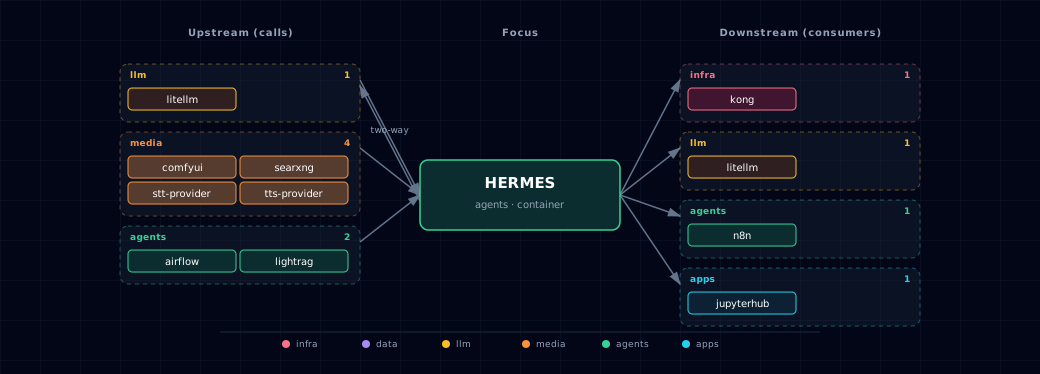
Open the full-size diagram for a full-screen view.
10.4. Future — Missing pair integrations¶
- hermes ↔ neo4j — Why: Adds durable cross-session episodic memory (entities, relations) queryable from other services, replacing flat-file state under
/opt/data. Mechanism: Custom skill overbolt://neo4j-graph-db:7687exposed as amemory.graphtool. Effort: medium. Confidence: medium. - hermes ↔ weaviate — Why: Semantic recall across sessions and ingested docs, reusing the in-stack
multi2vec-clipvectorizer. Mechanism: Skill callinghttp://weaviate:8080/v1/objectsagainst aHermesMemoryclass. Effort: medium. Confidence: medium. - hermes ↔ minio — Why: Skill outputs (ComfyUI images, STT transcripts) get shareable URLs other services can fetch instead of being trapped in a bind mount. Mechanism: New
hermes-artifactsbucket via the existingminio-initIAM pattern; S3 SigV4 againsthttp://minio:9000. Effort: small. Confidence: high. - hermes ↔ n8n — Why: Reverses the one-way edge so Hermes can call n8n workflows as tools. The 400+ n8n connectors then become Hermes capabilities without per-platform skills. Mechanism: Generic "call-n8n" skill POSTing to
http://n8n:5678/webhook/<id>withN8N_WEBHOOK_TOKEN. Effort: small. Confidence: high. - hermes ↔ doc-processor — Why: Lets Hermes answer questions about uploaded PDFs by routing them through the in-stack Docling parser before context or vector ingest. Mechanism: Skill POSTing multipart to
http://docling-gpu:8000/v1/document/convert. Effort: small. Confidence: high. - hermes ↔ supabase — Why: A JWT-scoped shared session store lets one Hermes session follow a user across Open WebUI, JupyterHub and OpenClaw. Sessions are then not pinned to single-tenant
/opt/data. Mechanism: Skill writing tohermes_sessionsvia PostgREST athttp://supabase-api:3000, keyed by Supabase JWTsub. Effort: medium. Confidence: medium.
10.5. Future — Candidate new services¶
No high-confidence opportunities identified.
10.6. Future — Unused features in this service¶
- MCP server mode — Why pursue: Unlocks tool-use over Neo4j/Weaviate/MinIO/n8n via a uniform protocol instead of bespoke skills, leveraging Hermes's existing MCP-client support. Effort: medium.
- Messaging-platform allowlists — Why pursue: Wiring
GATEWAY_ALLOW_ALL_USERS,TELEGRAM_ALLOWED_USERS, andDISCORD_ALLOWED_USERSis required before OpenClaw can safely bridge Hermes to Telegram/Discord/WhatsApp without an open relay. Effort: small. - Per-user / multi-tenant sessions — Why pursue: Needed for any shared deployment beyond a single developer's laptop; current
/opt/datalayout is single-tenant. Effort: large. - Voice mode (mic passthrough) — Why pursue: Enables true voice agent UX in-stack, currently gated on running Hermes via
localhostSOURCE for mic access. Effort: large. - Skill marketplace / dynamic skill install — Why pursue: Lets users add capabilities without rebuilding the image; Hermes upstream already supports dynamic skill loading. Effort: medium.
11. Troubleshooting¶
Run from the repository root; the commands read keys and ports from .env.
env_get() { grep "^$1=" .env | cut -d= -f2-; }

# Service status
docker compose ps hermes hermes-init

# Logs
docker compose logs -f hermes
docker compose logs hermes-init   # one-shot config rendering

# Verify the OpenAI-compatible API is up
curl -fsS http://localhost:$(env_get HERMES_API_PORT)/v1/models \
  -H "Authorization: Bearer $(env_get HERMES_API_KEY)" | jq .

# Verify hermes-agent appears in LiteLLM's model_list
curl -fsS http://localhost:$(env_get LITELLM_PORT)/v1/models \
  -H "Authorization: Bearer $(env_get LITELLM_MASTER_KEY)" | jq '.data[].id' | grep hermes

# Inspect the rendered config Hermes is using
docker compose exec hermes cat /opt/data/config.yaml
For general startup and routing issues, see Troubleshooting.
12. Capabilities & limitations¶
Support tier: experimental — Capability contract declared; no cited cold-start, workflow, or upgrade qualification run yet (evidence at v0.1.0).
| Capability | Status | Verification | Notes |
|---|---|---|---|
| LiteLLM-backed programmable agent | supported | tested | Atlas renders one usable default chat model from LiteLLM, filters recursive aliases, and exposes Hermes back through LiteLLM as hermes-agent. |
| Source-aware agent tools | partial | tested | Init renders enabled speech and SearXNG settings in the shape Hermes reads, plus a ComfyUI host companion skill. Unavailable services are omitted. LightRAG is reachable only through LiteLLM. Airflow triggering remains a user-authored skill or curl pattern. |
| Container and operator-host lifecycle | partial | tested | Atlas manages the container and its generated config. Localhost mode only resolves an operator-run API and dashboard, and cannot guarantee their setup, tools, or process supervision. |
| Hermes API and dashboard authentication | partial | documented | The OpenAI-compatible API uses HERMES_API_KEY, and hermes.localhost requires the Kong dashboard Basic credential. The dashboard runs in upstream insecure mode, so the direct host port and backend-network peers reach it without authentication. |
| Agent workspace persistence | partial | documented | Sessions, memories, skills, auth, and logs persist in one hermes-data volume, with no shared database, tenant isolation, replication, or cross-service artifact store. |
| Backend and OpenClaw direct bridges | stubbed | tested | Atlas injects Hermes endpoint credentials into Backend and OpenClaw, but neither currently calls the promised direct bridge. Open WebUI and n8n use LiteLLM or manual HTTP paths instead. |
| Untrusted autonomous tool isolation | not-supported | documented | Hermes skills can execute tools and code with the runtime's mounted workspace and network access. Atlas provides no per-user sandbox or policy engine for untrusted agent execution. |