5.2.61. Apache Zeppelin (Spark-first notebook)¶
Zeppelin runs as a single container in the stack's apps band. The Spark interpreter is intended for the in-stack standalone Spark cluster (spark://spark-master:7077) plus MinIO S3A. zeppelin-init also seeds a Trino JDBC interpreter when TRINO_SOURCE=container; Supabase Postgres remains a manual JDBC profile. Notebooks live in services/zeppelin/notebooks/, bind-mounted into the container.
1. Overview¶
Image: apache/zeppelin:0.12.1 (Apache 2.0), wrapped by services/zeppelin/build/Dockerfile so /opt/spark contains the matching Spark 4.1.2 runtime plus S3A and Iceberg lakehouse jars. Interpreters run in the Zeppelin container (no Kubernetes interpreter isolation). The Spark interpreter is the headline.
The wrapper also removes the interpreters and plugins that Atlas never configures:
- the Alluxio, BigQuery, Cassandra, Elasticsearch, Neo4j, R and SPARQL interpreters;
- the Docker and Kubernetes interpreter launchers;
- the Azure, GCS and S3 notebook repositories.
It also replaces the server's Jackson and BouncyCastle jars with checksum-pinned 2.18.11 and 1.86 releases. Spark, JDBC (%postgres, %trino), Markdown, Python and the other stock interpreters are unchanged. To restore a removed interpreter, drop it from that Dockerfile's removal list; the build fails if a base-image bump moves any listed path.
Hard requirement: Zeppelin needs SPARK_SOURCE != disabled. If you pick ZEPPELIN_SOURCE=container without Spark, the bootstrapper stops with an actionable error.
1.1. Spark backend¶
The Zeppelin Backend Decision (docs/strategy/zeppelin-spark-backend-decision.md) selects the standalone Spark interpreter path. Zeppelin submits to spark://spark-master:7077 through spark-submit in client mode. The stack should not require %spark Scala to use Spark Connect: Spark 4 rejects spark.remote together with master or deploy-mode settings. JupyterHub remains the Spark Connect notebook path (SPARK_REMOTE or SparkSession.builder.remote(...)).
spark.cores.maxisZEPPELIN_SPARK_CORES_MAX(default 1). The interpreter is long-lived. Without the cap it holds every free worker core, and Airflow cluster-mode submits wait.zeppelin-initre-seeds the value on each start, so change it in.env, not in the interpreter UI.format("kafka")does not work from%spark. The driver runs in Zeppelin, and Zeppelin's Spark runtime has no Kafka connector jars (open issue #1376).
1.2. Zero-touch Spark interpreter seeding¶
zeppelin-init waits for the Zeppelin REST API, updates the stock spark interpreter setting, restarts it, and exits. It is idempotent: rerunning it preserves user-owned properties while overwriting Atlas-owned Spark/lakehouse values.
For non-OK JSON replies, init logs the operation and endpoint without printing the response payload.
Seeded values include:
SPARK_HOME=/opt/sparkspark.master=spark://spark-master:7077zeppelin.spark.enableSupportedVersionCheck=falsespark.submit.deployMode=clientspark.driver.host=zeppelinandspark.driver.bindAddress=0.0.0.0PYSPARK_DRIVER_PYTHON=/opt/conda/envs/pyspark/bin/python(CPython 3.10),PYSPARK_PYTHON=python3for the executors, andzeppelin.pyspark.useIPython=false- MinIO S3A settings for
s3a://reads/writes and Spark event logs spark.sql.catalog.lakehouse.uri=http://iceberg-rest:8181and the rest of the Iceberg REST catalog settings forlakehouse
Manual recovery path: open Zeppelin at http://localhost:${ZEPPELIN_PORT}, go to top-right user menu → Interpreter → spark, and verify the values above. Click Save, then confirm the restart prompt if you make changes.
1.3. Verify it works¶
In a new notebook, run a %spark (Scala) cell:
%spark
println(spark.version)                 // prints the cluster's Spark version (4.1.x)
spark.range(5).selectExpr("id * id as sq").show()
…and a %spark.pyspark (Python) cell:
%spark.pyspark
spark.sql("SELECT 1 + 1 AS result").show()
If both return values, the notebook is talking to the standalone Spark cluster.
The starter notebook notebooks/spark_basics.zpln checks the Spark version,
S3A round-trip and JDBC integrations (§5).
With Iceberg REST enabled, a %spark.sql cell can validate the lakehouse catalog:
%spark.sql
SHOW NAMESPACES IN lakehouse
With Trino enabled, zeppelin-init creates a named JDBC interpreter profile called trino. Use %trino in Zeppelin 0.12.1:
%trino
SHOW CATALOGS;
SHOW SCHEMAS FROM lakehouse;
Use %trino, not %jdbc(trino): Zeppelin 0.12.1 uses the interpreter name as the paragraph prefix for created JDBC profiles.
1.4. MinIO (s3a) and Spark History¶
The seeded interpreter carries the stack's storage settings, so notebooks need no credentials:
s3a://usesspark.hadoop.fs.s3a.*with MinIO athttp://minio:9000, the scopedMINIO_SPARK_*account and path-style access.- Event logs go to
s3a://<MINIO_BUCKET_SPARK_HISTORY>/(defaultspark-history). View them in the Spark History UI (SPARK_HISTORY_PORT). - The
lakehousecatalog useshttp://iceberg-rest:8181and warehouses3a://<MINIO_BUCKET_ICEBERG_LAKEHOUSE>/(defaultlakehouse).
1.5. Driving Zeppelin from VS Code¶
Zeppelin speaks its own REST + websocket protocol, not the Jupyter kernel protocol, so VS Code's built-in Jupyter extension cannot connect to it. The community "Zeppelin Notebook" extension (AllenLi1231.zeppelin-vscode) renders .zpln files and runs paragraphs against the same Spark interpreter as the web UI. Point it at http://localhost:${ZEPPELIN_PORT} (no credentials; see §2), through an SSH tunnel for a remote host. The Marketplace page lists setup steps and caveats. The browser UI (§2) is the dependable fallback.
2. Access¶
| Surface | URL | Auth |
|---|---|---|
| Direct | http://localhost:${ZEPPELIN_PORT} |
None; the published port is always bound to 127.0.0.1. |
No authentication ships pre-configured, so Atlas does not publish Zeppelin through Kong and does not honor a wider HOST_BIND_IP for this service. Configure Zeppelin authentication before you add any external reverse-proxy route.
From another machine, tunnel the loopback port, then open http://localhost:<ZEPPELIN_PORT>:
ssh -L <ZEPPELIN_PORT>:127.0.0.1:<ZEPPELIN_PORT> <user>@<atlas-host>
Zeppelin 0.12.1 refuses a state-changing REST request or a websocket from another origin (403). It accepts an origin whose host is localhost (any port) and the origins in ZEPPELIN_ALLOWED_ORIGINS. Atlas sets these to http://localhost:<ZEPPELIN_PORT> and http://127.0.0.1:<ZEPPELIN_PORT>. If the tunnel uses another local port, open Zeppelin at a localhost URL.
3. Configuration¶
ZEPPELIN_SOURCE=disabled           # container | disabled
ZEPPELIN_IMAGE=apache/zeppelin:0.12.1
ZEPPELIN_INIT_IMAGE=python:3.12.13-alpine
ZEPPELIN_PORT=                     # auto-assigned (apps band)
ZEPPELIN_SPARK_CORES_MAX=1         # spark.cores.max for the interpreter (§1.1)
ZEPPELIN_MEMORY_LIMIT=2g           # container limits
ZEPPELIN_CPU_LIMIT=1.5
ZEPPELIN_DB_USER=atlas_zeppelin    # read-only Postgres role for the manual JDBC profile
ZEPPELIN_DB_PASSWORD=              # auto-generated
4. Integration with the stack¶
- Spark (required) —
%sparkcells use the standalone Spark interpreter path selected in the Zeppelin backend decision:SPARK_HOMEplusspark.master=spark://spark-master:7077. - MinIO —
s3a://credentials come from the generatedMINIO_SPARK_*service account. It is limited to the Spark event-log and lakehouse workflow buckets; Zeppelin never receives MinIO root credentials. - Iceberg REST (optional) — when
ICEBERG_REST_SOURCE=container, the seededlakehousecatalog points tohttp://iceberg-rest:8181and uses the scoped Iceberg MinIO credentials for S3FileIO. - Trino (optional) — when
TRINO_SOURCE=container,zeppelin-initwaits forhttp://trino:8080/v1/info. It then creates or updates a named JDBC interpreter profiletrino(groupjdbc) withdefault.driver=io.trino.jdbc.TrinoDriver,default.url=jdbc:trino://trino:8080/lakehouse,default.user=atlas, and dependencyio.trino:trino-jdbc:482. Then%trino SHOW CATALOGSworks without manual UI setup. Trino still requiresMINIO_SOURCE=containerandICEBERG_REST_SOURCE=container; ifTRINO_SOURCE=disabled, the init script logs a skip and leaves existing JDBC settings alone. - Supabase Postgres — the container receives JDBC details for the read-only
ZEPPELIN_DB_USERrole (ZEPPELIN_JDBC_POSTGRES_URL/_USER/_PASSWORD), but Zeppelin does not auto-bind them to a JDBC interpreter. One-time manual setup is required: create apostgresJDBC interpreter in the Zeppelin UI with those values. - LiteLLM (optional) — Python interpreter can call the LiteLLM gateway via
openai.OpenAI(base_url="http://litellm:4000/v1", api_key=...). No pre-configuration ships; users wire it themselves.
5. Starter notebook¶
services/zeppelin/notebooks/spark_basics.zpln ships pre-loaded. 5 cells:
- Spark version check (
spark.version) - Markdown intro
- MinIO round-trip via S3A (
s3a://<MINIO_BUCKET_SPARK_HISTORY>/..., defaultspark-history) - Trino JDBC metadata smoke via
%trino(SHOW CATALOGS;SHOW SCHEMAS FROM lakehouse) whenTRINO_SOURCE=container - Postgres JDBC
SELECT version()against supabase-db. It needs the one-timepostgresinterpreter setup in §4; until then it errors with "Interpreter not properly configured".
Use it as a template for your own notebooks.
services/zeppelin/notebooks/iceberg_advanced_sql.zpln is the opt-in
standalone Spark counterpart to JupyterHub's Spark Connect advanced smoke,
covering Iceberg's MERGE/branching/streaming/maintenance surface. Its
streaming paragraph writes to the buckets named by MINIO_BUCKET_ICEBERG_LANDING
and MINIO_BUCKET_ICEBERG_CHECKPOINTS. Run it
from the Zeppelin UI or from the repository root:
scripts/smoke-iceberg-advanced-sql.sh zeppelin
This data-eng / all track smoke adds no new service, SOURCE, or port. It
requires SPARK_SOURCE, ICEBERG_REST_SOURCE, MINIO_SOURCE, and
ZEPPELIN_SOURCE all set to container. See
docs/operations/iceberg-advanced-smoke.md
for the full feature list this smoke exercises.
6. Dependencies & Integrations¶
6.1. Current — Upstream (this service calls)¶
| Service | Category | Status |
|---|---|---|
| iceberg-rest | data | current |
| minio | data | current |
| redpanda | data | optional: Kafka jars not bundled (#1376); Atlas passes only SPARK_KAFKA_BOOTSTRAP_SERVERS |
| spark | data | current |
| supabase | data | current |
| trino | data | current |
6.2. Current — Downstream (services that call this)¶
No downstream consumers.
6.3. Architecture diagram¶
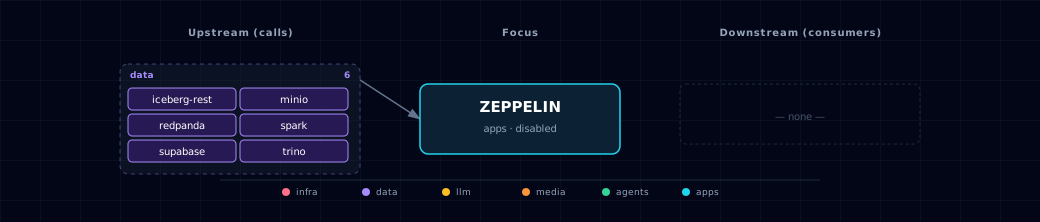
Open the full-size diagram for a full-screen view.
6.4. Future — Missing pair integrations¶
No high-confidence opportunities identified.
6.5. Future — Candidate new services¶
No high-confidence opportunities identified.
6.6. Future — Unused features in this service¶
No high-confidence opportunities identified.
7. Troubleshooting¶
- Spark interpreter says "no master URL" — the container and the
sparkinterpreter must both usespark://spark-master:7077. Check the container withdocker exec ${PROJECT_NAME}-zeppelin env | grep SPARK_MASTER, and checkspark.masterin the interpreter settings. Rerun./start.shto restore both, becausezeppelin-initre-seeds the interpreter. - First
%sparkcell after stack-up errors with "connection refused" — Zeppelin waits forspark-masterto be healthy andspark-initto complete. A cold Spark worker or a freshly restarted interpreter can still need a few seconds before it accepts driver and executor traffic. Confirmspark.master=spark://spark-master:7077in thesparkinterpreter settings, then re-run the cell once the Spark master UI shows a live worker. -
S3A: "Access Denied" on s3a://... — the scoped
MINIO_SPARK_*credentials or policy can be missing. Check credential and submit-option presence without printing their values:docker exec ${PROJECT_NAME}-zeppelin sh -c ' for name in MINIO_SPARK_ACCESS_KEY MINIO_SPARK_SECRET_KEY SPARK_SUBMIT_OPTIONS; do if printenv "$name" | grep -q .; then printf "%s: configured\n" "$name" else printf "%s: missing\n" "$name" fi done'Presence alone does not confirm bucket permissions. Re-run
./start.shto provision the account and refresh the interpreter. -
JDBC interpreter "Interpreter not properly configured" — Zeppelin does not auto-bind the
ZEPPELIN_JDBC_POSTGRES_*env vars to a JDBC interpreter profile. Walk through §4's one-time UI setup, then restart it (Interpreter → postgres → Restart). Supabase Postgres also must be running (it's a required dep of the stack). %trinois missing or cannot load the driver — confirm bothZEPPELIN_SOURCE=containerandTRINO_SOURCE=container, then checkdocker logs ${PROJECT_NAME}-zeppelin-init. The init script reports "trino JDBC interpreter created", "configured and restarted" or "already configured". The interpreter dependency must includeio.trino:trino-jdbc:482.-
%spark.pysparkfails withFail to bootstrap pyspark— PySpark 4.1 needs Python 3.10 or newer, and the stock image's own conda envs are 3.7 and 3.9. Check that thesparkinterpreter'sPYSPARK_DRIVER_PYTHONis/opt/conda/envs/pyspark/bin/python; rerunning./start.shre-seeds it.- That env is installed from the explicit conda-forge locks in
build/pyspark-env/(one per architecture). - To refresh them, solve
python=3.10against conda-forge withCONDA_SUBDIRset tolinux-64andlinux-aarch64(conda create --dry-run --json --override-channels -c conda-forge). Write each package's URL and md5 under@EXPLICIT. - Keep the minor release equal to the Spark image's
python3.
- That env is installed from the explicit conda-forge locks in
-
"Notebook won't save" —
/notebookis bind-mounted fromservices/zeppelin/notebooks/. Confirmservices/zeppelin/notebooks/exists and is writable by the host user. Zeppelin writes new .zpln files there.
8. Capabilities & limitations¶
Support tier: experimental — Capability contract declared; no cited cold-start, workflow, or upgrade qualification run yet (evidence at v0.1.0).
| Capability | Status | Verification | Notes |
|---|---|---|---|
| Spark-first interactive notebooks | supported | tested | Atlas bundles a matching Spark runtime and seeds the standalone Spark interpreter for Scala, PySpark and SQL paragraphs against the in-stack cluster. PySpark's driver runs a bundled CPython 3.10, the minor release the cluster's executors run. |
| MinIO and Iceberg lakehouse notebooks | partial | tested | The interpreter receives scoped S3A and Iceberg REST settings and starter notebooks, while advanced operations remain an operator-run live smoke. |
| Adaptive Trino and Postgres JDBC | partial | tested | Init seeds a Trino interpreter only when enabled, but Supabase Postgres variables still require one-time manual JDBC interpreter configuration. |
| Notebook and log persistence | partial | documented | Notebooks bind to the repository and logs use a named volume, but concurrent edits, backup, restoration, and multi-replica writer coordination are operator-owned. |
| Authenticated Zeppelin access | not-supported | tested | Zeppelin ships without authentication. It is deliberately exposed only on a fixed loopback port with no Kong route. Remote users must tunnel or configure auth before proxying it. |
| Interpreter process isolation and HA | not-supported | documented | All interpreters run in one Zeppelin container with injected lakehouse credentials; Atlas configures neither per-user sandboxing nor a replicated notebook control plane. |