5.2.11. ComfyUI¶
Node-based image generation workflow engine. ComfyUI runs as one container with a web UI and an HTTP API (/prompt, /history/{id}, /view) on its own port. Its WebSocket (/ws) streams executing, executed and progress events while a workflow runs. Backend, Hermes, JupyterHub and Open WebUI call ComfyUI at COMFYUI_ENDPOINT (§2); browsers use the Kong route. n8n reaches it through the backend (backend:8000/comfyui/*), not directly.
Source variants:
container-cpuandcontainer-gpu: run theai-dock/comfyuiimage.localhost: consumers use a ComfyUI that you run on the host.managed-localhost-mps: Atlas installs and runs a native Metal ComfyUI on Apple Silicon (§9).disabled: removes ComfyUI from compose.
A short-lived comfyui-init container stages the models in COMFYUI_USER_MODELS into the comfyui-models volume. The wizard's "ComfyUI · models" step sets that variable. An AI-Dock provisioning hook installs pinned custom-node repositories and their declared requirements in the ComfyUI runtime.
Where to start: choose models in §6 and queue a workflow through the API (§6, §8.3). Apple Silicon setup is in §9. Known problems are in §11.
1. Overview¶
Image: ghcr.io/ai-dock/comfyui:v2-cpu-22.04-v0.2.7 (CPU default). COMFYUI_REF=v0.27.0 with COMFYUI_AUTO_UPDATE=true makes the ai-dock startup check out that ComfyUI release, even when the base image tag lags.
container-gpu is not GPU-accelerated. COMFYUI_IMAGE stays the CPU image (which forces --cpu), and the fragment reserves no NVIDIA device. So container-gpu behaves like container-cpu, also when COMFYUI_SOURCE=auto selects it on NVIDIA hosts. A CUDA ai-dock image alone does not help without a GPU reservation.
Generated images go to the comfyui-output volume, and the /view endpoint serves them. COMFYUI_UPLOAD_TO_SUPABASE=true and COMFYUI_STORAGE_BUCKET=comfyui-images are reserved but inert. No component in the stock ai-dock image, Atlas provisioning or the backend reads them, so outputs are not uploaded to Supabase (§5.4). The comfyui-custom-nodes volume holds the allowlisted community nodes from services/comfyui/custom-nodes.yaml.
2. Access¶
| Path | URL | Notes |
|---|---|---|
| Direct | http://localhost:${COMFYUI_PORT} (default 63054) |
Web UI + REST API. |
| Kong | http://comfyui.localhost:${KONG_HTTP_PORT} |
Browser-friendly; needs ./start.sh --setup-hosts. |
| Internal | ${COMFYUI_ENDPOINT} |
Resolved per COMFYUI_SOURCE: http://comfyui:18188 for container, http://host.docker.internal:${COMFYUI_LOCALHOST_PORT} for localhost. |
| WebSocket | ws://comfyui:18188/ws |
Streams progress events; one connection per caller. |
Canonical port table: Ports and Routes.
3. Configuration¶
COMFYUI_SOURCE=container-cpu                # container-cpu | container-gpu | localhost | managed-localhost-mps | disabled
COMFYUI_PORT=63054                          # computed by topology.py
COMFYUI_BASE_URL=http://comfyui:18188       # in-container default
COMFYUI_ARGS=--listen                       # static — passed verbatim; the CPU image adds --cpu itself (compose default when unset: --listen --cpu)
COMFYUI_PLATFORM=linux/amd64
COMFYUI_USER_MODELS=                         # comma-separated catalog names; set by the wizard
COMFYUI_UPLOAD_TO_SUPABASE=true
COMFYUI_STORAGE_BUCKET=comfyui-images
COMFYUI_AUTO_UPDATE=true                    # AI-Dock startup updates ComfyUI to COMFYUI_REF
COMFYUI_REF=v0.27.0                         # pinned upstream ComfyUI release tag or full commit SHA
COMFYUI_MEMORY_LIMIT=40g                    # hard ceiling, not a reservation; supports large bundles such as Krea 2
COMFYUI_CPU_LIMIT=2.0                       # container CPU ceiling; stops CPU-mode inference from taking every host core
COMFYUI_CUSTOM_MODELS_FILE=/custom-models.yaml  # sidecar of models outside the catalog; set with --comfyui-custom-models-file (§6)
COMFYUI_CUSTOM_NODES_FILE=/custom-nodes.yaml # os.pathsep-joined path-list: Atlas allowlist always present + consumer custom_nodes.comfyui paths
Localhost overrides:
COMFYUI_LOCALHOST_PORT=8000                 # URL is derived as http://host.docker.internal:8000 at compose-render time
COMFYUI_LOCAL_MODELS_PATH=~/Documents/ComfyUI/models   # SOURCE=localhost preflight path (managed MPS uses COMFYUI_MPS_MODELS_PATH); container sources mount it read-only at /host_models (unused)
Managed Apple-Silicon / Metal (MPS) overrides (SOURCE=managed-localhost-mps; see §9):
COMFYUI_MPS_LOCALHOST_PORT=8188             # fixed host port; URL is http://host.docker.internal:8188 (named _LOCALHOST_ so the slot allocator leaves it fixed)
COMFYUI_MPS_LISTEN=127.0.0.1                # bind address; set 0.0.0.0 on Linux container engines (§9.1)
COMFYUI_MPS_REF=v0.27.0                     # pinned upstream ComfyUI git ref the managed host checks out (mirrors COMFYUI_REF)
COMFYUI_MPS_TORCH_PIN="torch==2.11.0 torchvision==0.26.0 torchaudio==2.11.0"   # pinned Metal Torch; bump with COMFYUI_MPS_REF
COMFYUI_MPS_STATE_DIR=~/.atlas/comfyui-mps  # Atlas-owned host state dir: pinned checkout + venv + pid/log/status files
COMFYUI_MPS_MODELS_PATH=~/Documents/ComfyUI/models   # existing host models dir reused via extra_model_paths (no duplicate weights)
COMFYUI_MPS_MIN_MEMORY_GB=16                # unified-memory floor the preflight warns below (whole GiB)
Auto-managed (do not edit manually):
COMFYUI_ENDPOINT=...                        # consumed by backend, celery, open-webui, jupyterhub (hermes as COMFYUI_INTERNAL_URL); not n8n
COMFYUI_SCALE / COMFYUI_INIT_SCALE
4. Architecture & wiring¶
Request flow. The backend POSTs a workflow JSON to ${COMFYUI_ENDPOINT}/prompt and receives a prompt_id. n8n workflows call the backend's /comfyui/* routes, not ComfyUI. To track progress, the caller polls GET /history/{prompt_id}, or opens a /ws websocket and filters by prompt_id. Outputs go to output/ in the container; the /view endpoint serves them by filename.
Init flow. At start, the bootstrapper resolves the selected models and custom nodes from COMFYUI_USER_MODELS and the catalogs, and writes a manifest to volumes/comfyui/. comfyui-init downloads the models into comfyui-models. Downloads are SHA-256 verified; an interrupted download restarts from the beginning, and verified files are kept. The ComfyUI AI-Dock provisioning hook clones the allowlisted nodes into comfyui-custom-nodes.
Selected models and nodes are required for readiness, whether or not they have a checksum; provisioning_required: false opts an advisory asset out.
Each provisioner publishes provisioning, ready or failed for its exact plan into its volume. The healthcheck passes only on a matching ready and then probes /system_stats. A failed required model makes comfyui-init exit nonzero; optional failures only warn. Re-running ./start.sh retries failed work and reuses verified files. The manifest and TSV formats are documented in the comfyui_resolver module and services/comfyui/provisioning/provision_custom_nodes.sh.
Hard dependencies (depends_on.required): supabase, litellm, ollama. Compose gates comfyui on supabase-db-init and comfyui-init, and comfyui-init on ollama-pull. ComfyUI does not call LiteLLM; litellm is listed only for canonical wizard row ordering. The supabase-storage dependency is reserved for an output-upload path that is inert (§5.4). ComfyUI's only runtime_adaptive entry is adapts_to: comfyui.
Volumes: comfyui-models (checkpoints, VAEs, LoRAs), comfyui-custom-nodes (allowlisted community nodes cloned at pinned refs), comfyui-input (input images at /opt/ComfyUI/input), comfyui-output (generated images, served by /view).
Output deduplication. None. The same workflow run twice writes two output files to the comfyui-output volume.
5. Dependencies & Integrations¶
5.1. Current — Upstream (this service calls)¶
No upstream calls.
5.2. Current — Downstream (services that call this)¶
| Service | Category |
|---|---|
| kong | infra |
| hermes | agents |
| backend | apps |
| jupyterhub | apps |
| open-webui | apps |
5.3. Architecture diagram¶
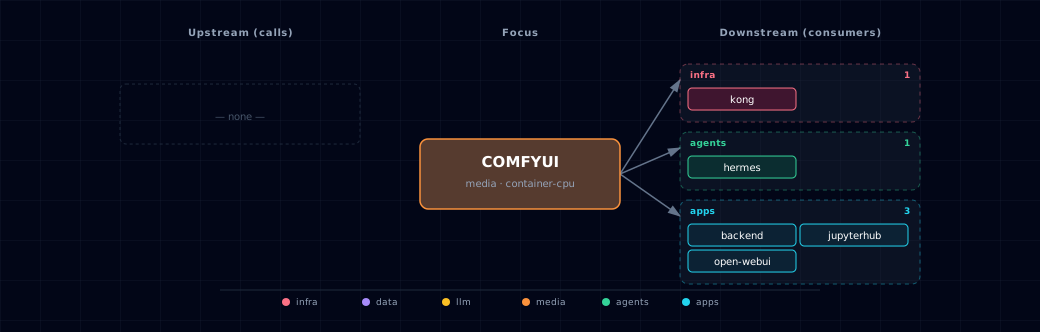
Open the full-size diagram for a full-screen view.
5.4. Future — Missing pair integrations¶
- comfyui ↔ minio — Why: outputs stay in the
comfyui-outputvolume only, andCOMFYUI_UPLOAD_TO_SUPABASEandCOMFYUI_STORAGE_BUCKEThave no consumer.services/minio/service.ymlalready provisions acomfyuibucket and an unusedMINIO_COMFYUI_ACCESS_KEY. Mechanism: a small custom node, or a sidecar that reads theexecutedevent onws://comfyui:18188/ws, pushes/viewartifacts tos3://comfyuionhttp://minio:9000. Addminiotoruntime_deps.optional. Effort: small. Confidence: high. - comfyui ↔ weaviate (via multi2vec-clip) — Why: each generation produces an image and its prompt. The weaviate family already runs
multi2vec-clip, so outputs can be embedded for similarity search with no new infrastructure. Mechanism: a post-execution hook PUTs{image, prompt, workflow_id}into aComfyImageclass withvectorizer: multi2vec-cliponhttp://weaviate:8080/v1/objects. Effort: medium. Confidence: high. - comfyui ↔ n8n — Why:
services/n8n/service.ymlinstallsn8n-nodes-comfyuiand the image-to-image package. The comfyui manifest has noruntime_deps.optionallink to n8n, and no n8n credential is pre-seeded. Mechanism: pre-seed an n8n credential at startup (POST /credentials) that points at${COMFYUI_ENDPOINT}; addn8ntoruntime_deps.optional. Effort: small. Confidence: medium. - comfyui ↔ redis — Why: compose lists
redisindepends_on, but ComfyUI does not use it. A queue-state bridge would let n8n and the backend poll job status without one open websocket per request. Mechanism: a custom node mirrorsexecuting/executed/progressevents into Redis pub/sub channelscomfyui:job:<prompt_id>. Effort: medium. Confidence: low (polling/historyis cheaper).
5.5. Future — Candidate new services¶
No high-confidence opportunities identified.
5.6. Future — Unused features in this service¶
- ComfyUI-Manager +
cm-clifor custom-node lifecycle — Why pursue: Atlas clones pinned nodes from an allowlist. It does not use ComfyUI-Manager to enable, disable or remove nodes, or to reconcile their dependencies. Its GPL-3.0 license and runtime behavior need an explicit decision first. Effort: small. - Video model support (Mochi / LTX-Video) — Why pursue: upstream ComfyUI supports video diffusion. The picker has a
videocategory filter, but the curated list is thin. Production-ready video checkpoints (Mochi, LTX-Video, Wan) would give GPU users video generation. Effort: medium. - Authentication on the ComfyUI endpoint — Why pursue:
server.pyships no auth and Kong fronts ComfyUI oncomfyui.localhost. A Kong basic-auth or JWT plugin would stop any LAN peer from queueing GPU jobs. Effort: small.
6. Operations¶
Choosing models. Run ./start.sh with no arguments to open the wizard, and go to the "ComfyUI · models" step. The step shows for every non-disabled source, like the Ollama picker. Keys:
f: filter chips by category (Image / Image-edit / Video / Audio / 3D)./orTab: search by name.Space: toggle a row.Enter: confirm.
The selection is saved as COMFYUI_USER_MODELS in .env. On the next ./start.sh:
container-cpu/container-gpu:comfyui_resolverwritesvolumes/comfyui/selected-models.yaml,active-models.tsvandactive-custom-nodes.tsv. Both TSVs have arequired/optionalcolumn; a plan without it fails safe as required.comfyui-initdownloads each model row intocomfyui-models. The AI-Dock hook clones each allowlisted node intocomfyui-custom-nodes. Node dependencies come from the content-addressed lock copied beside the TSV, never from the clone'srequirements.txt.localhost: the bootstrapper still writes the manifest, so the backend/comfyui/db/modelsendpoint shows the active set to Open WebUI and n8n.comfyui-initdoes not run (scale=0). You populate your host ComfyUI models directory yourself.managed-localhost-mps: the same set is provisioned intoCOMFYUI_MPS_MODELS_PATHat start, and allowlisted nodes are installed into the host ComfyUI. Nocomfyui-initcontainer runs (§9).
Each start re-scrapes Hugging Face and civitai. A selected model that the scrape no longer returns stays active with its last-resolved metadata, kept in volumes/comfyui/selected-library-entries.json. A name that nothing resolves is not staged; the start warns, and the wizard keeps it as a saved row. If that file cannot be read, the step shows the reason as a warning.
If two selected models would be saved at the same path, the first wins, and the start warns and continues.
The files under volumes/comfyui/ are gitignored runtime artifacts. Each non-disabled start rewrites them; do not edit or commit them. A normal start therefore leaves the checkout, and a consumer's Atlas submodule, clean. Tracked marker files (.gitkeep and a short README) keep the directory on fresh clones, because the backend bind-mounts it read-only. The catalog you edit is services/comfyui/models.yaml.
CLI alternative (works for all non-disabled sources):
./start.sh --comfyui-models=sdxl-base-1.0,sdxl-vae,flux1-dev-Q4_K_S
Required custom_nodes. Some models (Flux GGUF, AnimateDiff, IP-Adapter, InstantID, 3D-Pack, etc.) need specific custom nodes. The wizard marks those rows with a node: <node-name> badge. For container sources, Atlas maps the names through services/comfyui/custom-nodes.yaml into active-custom-nodes.tsv. The hook clones only allowlisted repos at their pinned commits.
A node with install_requirements: true must also declare requirements_lock and requirements_lock_sha256. Both the container and managed-MPS provisioners verify that digest and install with --require-hashes --no-deps. Unknown or unconstrained nodes fail closed. To regenerate the reviewed locks:
- Run
uv run python scripts/compile_comfyui_custom_node_locks.py --write. - Update the catalog digest that it prints.
- Prove byte identity with
--check.
An optional mps_unsafe: true skips a node under managed-localhost-mps (CUDA/x86-only native wheels). Container sources ignore it.
3D-Pack secure-install boundary. The pinned 3D-Pack imports rembg, Real-ESRGAN and BasicSR. The AI-Dock runtime is Python 3.10, but the first rembg release that fixes its advisories needs Python 3.11 or newer. BasicSR has no fixed release. Atlas therefore does not clone 3D-Pack. Its catalog rows stay visible for operators who manage the node outside Atlas, and the unknown-node warning states the boundary.
Consumer-declared custom nodes. A consumer manifest can add nodes with custom_nodes.comfyui in atlas.consumer.yml. The value is a path or path-list to a file with the same schema: {name, repo, ref, install_requirements, requirements_lock, requirements_lock_sha256, mps_unsafe, provisioning_required}. Rules:
- Lock paths are relative to the declaring YAML and must not escape its directory. The two lock fields are required only when
install_requirementsis true. provisioning_requiredis a boolean, defaulttrue.- The Atlas
custom-nodes.yamlis always in the merged allowlist and wins on a name collision. - Consumer nodes are active unconditionally: no model needs to reference them.
- The pinned-SHA, GitHub-HTTPS and hashed-lock rules are enforced at manifest load (fail-loud) and again at provision.
- Under
managed-localhost-mps, the nodes are cloned into the hostcustom_nodes/, and their locked requirements go into the host venv.
Adding models not in the catalog. Edit services/comfyui/custom-models.yaml (schema in its header comment). Entries show in the wizard with a [Custom] badge. Use url/filename for one file. Use files: with a per-file target_dir for multi-file models, for example weights, text encoders and a VAE; target_dir can place mesh weights in checkpoints. The start skips an entry, with a warning, in these cases:
- The downloader would refuse it: a name with
/, a URL without a path, or a SHA-256 that is not 64 hex digits. Upper-case hex is valid. - It would be saved at the same
target_dir/filenameas another active model. Give it a distinctfilename:.
Scraped Hugging Face files with a generic name, such as diffusion_pytorch_model.safetensors, are saved as <owner>--<repo>--<file>. A copy saved earlier under the generic name is not reused, so the model downloads once more.
To use another sidecar, pass --comfyui-custom-models-file <path>. A relative path resolves against the directory you run ./start.sh from and is stored absolute. Join several paths with the OS path separator. A configured path that does not exist gives a startup warning and fails ./start.sh doctor. Only the shipped default /custom-models.yaml falls back to the repo sidecar silently.
The shipped curated catalog has a stricter trust contract. Each artifact uses an immutable Hugging Face revision and an exact lowercase SHA-256, and the init container refuses an unverified curated row. User sidecars and live or fallback discovery are operator-controlled. A supplied SHA-256 is enforced. A file without a digest is downloaded and logged as <source>/unverified (for example custom/unverified); Atlas does not call it verified.
Removing models. Unchecking a model in the wizard makes it inactive on the next start: it leaves the manifest and is not downloaded again. The file stays in the volume, as with Ollama. To reclaim disk:
# Nuke the entire volume:
./stop.sh --cold

# Selective delete:
docker run --rm -v <project>-comfyui-models:/m alpine \
  rm /m/checkpoints/<file>
Backend REST view. GET /comfyui/db/models?active_only=true on the backend returns the active catalog rows for Open WebUI and n8n.
Media gateway. The backend's POST /media/generate with provider=comfyui, modality=image builds and submits a ComfyUI graph: an SD1.5/SDXL checkpoint graph, or the Krea 2 split-loader graph. It supports img2img (image_url and strength 0–1; init image at most 4096 px per side) and cancellation with POST /media/operations/{id}/cancel. The owner gets the result from GET /media/operations/{operation_id}/artifacts/{index}. GET /comfyui/image/{filename} remains for n8n and Open WebUI.
If the submit reply is lost, malformed or lacks a usable prompt id, /media/generate returns 504 with a local_submission_id. Atlas keeps a submission_unknown operation for reconciliation. Inspect the ComfyUI queue before you retry. Settlement instructions are in Backend §3.6.
Queue and monitor a workflow programmatically. POST a workflow graph to /prompt to get a prompt_id. Then poll /history/{prompt_id}, or open ws://comfyui:18188/ws and filter events by that ID (status, executing, executed, progress, execution_error). This is stock ComfyUI API behavior; upstream ComfyUI documents the full contract.
7. Performance notes¶
- Container sources run on CPU. Both
container-cpuandcontainer-gpurun the CPU image (§1), capped atCOMFYUI_CPU_LIMIT(default 2.0 CPUs). CPU generation is much slower than GPU or Metal generation. Atlas has not published measured generation times. Use the container sources to test workflows, not for production. - Model loading adds first-run latency. The curated SD 1.5 and SDXL checkpoints are 3.97 GB and 6.94 GB (
models.yaml). The first workflow that uses a model waits while ComfyUI loads it into memory; later runs reuse it. Atlas has not measured this load time. - No batching. ComfyUI processes one workflow at a time; concurrent requests queue. For high throughput, add replicas (out of scope for the default stack).
8. Krea 2 model bundles¶
8.1. Bundle inventory¶
Atlas exposes Krea 2 as two independent BF16 catalog selections. Both use ComfyUI core loaders and share the same Qwen3-VL 4B text encoder and Qwen-Image VAE. If you select both, the manifest keeps six logical rows for bundle provenance, but active-models.tsv has four unique downloads.
Container sources use a COMFYUI_MEMORY_LIMIT=40g hard ceiling so the bundle can load. This is a limit, not a reservation; smaller workloads use only their actual memory.
| Bundle | Catalog ID | Precision | Disk | Recommended RAM | Recommended VRAM |
|---|---|---|---|---|---|
| Krea 2 Turbo | krea2-turbo-bf16 |
BF16 | 35.413 GB | 32 GB | 32 GB |
| Krea 2 RAW | krea2-raw-bf16 |
BF16 | 35.413 GB | 32 GB | 32 GB |
Exact catalog IDs, per-file sizes, and pinned SHA-256 hashes are maintained in services/comfyui/models.yaml, the authoritative catalog source.
8.2. Pinned artifacts¶
All four unique files (Turbo diffusion model, RAW diffusion model, shared text encoder, shared VAE) come from immutable revision 8038ce89b91b042141541ad0fa51b985ca262c5f of Comfy-Org/Krea-2. Per-file target paths, byte sizes, and SHA-256 hashes are recorded in services/comfyui/models.yaml.
8.3. Core-node workflow¶
workflows/krea2-turbo-api.json is an API-ready 1024-square example. It uses CLIPLoader type krea2, 8 steps, CFG 1.0, euler with the simple scheduler, and ConditioningZeroOut for negative conditioning. No custom nodes are required. Atlas pins ComfyUI v0.27.0; core Krea 2 support first appeared in v0.26.0.
Queue it after selecting krea2-turbo-bf16:
curl -X POST http://localhost:${COMFYUI_PORT}/prompt \
  -H 'content-type: application/json' \
  --data-binary @services/comfyui/workflows/krea2-turbo-api.json
8.4. License and deployment obligations¶
The weights use the pinned Krea 2 Community License. The krea/Krea-2-Turbo repository is gated: Hugging Face shows the file only after you sign in and accept its terms. Commercial use at or above $1,000,000 USD ($1M) in company-wide annual revenue requires an enterprise license. Deployments must also implement reasonable and appropriate content filtering. The license states no seat-count threshold.
The model picker and the generated manifest metadata show these obligations before the weights download.
8.5. Verification¶
Offline tests validate the artifact metadata, bundle expansion, shared-download deduplication, wizard badges, workflow node graph and all three documentation surfaces. The real 1024-square generation is an opt-in live smoke test, because it needs the 35.413 GB bundle and suitable hardware:
ATLAS_COMFYUI_LIVE_ENDPOINT=http://localhost:${COMFYUI_PORT} \
  uv run --project bootstrapper pytest bootstrapper/tests/test_krea2_catalog.py -m live -q
8.6. Identity Edit LoRA for comfyui-krea2edit¶
The comfyui-krea2edit node pack is not in the Atlas allowlist; a consumer declares it with custom_nodes.comfyui (§6). The pack needs a Krea 2 model, the Qwen3-VL encoder and the krea2_identity_edit_v1_2.safetensors LoRA. Without the LoRA, the nodes register but do not edit. Under managed-localhost-mps, provision-nodes and doctor still report success.
Select the curated krea2-identity-edit-v1-2 entry (1.83 GB, category lora) together with the node. The wizard badges it requires GPU and recommends 32 GB RAM and 32 GB VRAM. Like all Krea 2 artifacts, it carries the other license under the Krea 2 Community License.
The LoRA is an unofficial community fine-tune, trained on Krea 2 Raw; identity fidelity on Turbo can be lower.
9. Managed Apple-Silicon / Metal (MPS) source¶
COMFYUI_SOURCE=managed-localhost-mps is a managed host source for Apple Silicon (M-series) Macs. Docker Desktop on macOS cannot pass Metal into a Linux container. So Atlas installs and runs a native ComfyUI process on the host and points COMFYUI_ENDPOINT at it. In unmanaged localhost mode you install, update and launch ComfyUI yourself. Every consumer (backend, Open WebUI, JupyterHub, consumer manifests) uses the same COMFYUI_ENDPOINT contract, whatever the source.
One process per host. One ComfyUI instance already saturates the Apple Silicon GPU; a second one on the same machine is slower overall. The managed source runs exactly one process, keyed by a PID file. For parallelism, add machines.
9.1. What Atlas manages¶
- Pinned checkout and venv —
COMFYUI_MPS_REF(defaultv0.27.0, mirroringCOMFYUI_REF) is checked out intoCOMFYUI_MPS_STATE_DIR(default~/.atlas/comfyui-mps), with a venv that holds Metal-enabled Torch. Each install compares the ref and requirements fingerprint with recorded state. A changed pin or dependency file is reinstalled; an unchanged environment is reused. - Host models reuse and provisioning — the process reads
COMFYUI_MPS_MODELS_PATH(default~/Documents/ComfyUI/models, shared withCOMFYUI_LOCAL_MODELS_PATH) through a generatedextra_model_paths.yaml. Existing weights, for example a Krea 2 or Flux install, are used in place with no duplicate weights. At start, Atlas downloads the selected catalog models (COMFYUI_USER_MODELS) that are missing from that tree, as the container init would. - Download rules — downloads are SHA-256 verified, and a verified file is skipped. They resume from a
.partfile, publish atomically, check free disk first and announce licenses. - Resume and failures — fp8 variants are skipped with a warning (MPS needs BF16). A resume sends
If-Rangewith the recorded ETag or Last-Modified, so a changed upstream file downloads again from the start. A.partwith no recorded validator also restarts. A short transfer keeps the.partand fails that file; an oversized.partis deleted and fetched again. Neither is published. - Provisioning runs — only one provisioning run uses a models tree at a time. A second run (for example
./start.sh comfyui-mps provisionduring a start) waits, then skips the files the first run published. A per-file failure does not stop the stack; re-run./start.sh comfyui-mps provision. A symlinked model folder (for examplemodels/checkpoints -> /Volumes/x) is written through the link. - Port, bind address, PID/log/status files — the process listens on
COMFYUI_MPS_LOCALHOST_PORT(default8188) atCOMFYUI_MPS_LISTEN(default127.0.0.1). Loopback works on Docker Desktop/macOS, wherehost.docker.internalforwards to host loopback. On Linux container engines,host.docker.internalmaps to a bridge address that cannot reach a loopback listener; setCOMFYUI_MPS_LISTEN=0.0.0.0there. - Probes and state files — when the process listens on all interfaces (
0.0.0.0or::), Atlas's health and port probes use127.0.0.1. Otherwise they use the bind address, including an IPv6 literal such as::1.comfyui-mps.pid,comfyui-mps.logandstatus.jsonare in the state dir. A start aborts if an unrelated process holds the port. - Custom nodes share the Metal venv — unlike the disposable container image, this venv holds the pinned Metal Torch stack. Atlas never installs a node's own
requirements.txt. It installs only the reviewed, hash-verified lock, which omits the base Torch triple, without dependency resolution.provision-nodescomparespip freezebefore and after, and points to./start.sh comfyui-mps install --updateif Torch drifts. - CUDA-only nodes — mark them
mps_unsafe: trueso they skip before pip runs. 3D-Pack is not provisioned on either runtime (§6).
9.2. Lifecycle¶
A normal ./start.sh with this source runs preflight → install → start immediately before docker compose up. The shared managed-host rules apply: rollback on a failed launch, host-global processes, and opt-in stop with ./stop.sh --stop-managed-hosts. See Operations §8. ComfyUI-specific points:
- A read-only check runs before a warm start stops the stack. It looks for a failed preflight, an untrusted pid record or a foreign listener on the port. On a failure, the launch exits and leaves the running containers as they are.
- A plain
./stop.shleaves the process running and prints an advisory. To stop only ComfyUI, run./start.sh comfyui-mps stop. A containerdownnever stops a native host process.
Headless CLI:
./start.sh comfyui-mps preflight     # read-only host probe (OS/arch, memory, Torch/MPS, per-model precision). No install.
./start.sh comfyui-mps install       # idempotent pinned checkout + venv + Metal Torch
./start.sh comfyui-mps install --update   # force a fresh dependency reconciliation
./start.sh comfyui-mps provision     # idempotent model provisioning into COMFYUI_MPS_MODELS_PATH; --verify forces a full re-hash
./start.sh comfyui-mps provision-nodes  # idempotent custom-node provisioning into <state>/ComfyUI/custom_nodes; one run at a time; a node folder that is not a git checkout is reported, never deleted
./start.sh comfyui-mps start         # launch the host process (idempotent — one per host; restarts it after a port/listen change)
./start.sh comfyui-mps status        # running / pid / installed ref (JSON)
./start.sh comfyui-mps health        # probe /system_stats: reachability + compute device (mps/cpu)
./start.sh comfyui-mps stop          # stop the complete managed process group
./start.sh comfyui-mps remove        # stop + delete the state dir (checkout, venv, logs)
Changing the port or listen address. status.json records the launch port and listen address, and status reports that port while the process runs. When COMFYUI_MPS_LOCALHOST_PORT or COMFYUI_MPS_LISTEN changes, the next start stops the Atlas-owned process and relaunches it on the new address.
Doctor. ./start.sh doctor runs the same preflight as a CI-safe check and reports a comfyui-mps line. It is skipped when the source is not selected, fail with a fix on an unsupported host, and pass/warn on Apple Silicon. Under managed-localhost-mps, doctor also lints declared custom nodes. A node whose repo is absent or not at its pinned ref points to ./start.sh comfyui-mps provision-nodes; mps_unsafe nodes are ignored.
9.3. Preflight (the narrow MPS probe)¶
preflight is read-only and never launches anything. It checks:
- OS macOS and arch arm64 (
failelsewhere). gitandpython3are present.- Unified memory against
COMFYUI_MPS_MIN_MEMORY_GB(warnbelow the floor; large BF16 bundles can run out of memory). COMFYUI_MPS_MODELS_PATHexists and has expected model subdirectories such ascheckpoints,vae,diffusion_models(warnotherwise, so a typo shows at preflight).torch.backends.mps.is_available(), after the venv exists.- Per-model precision:
fp8/fp8-scaledweights crash on MPS and get awarnwith a "use a BF16 variant" hint.
9.4. Cold vs warm, and health¶
Weights load lazily on the first request, so the first request is slower than a warm one. Atlas has not measured this delay. health reports reachable and the compute device (mps when /system_stats shows a non-CPU device). A new process is reachable but cold; the first generation warms it. ./start.sh waits up to 60 s for reachability and prints a warm/cold line. A warming host is not an error: downstream containers retry.
status reports running only when the pidfile's recorded start time matches the live process. A dead stale PID, whose process group is also gone, is cleared before relaunch. A PID that the OS recycled to a younger process is stale: start replaces the record, and doctor warns first.
If identity is missing, cannot be probed or does not match without that proof, start and stop fail closed and keep the evidence. Atlas never signals a process it cannot prove it launched. bootstrapper/tests/test_comfyui_mps_manager.py holds the exact recovery logic.
9.5. Unsupported hosts¶
On any host that is not macOS/arm64 (Linux CI, Intel Macs, Windows), the preflight fails with an explicit message, and install/ensure_running refuse to proceed. Atlas never claims a Linux container is Metal-capable. ./start.sh shows the error instead of booting a half-configured stack.
9.6. Upgrades, rollback, logs, removal¶
- Upgrade / rollback — set
COMFYUI_MPS_REFin.env(a release tag or full commit SHA), then stop and start the service. Install detects the drift and reconciles the venv;install --updateforces a rebuild. Stop acts on the full process group, so child workers do not survive the server. - Reproducible Torch —
COMFYUI_MPS_TORCH_PINpins the Torch versions and is reconciled automatically, so a fresh install of the sameCOMFYUI_MPS_REFis reproducible. Bump the pin withCOMFYUI_MPS_REFwhen the new ComfyUI ref needs a newer Torch. The default is in.env.example. - Pid file without an identity stamp — a pid file written by an older Atlas has no
start_utc=stamp../start.shdoes not signal or adopt that process: it warns, leaves it running and starts the rest of the stack. To hand it back to Atlas, confirm the pid is ComfyUI (ps -p "$(head -n1 ~/.atlas/comfyui-mps/comfyui-mps.pid)" -o command=). Then run thekill -TERM <pid>andrm -f <pid file>commands that the warning prints, and re-run./start.sh. - Logs —
tail -f "${COMFYUI_MPS_STATE_DIR/#\~/$HOME}/comfyui-mps.log"(default~/.atlas/comfyui-mps/comfyui-mps.log), the same filestatus/startreport. - Removal —
./start.sh comfyui-mps removestops the process and deletes the state dir (a blankCOMFYUI_MPS_STATE_DIRuses the default). It refuses when any of these is true: ComfyUI/outputholds a file other than ComfyUI's placeholder.ComfyUI/userholds saved workflows or subgraphs (at any depth).ComfyUI/inputholds an upload other than the shippedexample.png. Move them first.COMFYUI_MPS_MODELS_PATHis inside the state dir, however the path is spelled.- The state dir is, or is a parent of, the working directory, the repository,
$HOMEor the~/.atlasstate root (ATLAS_MANAGED_HOST_STATE_ROOT). The check compares file identity, so another spelling is refused too. - Host models are never deleted — Atlas never deletes or prunes
COMFYUI_MPS_MODELS_PATH. Provisioning only adds catalog files and a small.atlas_provisioned.jsonverification cache. A file with a wrong checksum is replaced only after a verified download that fits on disk beside it. If the download fails, the file stays. An empty response is refused. A zero-byte file without a declared checksum is fetched again.
9.7. n8n is excluded¶
n8n does not receive COMFYUI_ENDPOINT for any ComfyUI source. n8n-nodes-comfyui is installed, but users enter http://comfyui:18188 in workflow credentials by hand. The n8n README lists this under "Dependencies & Integrations" as a missing pair integration. The managed-MPS source does not change that. The backend, Open WebUI and JupyterHub do receive the endpoint. Celery also receives it as COMFYUI_BASE_URL, but runs no ComfyUI task, so it is not a functional consumer.
9.8. Verification¶
Fully mocked unit tests (bootstrapper/tests/test_comfyui_mps_manager.py) cover the host lifecycle, failure recovery and preflight on generic Linux CI. Two opt-in Darwin-arm64 live checks prove the real path without duplicate weight downloads:
# 1. Bring the managed host up (reuses your existing host models dir):
./start.sh comfyui-mps install && ./start.sh comfyui-mps start

# 2. Prove /system_stats reports MPS:
uv run --project bootstrapper pytest bootstrapper/tests/test_comfyui_mps_manager.py -m live -q

# 3. Run one Krea 2 Turbo generation against the managed endpoint (reuses the same live smoke as container sources):
ATLAS_COMFYUI_LIVE_ENDPOINT=http://localhost:8188 \
  uv run --project bootstrapper pytest bootstrapper/tests/test_krea2_catalog.py -m live -q
10. Hunyuan3D-2 native image→3D (MPS-runnable, shape-only)¶
Atlas curates the ComfyUI-core native Hunyuan3D-2 single-image shape generator. TRELLIS and Pixal3D need CUDA sparse kernels; Hunyuan3D-2's DiT is pure Torch, so it runs on Apple-Silicon MPS through the managed source (§9). It is a large optional download and never essential. It stages only when selected (COMFYUI_USER_MODELS=hunyuan3d-2), never on an empty selection.
Native support is shape-only: geometry with no texture / PBR / material stage. That stage is CUDA-bound and excluded from this bundle.
10.1. Inventory¶
Single catalog entry hunyuan3d-2 (mesh_model, fp16), roughly 4.9 GB on disk, recommending 16 GB RAM / 8 GB VRAM. Catalog ID, disk/RAM/VRAM figures, and the pinned SHA-256 are maintained in services/comfyui/models.yaml.
10.2. Pinned artifact¶
The DiT checkpoint (checkpoints/hunyuan3d-dit-v2.safetensors) is pinned to revision 9cd649ba6913f7a852e3286bad86bfa9a2d83dcf of tencent/Hunyuan3D-2. services/comfyui/models.yaml records its byte size and SHA-256. Its category is mesh_model, but target_dir is checkpoints, so ComfyUI's ImageOnlyCheckpointLoader finds it. Native Hunyuan3D-2 support predates Atlas's pinned ComfyUI ref (COMFYUI_REF / COMFYUI_MPS_REF, default v0.27.0).
10.3. Core-node workflow¶
workflows/hunyuan3d-2-image-to-glb-api.json is an API-ready single-image → shape example. It uses only ComfyUI-core nodes: ImageOnlyCheckpointLoader → CLIPVisionEncode → Hunyuan3Dv2Conditioning → KSampler → VAEDecodeHunyuan3D → VoxelToMeshBasic → SaveGLB. It needs no custom node and no CUDA sparse kernels. SaveGLB writes a shape-only .glb. Put an input image at ComfyUI's input/example.png (or edit node 2), then:
curl -XPOST "$COMFYUI_ENDPOINT/prompt" -H 'content-type: application/json' \
  --data-binary @services/comfyui/workflows/hunyuan3d-2-image-to-glb-api.json
10.4. License¶
The weights use the Tencent Hunyuan Community License. Material operator obligations:
- Territory-restricted — not licensed for use in the European Union, the United Kingdom, or South Korea.
- Products or services with over 100 million monthly active users require a separate license from Tencent.
- Use is subject to the Tencent Hunyuan Community License Agreement and its Acceptable Use Policy.
10.5. Verification¶
Offline catalog, workflow and GLB-structure tests run on generic CI (bootstrapper/tests/test_comfyui_hunyuan3d_workflow.py). Rendering a real mesh is an opt-in live smoke, because official docs alone do not prove MPS support:
# Bring up the managed MPS host (§9), select the model, then:
ATLAS_COMFYUI_LIVE_ENDPOINT=http://localhost:8188 \
  uv run --project bootstrapper pytest bootstrapper/tests/test_comfyui_hunyuan3d_workflow.py -m live -q
11. Troubleshooting¶
container-gpu runs at CPU speed. Expected. container-gpu uses the same CPU image as container-cpu, which starts ComfyUI with --cpu, and Atlas reserves no GPU for it (§1). An NVIDIA Container Toolkit on the host does not change this. For Metal acceleration on Apple Silicon, use managed-localhost-mps (§9). Otherwise run a GPU ComfyUI yourself and use localhost.
First start takes a long time. ComfyUI starts only after comfyui-init exits successfully, and comfyui-init waits for ollama-pull. A large COMFYUI_USER_MODELS selection can be tens of GB (Krea 2 alone is 35.4 GB). Follow progress with docker logs -f <project>-comfyui-init. If a required download fails, comfyui-init exits nonzero and ComfyUI does not start. Re-run ./start.sh to retry.
Generated images don't appear in Supabase. Expected: the Supabase upload path is inert (§1). Retrieve outputs from the comfyui-output volume or the /view endpoint.
Localhost mode (COMFYUI_SOURCE=localhost) — containers can't reach host. Linux Docker needs host.docker.internal mapped to the host gateway. The bootstrapper injects extra_hosts: ["host.docker.internal:host-gateway"]; if you bypassed it, that mapping is missing. Kong's compose has the same wiring.
Managed MPS mode (COMFYUI_SOURCE=managed-localhost-mps) — unsupported host at start. This source runs a native Metal process and works only on Apple Silicon (macOS/arm64). Elsewhere the preflight fails by design. Run ./start.sh comfyui-mps preflight to see the failed check. On non-Apple hosts use container-cpu, container-gpu or unmanaged localhost (§9).
Managed MPS mode — health shows device: cpu or an fp8 model crashes. MPS needs BF16 weights; fp8/fp8-scaled variants crash on Metal. ./start.sh comfyui-mps preflight warns on fp8 catalog picks. If health reports device: cpu, Torch did not find Metal: run ./start.sh comfyui-mps install --update. A new host process is reachable but cold; the first request loads the model, so it is slower than later requests. That is not a hang.
ComfyUI shows health: starting for several minutes on first run. First the container checks out COMFYUI_REF and installs custom nodes (amd64-emulated on Apple Silicon). The healthcheck allows a 600 s start period.
/comfyui/workflow or /comfyui/generate returns 400. ComfyUI rejected the graph (a missing node, wrong input or unknown model file). Fix the workflow; do not retry. A 502 reports an upstream rejection or an invalid reply during another ComfyUI call. A 503 means the connection failed.
/comfyui/workflow or /comfyui/generate returns 504. A lost or unusable prompt reply includes malformed JSON and missing or invalid prompt ids. ComfyUI can still have queued the workflow. Check GET /comfyui/queue before you retry; a blind retry can run the workflow twice.
ws://comfyui:18188/ws 502s through Kong. Kong's WebSocket support is wired, but consumers that use comfyui.localhost can see timeout drops. From sibling containers, use the internal DNS name comfyui:18188.
docker compose ps comfyui comfyui-init
docker compose logs -f comfyui
curl -s http://localhost:${COMFYUI_PORT}/system_stats | jq .   # GPU/CPU info, queue depth
For general startup and routing issues, see Troubleshooting.
12. Capabilities & limitations¶
Support tier: experimental — Capability contract declared; no cited cold-start, workflow, or upgrade qualification run yet (evidence at v0.1.0).
| Capability | Status | Verification | Notes |
|---|---|---|---|
| Container and managed-MPS image generation | supported | tested | Atlas configures a CPU container and an Apple-Silicon Metal host process behind the same endpoint contract. container-gpu currently runs the same CPU image with no GPU device reservation, so it gets no CUDA acceleration. |
| Workflow and model provisioning | partial | tested | Atlas stages selected catalog models and pinned custom nodes and gates container readiness on their exact required plan; arbitrary third-party workflow dependencies remain operator-managed. |
| Supabase output upload | stubbed | documented | The upload flag and bucket variables are placeholders with no stock image, provisioning, or backend consumer. |
| Authenticated ComfyUI ingress | not-supported | documented | The published container UI/API and CORS-only comfyui.localhost route run without Atlas authentication; keep HOST_BIND_IP=127.0.0.1:, remove the publish, or add an authentication proxy before remote exposure. |