5.2.13. Document Processor Service¶
Document processing using IBM's Docling library, exposed through a bounded REST API.
1. Overview¶
The Document Processor service converts and extracts content from documents. It supports:
- Multiple Backend Support: Localhost (CPU/GPU) and Docker (NVIDIA GPU)
- Advanced Processing: Tables (DocLayNet + TableFormer), formulas, images, code blocks
- GPU Acceleration: NVIDIA GPU acceleration for layout and table models
- Multiple Formats: PDF, DOCX, PPTX, XLSX, HTML and images (§6)
- RAG-Ready: Bounded character chunks for retrieval-augmented generation
- Hardened Provider Boundary: bearer authentication, bounded admission, and finite conversion deadlines
2. Quick Start¶
2.1. GPU Users (NVIDIA CUDA)¶
Edit .env:
DOC_PROCESSOR_SOURCE=docling-container-gpu
Start the stack:
./start.sh
2.2. Localhost Users (CPU or Native GPU)¶
Step 1: Install dependencies
cd services/docling/provider/localhost
uv sync
Step 2: Start Atlas and generate the provider credential (repository root)
cd ../../../..  # repository root
./start.sh --doc-processor-source docling-localhost
Atlas generates and preserves DOCLING_API_TOKEN in .env. The provider
loads that file once at process import, so this step must precede the host
process on a fresh checkout.
Step 3: Start doc processor server on host (Terminal 2, repository root)
cd services/docling/provider/localhost
uv run server.py
For long-lived use, run the provider under a service manager with restart-on-failure (§4.5).
Note:
- Document processor is disabled by default - you must explicitly enable it
- First conversion downloads Docling's layout and table models; allow several minutes
- Later runs reuse the downloaded models
- Alternative: Edit
.envand setDOC_PROCESSOR_SOURCE=docling-localhostfor permanent enable
2.3. Disable Document Processor¶
DOC_PROCESSOR_SOURCE=disabled
3. Test the API¶
Export the generated credential from the repository root, then use the port for the selected source:
# repository root
export DOCLING_API_TOKEN="$(sed -n 's/^DOCLING_API_TOKEN=//p' .env)"

# Container GPU source
curl -X POST http://localhost:63051/v1/document/convert \
  -H "Authorization: Bearer ${DOCLING_API_TOKEN}" \
  -F "file=@document.pdf" \
  -F "output_format=markdown" \
  -F "use_ocr=auto" \
  -F "table_mode=accurate"

# Localhost source: use the native provider port instead
curl -X POST http://localhost:18159/v1/document/convert \
  -H "Authorization: Bearer ${DOCLING_API_TOKEN}" \
  -F "file=@document.pdf" \
  -F "output_format=markdown"
4. Configuration¶
4.1. Environment Variables¶
| Variable | Description | Default |
|---|---|---|
DOC_PROCESSOR_SOURCE |
Service source (docling-container-gpu, docling-localhost, disabled) | disabled |
DOC_PROCESSOR_PORT |
External port (container mode) | 63051 |
DOCLING_OUTPUT_FORMAT |
Output format (markdown, html, json, doctags) | markdown |
DOCLING_USE_OCR |
OCR mode (auto, always, never) | auto |
DOCLING_TABLE_MODE |
Table extraction (accurate, fast) | accurate |
DOCLING_API_TOKEN |
Auto-generated bearer credential for every route except /health |
generated |
DOCLING_AUTH_MODE |
required, or disabled only as an explicit rollback |
required |
DOCLING_CORS_ORIGINS |
Comma-separated browser origin allowlist; empty disables CORS | empty |
DOCLING_INFERENCE_TIMEOUT_SECONDS |
Conversion and lazy-load deadline; timeout returns 504 and terminates the process for restart |
900 |
4.2. GPU-Specific (NVIDIA Docker)¶
| Variable | Description | Default |
|---|---|---|
DOCLING_GPU_DEVICE |
Device type | cuda |
DOCLING_GPU_IMAGE |
Digest-pinned Docker base image | pytorch/pytorch:2.13.0-cuda12.6-cudnn9-runtime@sha256:… |
DOCLING_GPU_SCALE |
Container replicas (set by bootstrapper) | 0 |
4.3. Processing Options¶
| Variable | Description | Default |
|---|---|---|
DOCLING_MAX_FILE_SIZE |
Max file size in bytes | 52428800 (50MB) |
DOCLING_CONCURRENCY |
Maximum concurrent conversions per provider process | 1 |
DOCLING_ENABLE_FORMULAS |
Extract mathematical formulas | true |
DOCLING_ENABLE_CODE_BLOCKS |
Extract code blocks | true |
DOCLING_CHUNK_SIZE |
Default chunk size for RAG | 512 |
DOCLING_CHUNK_OVERLAP |
Default chunk overlap | 50 |
Upload limits:
- A request body may be at most
DOCLING_MAX_FILE_SIZEplus 1 MiB of form framing. It must arrive withinDOCLING_UPLOAD_TIMEOUT_SECONDS(default 120 s). - Uploads stream to bounded temporary files. An oversized, late or empty upload is rejected with
413,408or400, so a failed conversion is never indexed as content. DOCLING_CHUNK_OVERLAPmust be non-negative and at most half ofDOCLING_CHUNK_SIZE. One conversion returns at most 10,000 chunks.
Both providers enforce the same conversion fields: the container-GPU provider in services/docling/provider/shared/api_server.py, the localhost provider in its server.py.
4.4. Localhost-Specific¶
| Variable | Description | Default |
|---|---|---|
DOCLING_LOCALHOST_PORT |
Local service port for the host-installed source variant. URL is derived as http://host.docker.internal:${DOCLING_LOCALHOST_PORT} at compose-render time. |
18159 |
DOCLING_LOCALHOST_BIND_HOST |
Native provider listen address | 127.0.0.1 |
Container mode publishes Docling on loopback by default. Set HOST_BIND_IP=0.0.0.0: only when deliberate external access is protected by a firewall or gateway. Native mode is also loopback-only by default; change DOCLING_LOCALHOST_BIND_HOST explicitly if remote clients must connect.
4.5. Provider boundary and LightRAG adapter¶
Authentication. GET /health is public so Docker and service managers can probe readiness. While DOCLING_AUTH_MODE=required, every other route needs Authorization: Bearer ${DOCLING_API_TOKEN}. This includes /docs, POST /v1/document/convert and POST /internal/lightrag/bundle. GET /v1/models is exposed by the container-GPU provider only; the localhost provider does not advertise that route.
Atlas generates and preserves the token in .env. In shared examples, use a placeholder such as <DOCLING_API_TOKEN>, never the generated value. DOCLING_AUTH_MODE=disabled is an emergency or local rollback only. A wildcard CORS origin is rejected while authentication is required.
Admission and deadlines. Conversion capacity is reserved before multipart parsing, so overload gets 429 before a large body is read. Conversion and lazy model loading share one deadline, DOCLING_INFERENCE_TIMEOUT_SECONDS (default 900 s). On timeout the provider returns a generic 504 and exits with status 70, so Docker restarts it. Run a native provider under a service manager (systemd or launchd) with restart-on-failure. A bare uv run server.py stays stopped after a fatal timeout.
JSON image references. Both providers retain data:, http: and
https: image references in uploaded Docling JSON. They ignore filesystem
paths, file: URIs and other schemes before enrichment or export, including
page images. Embedded images and images from other input formats stay
available. The log reports only the discarded count. This also applies to
the LightRAG bundle.
LightRAG adapter. In-stack LightRAG never receives the Docling token. It calls docling-lightrag-adapter on a private network, and the adapter authenticates to Docling. The adapter runs only when LIGHTRAG_SOURCE=container and a Docling source is enabled. See Docling LightRAG Adapter.
5. API Reference¶
Both providers expose POST /v1/document/convert and public GET /health; the response schema for health is source-specific. The container-GPU provider additionally exposes GET /v1/models. The selected provider's complete OpenAPI schema, including all conversion parameters (output_format, use_ocr, table_mode, enable_chunking, chunk_size, chunk_overlap), is served at /docs after bearer authentication.
6. Supported Formats¶
Both providers use Docling's converter. Documents: PDF, Word (.docx), PowerPoint (.pptx), Excel (.xlsx) and HTML. Images: PNG, JPEG and TIFF.
Backend POST /documents/extract routes legacy Office (.doc, .xls, .ppt), EPUB, mail, RTF, OpenDocument and archives straight to Tika. This needs a Tika source. The routing policy applies even when Docling's registry includes a format, such as EPUB or email. Direct provider requests use the pinned Docling registry.
On that Backend route, Tika is not a general fallback. Other formats need a Docling source and fail when Docling is disabled or conversion fails.
Celery RAG ingestion follows the profile's parser_order instead of extension-based routing. It can try Tika after Docling fails.
7. Output Formats¶
output_format selects the shape of the returned content (request field: see §5):
markdown(default): readable structure.html: semantic markup with styling preserved.json: structured output with detailed metadata.doctags: Docling's native format with full document structure.
8. Integration¶
8.1. Open WebUI¶
Open WebUI is not wired to the Document Processor. It uses its own built-in
document extraction, and Atlas sets no Open WebUI Docling variable. Open WebUI's
own docling extraction engine expects the docling-serve API. The Atlas
provider serves a different API (/v1/document/convert with a bearer token),
so pointing that engine at it is not a supported configuration.
8.2. n8n Workflows¶
Use HTTP Request node:
POST {{$env.DOCLING_ENDPOINT}}/v1/document/convert
Authorization: Bearer {{$env.DOCLING_API_TOKEN}}
8.3. JupyterHub Notebooks¶
To call Docling from a JupyterHub notebook, use requests with /v1/document/convert. Pass Authorization: Bearer ${DOCLING_API_TOKEN} from the server-side environment and supply the conversion form fields. Do not print the token or persist it in notebook output.
8.4. Backend API¶
The backend's authenticated POST /documents/extract sends long-tail formats (§6) to Tika and every other upload to Docling. It returns 503 when the selected extractor is disabled. It does not proxy the Docling API.
9. RAG Integration¶
With enable_chunking=true, /v1/document/convert returns character-based chunks using chunk_size and chunk_overlap. Each chunk has chunk_index and chunk_type=text. The nullable page_number and section_title fields are not filled by the current chunker.
A typical pipeline: convert with chunking → embed each chunk → store in Weaviate → retrieve top-k chunks → pass them to an LLM as context.
JupyterHub notebooks receive DOCLING_ENDPOINT and DOCLING_API_TOKEN; no shipped notebook calls Docling yet.
10. Source Modes¶
10.1. docling-container-gpu¶
Runs Docling in Docker container with NVIDIA GPU acceleration.
Best for: hosts with an NVIDIA GPU
Resources: NVIDIA driver that supports CUDA 12.6 (the base image is pytorch/pytorch:2.13.0-cuda12.6-cudnn9-runtime)
Advantages:
- GPU-accelerated layout and table models
- Isolated environment
- No local installation needed
10.2. docling-localhost¶
Connects to Docling running on host machine.
Best for: Custom installations, development, CPU-only systems
Setup: Run the Atlas Docling provider on the host, port 18159 by default (§2.2)
Advantages:
- Works on any platform (Mac, Linux, Windows)
- Can use native GPU drivers
- Easier debugging
10.3. disabled¶
No document processing service.
Best for: When document processing is not needed
Impact: Document upload/conversion features unavailable
11. Required Services¶
No service requires the Document Processor. For the services that call it, see §13.2.
12. References¶
13. Dependencies & Integrations¶
13.1. Current — Upstream (this service calls)¶
No upstream calls.
13.2. Current — Downstream (services that call this)¶
| Service | Category | Status |
|---|---|---|
| kong | infra | current |
| docling-lightrag-adapter | media | optional: DOC_PROCESSOR_SOURCE=docling-container-gpu or docling-localhost |
| celery | agents | current |
| n8n | agents | current |
| backend | apps | current |
| jupyterhub | apps | current |
13.3. Architecture diagram¶
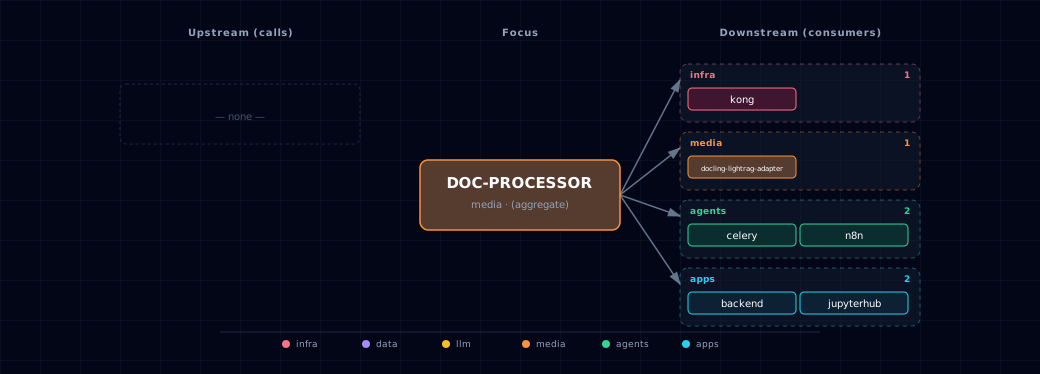
Open the full-size diagram for a full-screen view.
13.4. Future — Missing pair integrations¶
- doc-processor ↔ weaviate — Why: closes the RAG loop. Atlas emits character-based chunks; direct vector-store persistence would remove per-consumer write logic. Mechanism: a proposed post-convert callback writes to
http://weaviate:8080/v1/objects. Upstream'srag_weaviate.ipynbillustrates this pattern. Effort: medium. Confidence: high. - doc-processor ↔ minio — Why: conversion is slow and the same source is frequently re-requested. Caching
(sha256 → DocTags JSON)in MinIO removes re-processing cost and gives stable S3 URIs that n8n/backend can reference. Mechanism: sidecar writess3://docling-cache/<sha>.jsonvia boto3 on convert; subsequent requests short-circuit. Effort: medium. Confidence: medium. - doc-processor ↔ n8n — Why: README invites this pattern but no shipped workflow exists. A first-party "PDF → markdown → Weaviate" workflow makes RAG ingest a two-click setup. Mechanism:
services/n8n/init/workflows/docling-rag.jsondoing HTTP Request →POST http://docling-gpu:8000/v1/document/convert→ Weaviate node. Effort: small. Confidence: high. - doc-processor ↔ hermes — Why: Hermes agents lack a "read this document" tool. Docling-MCP exposes convert/extract directly to MCP-capable runtimes. Mechanism: run
docling-mcpas a streamable-HTTP MCP endpoint registered as a Hermes custom provider. Effort: medium. Confidence: medium. - doc-processor ↔ redis — Why: response-cache the slow conversions in the stack's already-deployed cache. Mechanism: keyed on
sha256(file)+options, TTL 24h, stored in an unused Redis database (redis://:${REDIS_PASSWORD}@redis:6379/<db>; the index table is in the Redis README) with compressed JSON. Effort: small. Confidence: medium.
13.5. Future — Candidate new services¶
- Docling MCP Server (details) — Headline: first-party MCP wrapper exposing Docling convert/extract tools to agent runtimes. Wires into: hermes, openclaw, backend.
13.6. Future — Unused features in this service¶
- Audio/ASR pipeline — Why pursue: Docling natively parses WAV/MP3/WebVTT to DoclingDocument with timestamps + sections, more structured than raw STT output. Effort: medium.
- HybridChunker (tokenizer-aware) — Why pursue: replaces naive
chunk_size/chunk_overlapwith embedding-model-aware boundaries, materially improving RAG recall. Effort: small. - DocTags lossless output — Why pursue: build editing and full-fidelity caching around the provider's existing
doctagsoutput. Effort: small. - VLM pipeline (GraniteDocling 258M) — Why pursue: better layout + chart understanding than the default DocLayNet/TableFormer pair, at low VRAM cost. Effort: medium.
- Structured information extraction (beta) — Why pursue: enables doc → entities/relations without a separate LLM step, feeding the proposed Neo4j integration. Effort: large.
14. Troubleshooting¶
14.1. Model Download Fails¶
Problem: First conversion fails to download models
Solution:
- Check Hugging Face Hub access
- Set
HUGGING_FACE_HUB_TOKENif needed - Verify free disk space for the Hugging Face model cache
14.2. Slow Processing¶
Problem: Document processing slower than expected
Solution:
- GPU: Check CUDA drivers (
nvidia-smi) - GPU: Use
table_mode=fastfor faster (less accurate) table extraction - Memory: Ensure sufficient RAM/VRAM available
14.3. OCR Issues¶
Problem: Text not extracted from scanned PDFs
Solution:
- Set
use_ocr=alwaysto force OCR on all documents - Check document quality (low-res images may fail)
- Verify OCR dependencies are installed
14.4. Container Won't Start¶
Problem: docling-gpu fails to start
Solution:
- Check logs:
docker logs ${PROJECT_NAME}-docling-gpu - Verify SOURCE setting matches your hardware
- Ensure Docker has sufficient resources allocated
- Check GPU drivers and CUDA version
14.5. File Size Errors¶
Problem: "File too large" error
Solution:
- Increase
DOCLING_MAX_FILE_SIZEin.env - Split large documents into smaller files
- Compress images in PDF documents
15. Capabilities & limitations¶
docling — Support tier: experimental — Capability contract declared; no cited cold-start, workflow, or upgrade qualification run yet (evidence at v0.1.0).
| Service | Capability | Status | Verification | Notes |
|---|---|---|---|---|
| docling | Docling document conversion sources | partial | tested | Atlas provides an NVIDIA GPU container and an existing-host endpoint, but no CPU container or Atlas-managed native Docling lifecycle. |
| docling | Structured extraction and bounded chunking | supported | tested | The provider converts documents once and renders structured markdown or JSON with validated OCR, table, formula, code, chunk-size, overlap, and total-chunk controls. |
| docling | Authenticated bounded provider API | partial | tested | Atlas-managed Docling routes require a generated bearer token and enforce upload, admission, and inference deadlines by default, but AUTH_MODE=disabled is an explicit rollback. |
| docling | Truthful model readiness | partial | tested | Health stays unavailable until converter construction succeeds, but it does not certify every lazily loaded model artifact needed by a later document. |
| docling | LightRAG conversion bundle | supported | tested | An authenticated internal route renders the JSON and Markdown bundle consumed by the isolated asynchronous LightRAG compatibility adapter. |